


 Log In

Free gifts available with your purchase
PSP VintageWarmer2
PSP VintageWarmer2 is a high-quality digital simulation of an analog-style, a single- or multi-band compressor/limiter. It combines rich, warm analog processing with a straightforward user interface, and comes with a comprehensive library of presets. The plug-in processor is highly flexible and can be used for both softknee compression and brick-wall limiting. This makes it an essential tool for mixing and mastering engineers. Careful attention has been paid to PSP Vintage Warmer's overload characteristics with the processor being capable of generating saturation effects typical of analog tape recorders. PSP Vintage Warmer also incorporates professional VU and PPM metering together with accurate overload indicators thereby assuring professional quality results.
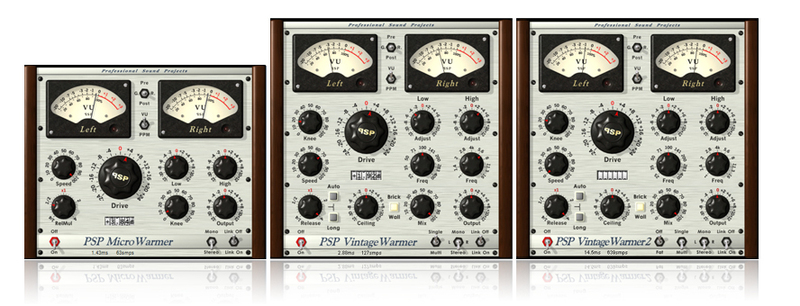
PSP VintageWarmer2 version contains 3 versions of the plug-in:
- PSP MicroWarmer which provides the same sound quality as it's big siblings, but with a simplified single-band interface and low latency performance optimized for use on individual tracks;
- PSP VintageWarmer (LE) which is a direct descendant of the original PSP VintageWarmer with its all strengths such as low resource usage and latency;
- PSP VintageWarmer2, the main addition being the FAT double sampling mode for even more analog sounding processing.
We strongly recommend that you use the PSP VintageWarmer (LE) or the PSP MicroWarmer in all multitracking applications except situations where FAT mode is important. The PSP VintageWarmer2 is recommended for mastering purposes and groups or master busses only.
Features
- High quality signal processing algorithms
- Single or multi-band signal processing
- FAT (Frequency Authentication Technique) PSP's double sampled processing
- 64-bit floating point precision
- Shelf filters for bass and treble frequencies in single-band processing mode
- Control of bass and treble signal components in multi-band processing mode
- Accurately calibrated VU and PPM meters with the overload indicators
- Disengagable brick-wall limiting
- Two Release Mutliplier ranges for fast or relaxed processing
- Semi Automated Release mode.
- Up to 192kHz sample rates supported
- Library of presets
Applications
- Optimising the density and average signal levels of recordings during mixing or mastering
- Shaping the dynamics of recordings during mixing
- Adding warmth to individual tracks or complete mixes
- Adding analog tape-style compression to individual tracks or complete mixes
System Requirements
PC
- Windows 7 – Windows 11
- VST, VST 3 and AAX
- The latest iLok License Manager application installed
Mac
- macOS 10.12 – macOS 13 Ventura (Apple Silicon Supported)
- VST, VST 3, AAX and AU
- The latest iLok License Manager application installed
Awards

Computer Music
The world’s best selling magazine dedicated to making great music with your Mac or PC.
"It may look like your granny's cooker, but the PSP VintageWarmer is one seriously hot plug-in!"
Len Sasso (Electronic Musician)
The ultimate resource for musicians who want to make better music, in the studio or onstage.
"PSP VintageWarmer is effective and easy to use. I was always able to find a factory preset that came close to the sound I was reaching for".
Bonobo
Simon Green, known by his stage name Bonobo, is a British musician, producer and DJ based in Los Angeles.
"The PSP VintageWarmer2 is on everything I use!"
PSPaudioware.com's VintageWarmer is a plug-in emulation of an analog multiband compressor. It is available in VST and DXi formats for the PC as well as VST and MOTU Audio System formats for the Macintosh. VintageWarmer is equally at home in tracking and finalizing applications. It offers single ...
Read MoreAs you might imagine, initial impressions can be a little overwhelming given the number of controls, but thankfully PSP have provided plenty of presets with suggested uses ranging from subtle mastering tweaks, mix first aid and finalising, 'analogue' warmth or saturation at various simulated tape...
Read More
























Reviews Summary
While it aims to provide a helpful overview, it may not capture every perspective or detail. We encourage you to read individual reviews to make an informed decision.
Customers highly praise this classic plugin for its rich, warm analog sound and low CPU usage. It is widely regarded as a versatile, must-have tool that noticeably enhances audio quality across tracks.


