


 Log In

Free gifts available with your purchase

Space & Time Modulation
Motion: Dimension Lite unveils a new realm of sonic exploration, focusing on an intricate blend of dual delays and adaptable reverbs to immerse you in a dynamic and responsive sound design journey.

What can Motion: Dimension Lite do?
- Provide intricate rhythmic patterns with dual delays.
- Blend smoothly between plate and hall reverbs for evolving spaces.
- Reverse delays for mind-bending sound design.
- Enhance atmospheres with mesmerising textures.
- Give mono sounds creative spatial complexity.
- Visualise your sound with a 3D reactive object.
Seamlessly integrate complex delay lines with lush reverberations, all controllable through the intuitive hexagon controller. From subtle echoes to sweeping sonic landscapes, Motion: Dimension Lite places comprehensive sonic manipulation at your fingertips.
Motion: Dimension Lite employs the Hexagon controller for intuitive and animated effect modulation, which contains six macro sliders that control pre-mapped effect settings. The magnetic cursor creates an interactive experience, making modulation a part of your production.
The Hexagon: Reactive Animation
Improving upon the concept of the traditional XY pad, the hexagon provides new automation possibilities, allowing six macro sliders to be pushed and pulled together by a magnetic field surrounding your mouse cursor.
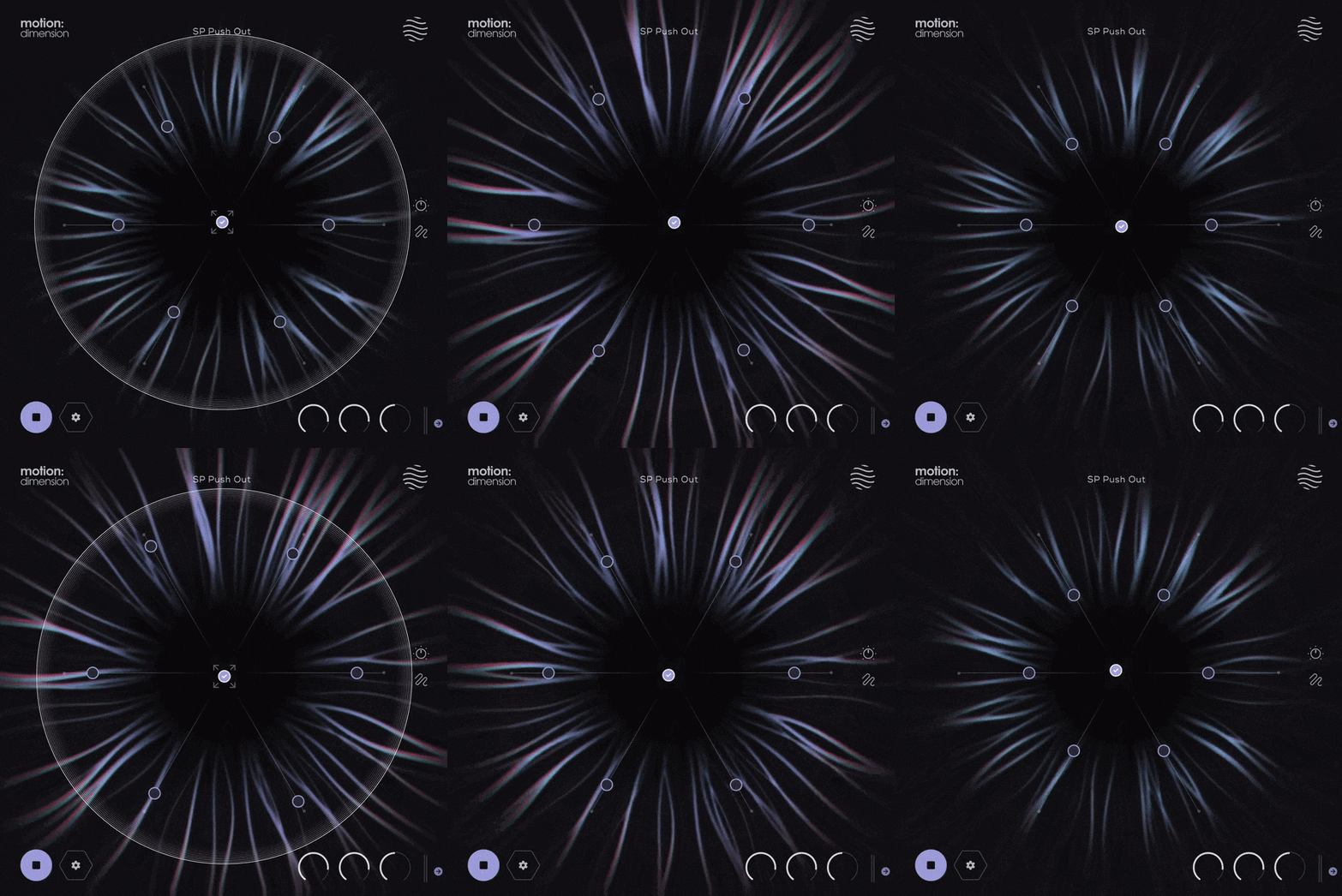
The six sliders act as macro controls for any delay or reverb parameter in the plugin. The sliders themselves are then moved by the magnet attached to your cursor.
Features
- Dual Delay & Reverb effects
- Reactive 3D Visualiser
- 6 Macro Sliders
- Magnetic Cursor control
- Attract & Repel modes
- Magnet On/Off Mouse settings
- Input/Output Gain controls
- Global Dry/Wet mix control
- Safety Limiter toggle
- Input Thru toggle
- Global Bypass
- Step-by-step interactive tutorial
- 75 Presets
- 43 Dual Presets
- 23 FX & Mapping Presets
- 9 Path & Cursor Presets
Watch Motion: Dimension in Action
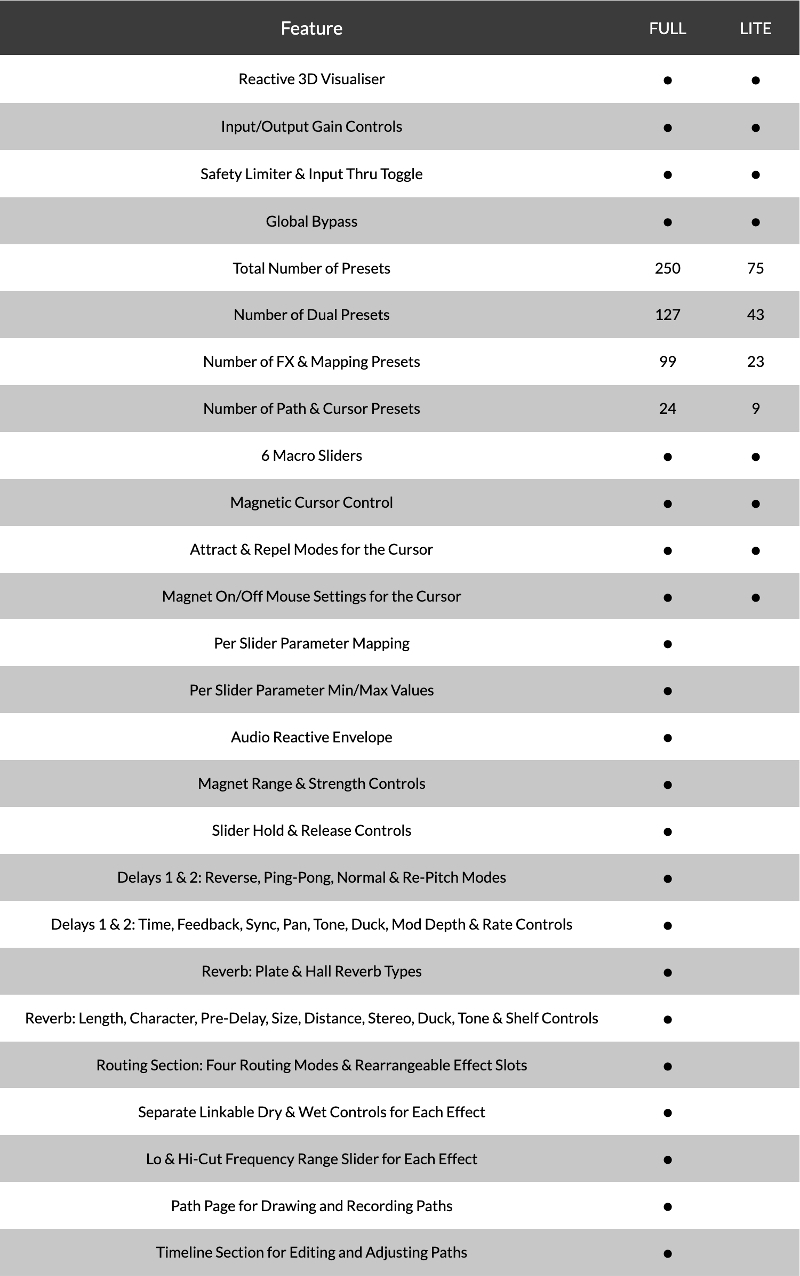
Version Comparison
System Requirements
macOS
- macOS 10.15 or higher (Intel / Native Apple Silicon supported).
- Plugin Formats: VST, VST3, AU, AAX, Standalone
- DAW's Supported: Ableton Live, Pro Tools, Logic Pro, FL Studio, Cubase, Nuendo, Reaper, Reason + more.
- Compatibility: 64-bit compatible only.
Windows
- Windows 7 or higher
- Plugin formats: VST, VST3, AAX, Standalone
- DAWs supported: Ableton Live, Pro Tools, FL Studio, Cubase, Nuendo, Reaper, Reason + more.
- Compatibility: 64-bit compatible only.
Note: When accessing this software via a Rent to Own plan or the Beatport Studio membership, it is installed and activated through the Beatport Access portal. An internet connection is required every 3 days to validate your license.

Klax
DnB production trio: Warner Bros, Critical, Shogun Audio and many more.
"Motion: Dimension has become our go-to for adding movement and atmosphere to any sound. From subtle echos to washed-out soundscapes, Motion: Dimension does it all."

Sanjay C
Trusted music production gear reviews and tutorials on YouTube with over 35,000,000 views.
"Motion offers such a unique way to automate movement - I hope Excite Audio make more like this!"

Martijn Van Sonderen
Member of electronic music trio Noisia and Zonderling.
"Motion: Dimension offers an interesting way of controlling movement that leads to sounds you wouldn't otherwise come up with."
Reviews Summary
While it aims to provide a helpful overview, it may not capture every perspective or detail. We encourage you to read individual reviews to make an informed decision.
Motion: Dimension Lite receives mostly positive feedback for its ability to add unique spatial movement, depth, and atmosphere to synths, vocals, and ambient tracks. Users appreciate its clean, easy-to-use interface, stability, and creative granular reverb effects. While a few reviewers found the features limited compared to the full version, felt the GUI was gimmicky, or struggled to dial in usable sounds, most recommend it as a fun and inspiring sound design tool.


