


 Log In

Free gifts available with your purchase

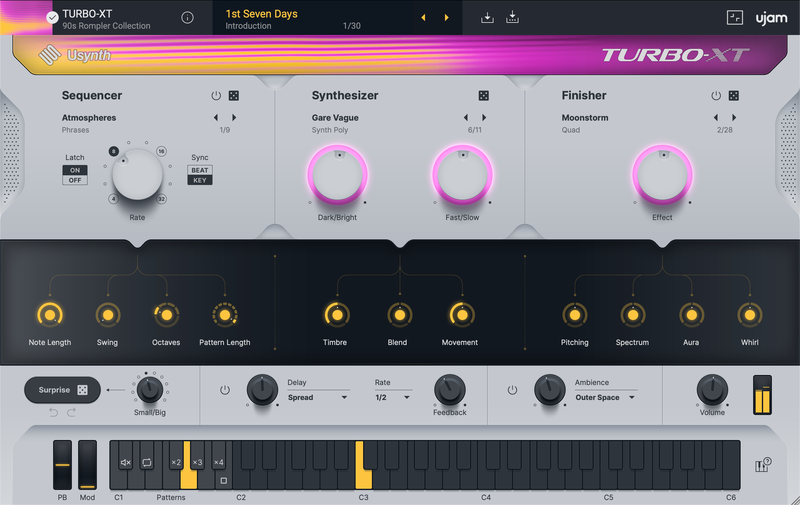
The ever-popular sounds of the 90s
This Usynth brings you the legendary and still widely used "Rompler" sounds of the late 80s and 90s. The Korg M1, Roland JV series or E-mu Proteus defined that era with their signature sound - influencing hundreds of hits then and still used in many genres of music today.
What's In It
- Legendary sounds from the 90's Romplers like Korg M1 or E-mu Proteus.
- Basses, Polys, Leads, Pianos, E-Pianos, Strings, Guitars, Brass and much more
- Revolutionary interface: Create your own sounds without synthesizer knowledge
- Powerful synthesizer engine with virtual analog, FM, wavetable and multisampler
A Wide Sound Palette
From single instruments such as piano, bass, guitar, or strings to layered and hybrid sampler and synth sounds, TURBO-XT is the perfect companion for either creating songs and arrangements with a retro aesthetic or simply adding a bit of blissful imperfection to a contemporary song.
The Usynth series - why it is made for you
Usynth is made for people who want to program their own synth sounds without programming synths - like most musicians. It features a powerful synthesizer engine that combines Virtual Analog, Wavetable, FM, and Multi Sampler, with dozens of filter modes, modulation matrices, envelopes, LFOs, and hundreds of parameters.
At A Glance
Unleash effortless inspiration with Usynth and its powerful Synthesizer Engine, game-changing Finishers, flexible built-in delay and reverb units, intuitive browser, and a user-friendly interface.
Try Usynth TURBO-XT now!
ujam invite you to test Usynth TURBO XT now and play around with it for 7 days without any limitations. From within Usynth, you can also start trials of all other available Usynth titles.
System Requirements
Operating Systems
- Windows: Windows 10 — Windows 11
- Mac: macOS Catalina (10.15) — macOS Sonoma (14)
- Supported on Intel Macs & Apple silicon Macs (Rosetta and native).
- You may have success on earlier versions but UJAM doesn’t support and fully qualify them.
For up-to-date info on UJAM products support for VST3, AAX, and Apple Silicon, please refer to the UJAM website.
Minimum Requirements
- 8GB of RAM
- 0,5 GB of free disk space
- 1280x768px Display, Internet Connection. If you want to move your .blob file to an external drive, ujam recommend the use of a SSD to prevent dropouts.
Plug-In Formats
- VST2, VST3, AU 2, and AAX
- AU 2 version only compatible with Logic Pro X and newer.
- All plug-in formats are 64-bit only.
- Moving your .blob file to an external drive isn’t supported.
Delivery Format
- Automated installation via UJAM App, or downloadable installer file.
- Usynth requires the latest version of the UJAM App to run on your computer.
- With your first Usynth title, the UJAM App will also stealthily install the Usynth plugin which hosts all titles.
Authorization
- Quick authorization via the UJAM App, or enter your email and password within the plug-in.


