


 Log In
Free gifts available with your purchase
The creative minds at Nugen Audio have long been hard at work designing some of the most user-friendly and time-saving utility plugins around. Now with the NUtility Bundle, you can access four of their very best DAW-enhancing tools in one fell swoop.
Unlock new possibilities for visualising, testing, modulating and building your audio with the NUtility Bundle.
Includes:
Aligner
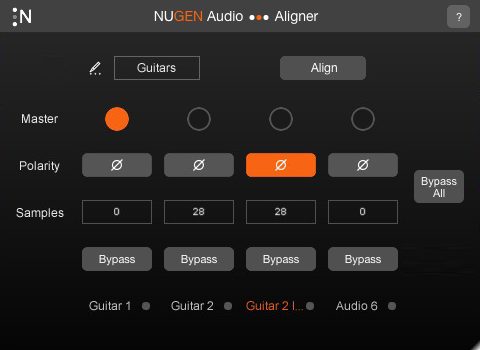
Perfectly Aligned Audio in Seconds
Speed up your workflow
When using more than one microphone to record a sound source, you might encounter phase or polarity issues between different tracks. This could be due to mic distance, or any other factor which causes the audio to reach one track before the other. Often this is almost imperceptible, but in many cases it can result in the recording sounding “thin” or “weak”.
Aligner is an automatic phase and polarity alignment tool, designed to speed up the daily workflow of audio engineers.
Learn more about Aligner.
AB Assist 2

Quick Comparison Tool - Remove Subjectivity and Biases
AB Assist is a tool for quickly comparing multiple pieces of audio. This could be different takes, mix revisions, versions of a master, plug-in options, or something else entirely! Blind tests can be conducted in 'test' mode, with the channels labeled randomly in order to remove any subjectivity or biases.
New For Version 2
- Receive and compare FOUR audio sources
- Compare SURROUND mixes in any channel count
- Auto-level-match: match short-term loudness (LUFS) of sources
- Mono-check: compare mono fold-down
- Smooth fades between sources
- Multiple plug-in instances communicate directly instead of using an external send
A|B Assist helps you work quicker and more accurately - versatile enough to become an essential part of your mix or mastering process.
Learn more about AB Assist 2.
Jotter
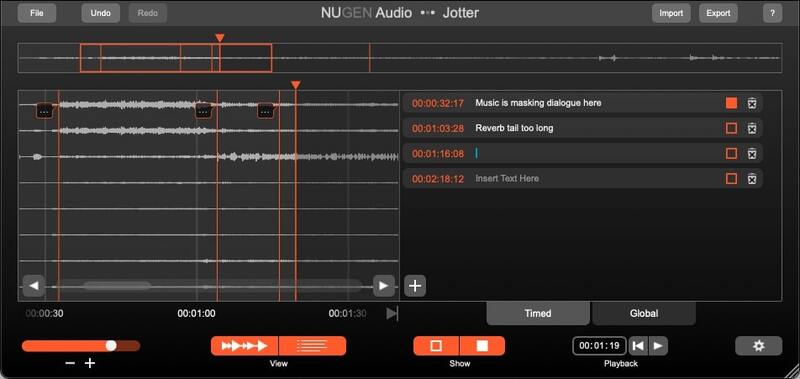
Designed With Collaboration In Mind
Streamline Your Communication
Jotter is a brand new utility plug-in for making notes and comments, designed with collaboration in mind. Simply insert Jotter anywhere in your project, and add annotations locked to the timecode. These can be shared between collaborators either via the plug-in, or via an exported .csv file. Jotter can also be used as a standalone application in situations where a DAW is either unavailable or simply not required.
Learn more about Jotter.
SigMod
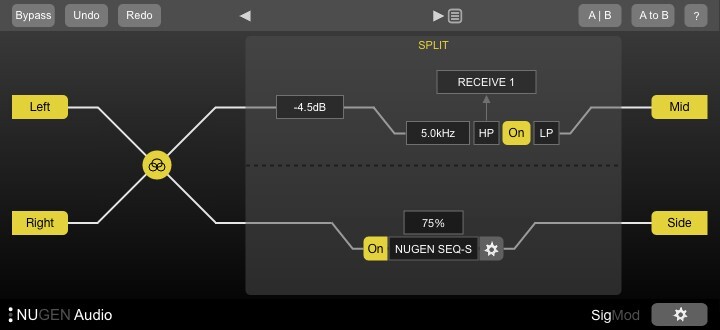
Power Up Your Plugins
Custom Signal Architecture
Instantly enhance the functionality of your plug-ins and DAW with twelve different signal modification units. Explore new creative possibilities and quickly add missing features. Each module can easily be inserted, swapped and moved around making new options to correct, convert or tweak your audio.
Full List of Modules
Combine these twelve single-process modules in any order to design the precise routing you require. Auto-resizing keeps the signal flow and functionality clear at all times.
- Mid/side
- Protect
- Tap
- Crossover
- Insert
- Mute/solo
- Trim
- Switch
- DC offset
- Mono
- Phase
- Delay
For your DAW
Several of SigMod's modules offer easy access to functionality which is either missing from certain DAWs, or at least awkward to access.
Mute/solo or Trim the left and right sides of a stereo signal independently, or easily flip the stereo image in one click with the Switch module. Quickly detect and correct DC offset to retain valuable headroom.
How does your mix sound in mono? Think about how many listeners will be using a phone or a DAB radio with one speaker - the Mono module switches your signal from stereo to mono in one click. You can also check the Phase relationship between your left and right channels, and use the simple Delay module to fix any syncing issues.
Your Imagination is the Limit
With SigMod's creative signal routing - particularly the Mid/side, Tap, Crossover and Insert modules - the possibilities are virtually endless, not to mention easy and tweakable.
Ever wondered how your go-to tape emulator would sound in mid/side mode?
Splitting your vocals into 6 different frequency bands and sending them each to a different compressor?
Even just using your old plug-ins in a DAW which doesn't support VSTs or AUs?
Expand your System
- Master & Channel Strip Features
- Signal Monitoring & Routing Options
- Mid / Side Conversion
- Output Level Protection
- Frequency Banded Splits
- 1000's of Possibilities...
Learn more about SigMod.
System Requirements
Mac
- macOS 10.13 and later (64-bit only)
- 512 MB RAM
- AAX, VST3, AU, AudioSuite
Windows
- Windows 7 and later (64-bit only)
- 512 MB RAM
- AAX, VST3, AudioSuite





















