Log In

Free gifts available with your purchase
Colorwoods Piano is an acoustic piano with a natural and serene taste but also powerful and crisp when you push it to the limit. It is based on an upright piano and was recorded with five gradual velocities.
Microphone Positions
To get a full sound, ZAK Sound used 6 microphones to record this piano: a centered large-diaphragm condenser microphone, a pair of small-diaphragm condensers in XY, another pair of small-diaphragm condensers in the front position, and a dynamic microphone.
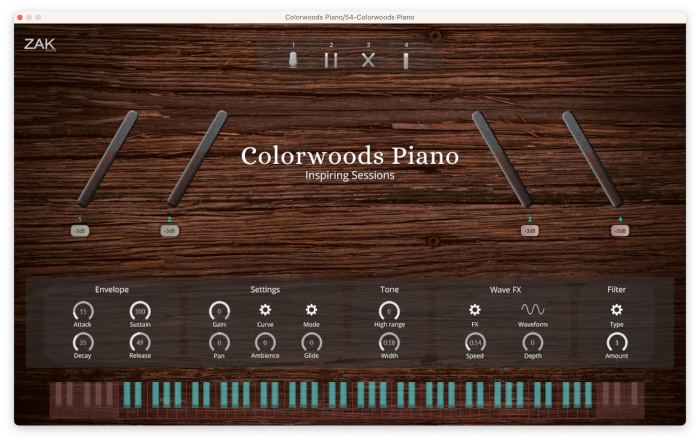
When all mic positions are active simultaneously, the sound is super full and complete. But it is also possible to control each microphone position with an individual gain knob.
This is why Colorwoods Piano can have a soft and relaxed sound with the selection of some microphones, or it can also become more powerful with the most potent microphones.
Features
- Control for each microphone position: gain knobs for the four positions of the six microphones (two stereo and two singulars)
- Envelope: Attack, sustain, decay, and release
- Settings: Gain, curve selection, mode (polyphonic, monophonic, legato), gain, pan, ambience, and glide (for legato)
- Tone: High range and width
- Wave FX: LFO with different waveforms and depth/speed controls
- Lowpass and highpass filter
System Requirements
Windows
- Compatible with Windows 8 / 10 / 11 (64 bit only)
- VST3
- 8GB RAM (Recommended)
- 4.3GB of free space
macOS
- Compatible with macOS 10.11 to 12 (native Apple Silicon support)
- VST3/AU
- 8GB RAM (Recommended)
- 4.3GB of free space