


 Log In

Free gifts available with your purchase
MODO DRUM 1.5 SE
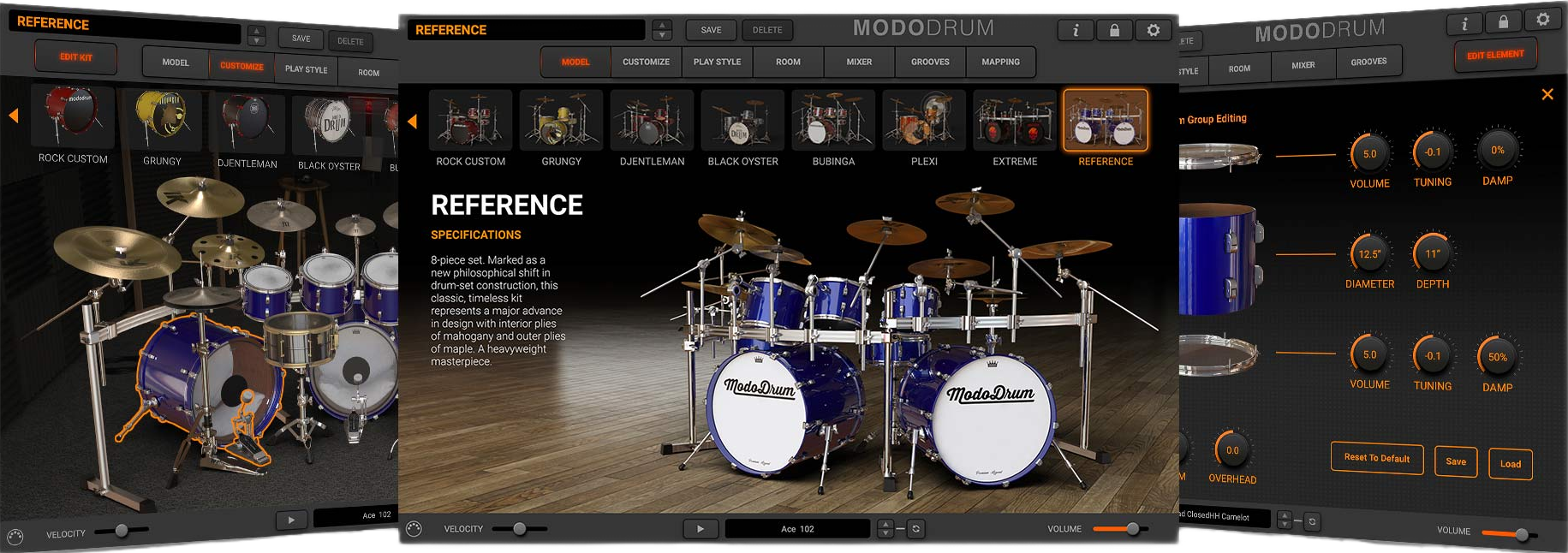
Real Time Sound Synthesis
Unlike traditional sample-based virtual instruments, MODO DRUM utilizes IK’s award-winning modal synthesis technology and an ultra-optimized sound engine to bring your drums to life.
Each drum’s acoustic behavior is determined by its physical parameters: dimensions, materials, skin, and more, as well by modeling the play style, the interaction of the drum head with the body, the sympathetic vibration of the drums with each other and the acoustic interaction with the room.
In short, MODO DRUM is creating sound in real time based on the ever-changing interactions between the player, drums, and room, mimicking the vibe of a real, live drummer. It’s never been easier to bring life to your drum tracks – and by extension your music overall.
Build your drum room
A new Custom Shop has been added to MODO DRUM CS and SE, which makes it easy to unlock new kits. With a single click on your choice of drum kit in the Showroom, you’ll be redirected to the IK website where you’ll find all the options to fill your cart and check out. From there, open the IK Product Manager to download and install your new kit directly in MODO DRUM, ready to make music.
Bringing the room to you
MODO DRUM’s ROOM section lets you place your drums in an array of different environments, from a dry drum booth to IK’s own in-house recording studio, to clubs, cathedrals and more! MODO DRUM uses convolution to ensure each element of your kit interacts naturally with the space and with each other. Let it ring or add gates and compression on the room tone for even more creative drum sounds.
Fine tuning made easy
The MIXER built into MODO DRUM gives you total control over the recorded sound. Adjust levels and panning per element of your kit – mute or solo your elements and flip phase. Elements can be grouped in buses and each element has two sends to process multiple elements with the same FX for a more cohesive feel.
Features
- Groundbreaking real-time modal synthesis technology
- Adjust every element of the sound on the fly
- Control the entire act of playing drums – kit, play style, sticks, room and FX
- Integrated Grooves manager
- Breakthrough physical modeling drum synthesis
- Incredible real-time control & amazing realism
- Loads faster and takes up less hard drive space
- Cutting-edge cymbal sample engine
- Adjust both diameter and height of every drum
- Change shell profile on the fly
Mac® (64-bits)
- Minimal: Intel® Core™ i5 with support for AVX instructions, 8GB of RAM (16 GB suggested), 20GB of available hard-disk space, macOS 10.9 or later. USB port (3.0 suggested).
- Runs natively on Apple’s M1 processors.
- Supported Plug-in formats (64-bit): Audio Units, VST 2, VST 3, AAX.
Windows® (64-bits)
- Minimal: Intel® Core™ i5 or equivalent with support for AVX instructions, 8GB of RAM (16 GB suggested), 20GB of available hard-disk space, Windows® 7 or later. ASIO compatible sound card. USB port (3.0 suggested).
- Supported Plug-in formats (64-bit): VST 2, VST 3, AAX.
Requires an OpenGL 2 compatible graphics adapter.


