/ Various Category / KORG Gadget 3 Plugins
KORG

KORG Gadget 3 Plugins

4.8 (12 Reviews)
$99.00 $199.00

50% off until Dec 08

KORG Gadget Plugins
KORG Gadget Plugins
The NEW KORG Gadget 3: Now more powerful than ever! gallery thumbnail
Buy Now
Product information

Important note: This does not include the Mac only Gadget DAW. Mac users who require the KORG Gadget DAW can purchase it, with the plugins, HERE.

More Powerful Than Ever, Quickly Turn Your Ideas Into Music

A Complete, Seamlessly Integrated Music Production Ecosystem

KORG Gadget Plugins is a plug-in suite featuring over 40 small synthesizers/drum machines (“gadgets”), which can be freely combined to create music driven by a powerful yet intuitive user interface.

KORG Gadget 3 offers an expanded variety of even more features to quickly turn your ideas into music, including two new gadgets, KORG Gadget 3 is the perfect tool to quickly turn your ideas into music.

What's New in KORG Gadget 3 Plugins

  • Gadget Instrument Collection with a total over 6,000 sound programs
  • New gadgets: Santa Ana (Guitar) and Sydney (Sampler)

KORG Gadget 3 is now even more powerful

Now in its third generation, KORG Gadget 3 is more powerful than ever. Two new gadgets have been added: "Santa Ana," which makes it easy for anyone to create realistic rhythm guitar, and "Sydney," which imports long samples and manipulates loops.
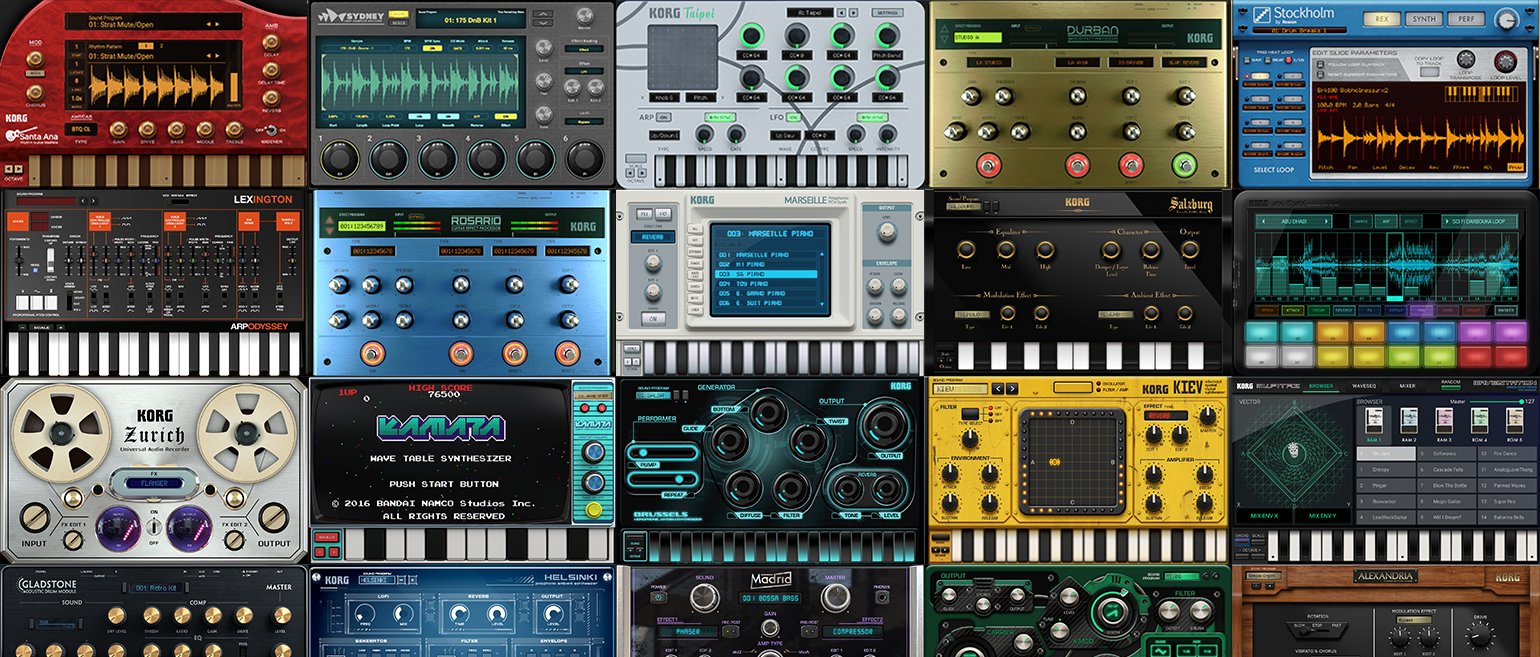
A huge collection of over 40 gadget instruments

Overwhelming sound. Immersive, intuitive and powerful user interface. Unprecedented and innovative quality. KORG Gadget 3 is a collection of over 40 gadget instruments, including compact synthesizers, drum machines, samplers, and audio and MIDI utilities. It has sophisticated parameters that make it easy for you to get to the sound they want, so you can create your own sounds instantly. The new Sound Browser allows you to get to your favorite sounds in the quickest time possible. It is perfectly suited for dance music as well as rock, pop, jazz, and other music sounds and genres. You are sure to find the sound you want among the numerous gadgets.

Features

  • A complete, seamlessly integrated music production ecosystem
  • A huge collection of over 40 gadget instruments
  • Plug-ins for instant sound in your favorite DAW

System Requirements

Mac

  • OS: macOS Big Sur 11.7.9 or later (with latest updates)
  • CPU: Apple M1 or better, or Intel Core i5 or better (for Intel, Core i7 or better recommended)
  • Memory: 8 GB RAM (16 GB or more recommended)
  • Storage: 8 GB free disk space (SSD highly recommended)
  • Internet connection
  • Plug-ins: AU, VST2, VST3, AAX (64-bit only)

Windows

  • OS: Windows 11 64bit or higher (with latest updates); 32-bit operating systems are not supported.
  • CPU: Intel Core i5 or better (Core i7 or better recommended)
  • Memory: 8 GB RAM (16 GB or more recommended)
  • Storage: 8 GB free disk space (SSD highly recommended)
  • Internet connection
  • Plug-ins: VST2, VST3(64-bit only)
Installation Instructions

Please note: opsix native is used as an example.

PC

Activation

1. Download the installer file from your Plugin Boutique account. Run the KORG Software Pass .exe file 

2.  Click 'I accept the agreement' > Click 'Next >'.

3. Click 'Next >'.

4. Click 'Next >'.

5. Click 'Next >'.

6. Click 'Install'.

7. Click 'Finish'.

8. Open KORG Software Pass.

9. If you already have a KORG account, skip to step 12 > Click 'Don't have a KORG ID? Signup'.

10. Sign up for a KORG account by filling in your details.

11. Go to your email inbox and locate the email from KORG > Click 'Confirm my account'.

12. Go back to the KORG Software Pass > Click 'Login at KORG ID'.

13. Click 'Register new product'

14. Copy & paste/manually enter the licence key/serial code that is available in your Plugin Boutique account > Click 'Start'.

15. Locate opsix native in the list of products > Click 'Download'.

16. The software will automatically open the downloaded .zip file > Double click the opsix native .exe file.

Installation 

1.  Click 'I accept the agreement' > Click 'Next >'.

2. Click 'Next >'.

3. Click 'Next >'.

4. Click 'Next >'.

5. Click 'Install'.

6. Click 'Finish.

7. Open opsix native in your DAW or as a standalone program. 

Your software is now activated and ready to use!

Mac

Activation

1. Download the installer file from your Plugin Boutique account. Run the KORG Software Pass .pkg file 

2. Click 'Continue'.

3. Click 'Continue'.

4. Click 'Continue'.

5. Click 'Agree'.

6. Click 'Install'.

7. Click 'Close'.

8. Open KORG Software Pass.

9. If you already have a KORG account, skip to step x > Click 'Don't have a KORG ID? Signup'.

10. Sign up for a KORG account by filling in your details.

11. Go to your email inbox and locate the email from KORG > Click 'Confirm my account'.

12. Go back to the KORG Software Pass > Click 'Login at KORG ID'.

13. Click 'Register new product'

14. Copy & paste/manually enter the licence key/serial code that is available in your Plugin Boutique account > Click 'Start'.

15. Locate opsix native in the list of products > Click 'Download'.

16. The software will automatically open the downloaded .zip file > Double click the opsix native .pkg file.

Installation 

1. Click 'Continue'.

2. Click 'Continue'.

3. Click 'Continue'.

4. Click 'Agree'.

5. Click 'Install'.

6. Click 'Close'.

7. Open opsix native in your DAW or as a standalone program. 

Your software is now activated and ready to use!

Plugin Boutique Rewards

Discover the most rewarding loyalty programme among all plugin retailers.

  • Free Loopmasters Samplepacks
  • Discounts on products and courses
  • Extra Virtual Cash claimed immediately at checkout
Find out more

Follow us:

X (Twitter) Facebook YouTube Instagram
Logo Logo

Plugin Boutique Limited, Part of the Beatport Group LLC.

Copyright © 2011-2025 Plugin Boutique. All rights reserved