


 Log In

Free gifts available with your purchase
UAD Lion '68 Super Lead Amp
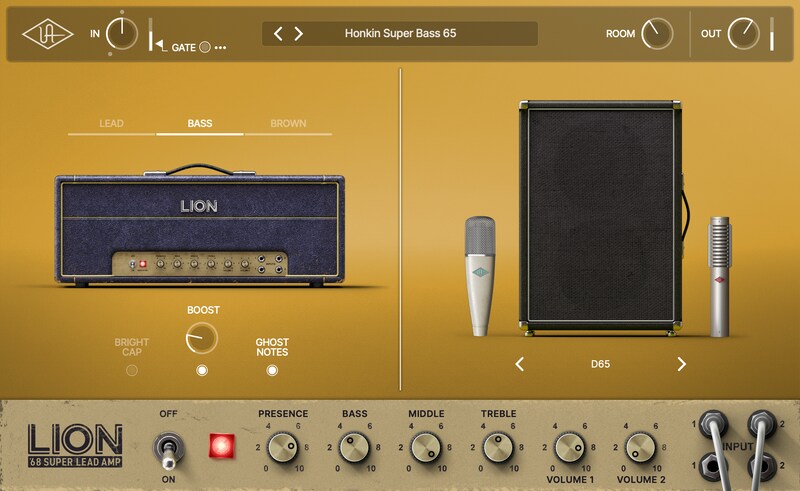
Experience the iconic plexi tones that powered rock – now in a plug-in
The native UAD Lion '68 Super Lead Amp plug-in gives you the classic British amp sounds made famous by decades of legendary artists including Jimi Hendrix, Van Halen, Led Zeppelin, AC/DC, and more*.
Based on the award-winning UAFX pedal, the Lion ‘68 plug-in delivers the dead-on tones of three distinct 100-watt plexi amplifiers. Built on world-class UAD modeling, you get all the gorgeous cleans, aggressive breakup, and hot-rodded roar of the originals. Plus you'll get classic boost effects, room sound, and a collection of perfectly mic'd speaker cabs.
Experience Authentic Plexi Tone Inside your DAW
The UAD Lion '68 plug-in gives you the inspiring tone and feel of three expertly miked "golden unit" 100-watt plexi amp heads — with sonic realism far beyond other plug-ins. Based on the award-winning UAFX pedal, you get all the controls that make this amp a must-have for nearly every genre inside your DAW.
Plug In to Legendary Super Lead Sound
Lion '68 faithfully captures the bell-like cleans, aggressive kerrang, and soaring distortion of a vintage hand-picked Super Lead head, giving you tones that jump from your speakers and electrify your nervous system.
Get Classic Super Bass Tones
Looking for less aggression with a spongier attack and more clean headroom? Lion '68's Super Bass will get you there, with a jaw-dropping emulation of this classic plexi amp variant – a favorite amp of Jimi Hendrix.
Go Brown for Hot-Rodded Heaven
The “brown sound” of Van Halen is ground zero for hot-rodded Super Lead tones. From the sag of a voltage-starved Super Lead amp to the mixed Celestion 25-watt "Greenback"/JBL D-120F 4x12 cabinet, you'll get the aggressive sizzle, softer midrange attack, and string-to-string definition that inspired generations of guitarists.**
Add Authentic Boosts
The Lion '68 plug-in lets you take your crunch and searing lead tones further with tried-and-true boost recipes — including inspiring emulations of a Maestro EP-III preamp and Boss GE-10 ten-band EQ — at the turn of a knob.**
Explore Famous Mic & Speaker Pairings
UAD Lion '68 gives you six classic speaker cabinet setups, as heard on generations of hits, with perfectly placed studio mics and dynamic room sounds.
Models include:
- Stripped: Vintage 4x12 cabinet with vinyl removed, with Celestion Greenback speakers, miked with a ribbon 160 mic and a dynamic 57 mic.
- GB30: 4x12 vintage Celestion greenback 30-watt speakers mic’d with a 57 and a ribbon 121 mic.
- Brown JB: 4x12 with two Celestion Greenback speakers and two JBL 120F speakers mic’d separately with 57s, and pre-mixed.
- EV12: 1x12 12", 200 watt Electro-Voice EVM12L mic'd with a 414 condenser mic
- D65: 2x12 British 65-watt speakers mic’d with a 421 dynamic mic and a ribbon 121 mic.
- Vee30: 4x12 British V30 speakers mic’d with a 414 condenser mic.
Find Your Sound Fast with Expert Presets
Dial in classic tones fast with a curated collection of presets that cover genres from rock, metal, pop, country, and more. Use them to start recording quickly or tweak the controls to dial in the perfect sound that fits your playing style.
Features
- Get the world's most authentic emulation of a late-'60s plexi amp in your DAW — no Apollo required
- Rock out with three legendary plexi setups — Super Lead, Super Bass, and "Brown" — for decades of inspiring tones
- Professionally capture studio amp tones, complete with classic mic/speaker pairings that sound just like famous recordings
- Get tried-and-true boost recipes including emulations of a Maestro EP-III preamp and Boss GE-10 EQ at the turn of a knob**
- macOS Big Sur 11, Monterey 12, Ventura 13, Sonoma 14, Sequoia 15 and Tahoe 26
- Windows 10 or Windows 11 (64-bit editions)
- Intel, AMD, or Apple silicon processor
- Internet connection to download software and authorize UAD Native plug-ins (UADx)
- Free iLok account
- Compatible with iLok USB (2nd generation or higher) but not required
- Free UA Connect application for managing UAD Native plug-ins (UADx)
- A supported DAW compatible with VST3, AU, or AAX plug-in file formats.


