Log In

Save $0.00 compared to buying products individually
Free gifts available with your purchase
The Alpha and Omega, the first and the last- apt names, as these will be both the first and last synths you reach for in your DAW. One FM, one analogue poly, both rammed with BLEASS-standard features, a sound designer's paradise encased in a blissfully simply UI- take the complexity out of programming your synths and get straight to sculpting sounds with this bundle.
Omega
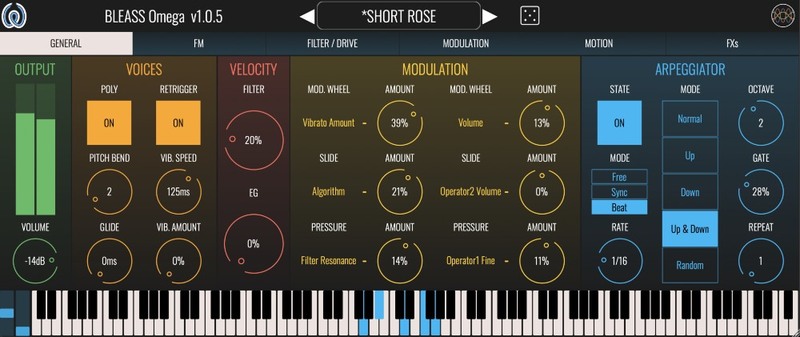
User-Friendly FM Synthesizer
If you think FM Synthesis is complicated, it's time to think again!
BLEASS Omega places all of the sparkle, character, nuance and dynamic expressiveness of FM Synthesis at your fingertips, and does away with the arcane programming interfaces so often associated with FM. Harnessing BLEASS' signature GUI technology, creating and crafting sounds in Omega is not just easier than with other FM synths, it's easy - PERIOD!
Al of the classic capabilities of FM Synthesis is available in BLEASS Omega - expressive electric pianos, deep thundering basses, crystal-clear pads, sparkling bells, and soulful leads. And thanks to the instrument’s analogue-style Waveshaper and multi-mode Filter, BLEASS Omega can inject powerful analogue-like flavour into those pure FM tones, giving searing filter sweeps, growling distortions, and harmonically-rich resonances.
The four FM operators that sit at the heart of BLEASS Omega are edited simultaneously from within a single screen, with all operator envelopes and controls available to the touch of your finger or click of your mouse. This amazingly user-friendly approach makes light work of sound editing and encourages experimentation and exploration in a way no other FM synth can achieve.
With eleven FM algorithms on offer, each providing a different way of interconnecting the four operators for radically different results, the sonic scope of BLEASS Omega is vast. The included library of over 160 professionally designed presets makes full use of this versatility, furnishing you with a varied and inspirational sound palette to use in your music-making and sound design projects.
BLEASS Omega fits in with your workflow and studio setup, no matter how you like to create. BLEASS Omega is available for Windows and macOS comes as a VST3 plugin instrument, compatible with all major DAWS.
Learn more about BLEASS Omega.
Alpha
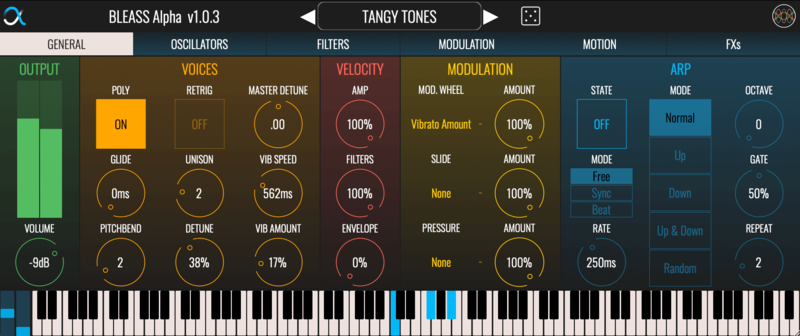
Versatile Analogue Polyphonic Synthesizer
BLEASS Alpha Synthesizer is a virtual analogue polyphonic stereo synthesizer inspired by classic analogue synths and enhanced by the BLEASS’ very own musical and technical approach.
The Alpha is a highly versatile Synthesizer that aims at bringing new ways of designing and playing an infinite constellation of sounds while sparking creativity.
Features
- Simple & Intuitive Interface - Follow the direction of the audio signal: design your own synth sounds by tweaking each panel, from left to right.
- Visualise Your Sound - Thanks to its user-friendly visual filters, sliders, LFOs and envelopes, quickly understand how to design your own presets.
- Low CPU Usage - Load multiple instances of BLEASS Alpha seamlessly.
- A Unique Motion Sequencer - Inspired by modular synthesizers brings a new dimension to your pads, leads and sequences by offering a large amount of rhythmic and expressive modulation possibilities, which can be coupled with the arpeggiator.
- MPE Compatibility for more expressivity.
- Huge Sonic Possibilities - Stereo oscillators, 5 different built-in effects, multiple modulation targets, 200+ factory presets and templates for sound design.
Learn more about Alpha.
System Requirements
PC
- Windows 10 and later (64-bit)
- VST3, AAX
Mac
- macOS 10.15 and later (64-bit only) (including macOS 11 Big Sur and Silicon processors)
- VST3, Audio Unit, AAX