


 Log In

Free gifts available with your purchase

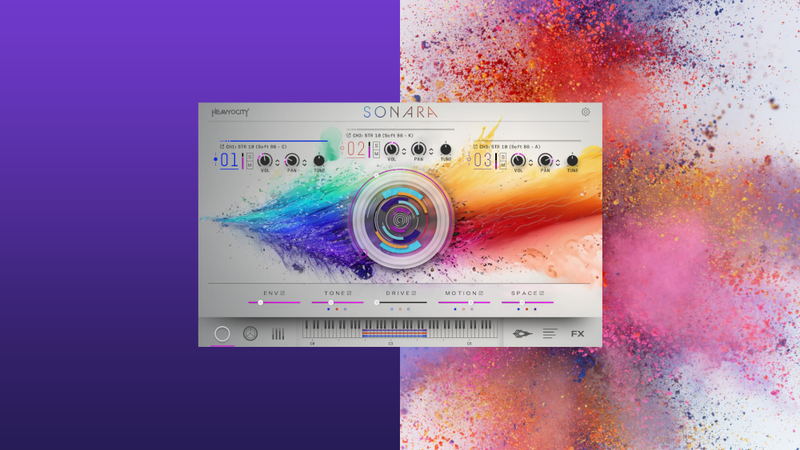
Welcome to Sonara: Voices in Motion - an instantly inspiring vocal collection designed to spark creativity and infuse your tracks with dynamic, emotive power. Featuring pristine, intimate performances that feel as if they’re happening right in front of you, Sonara delivers a versatile vocal experience that effortlessly crosses musical boundaries and seamlessly blends into any project—from cinematic scores to chart-topping hits.
This immersive collection comprises over 2,060 unique sources and more than 1,060 presets, delivering over 8GB of vocal power. From rhythmic pedals and melodic motifs to dynamic textures and expressive improv phrases, Sonara offers limitless layering possibilities and unmatched creative flexibility. With beautifully organic vocal interpretations and evolving soundscapes, this versatile library is designed to inspire across genres. Housed in the powerful Gravity 2 engine, Sonara sets a new benchmark for vocal production, unlocking creative potential like never before.
Voices In Motion
An instantly inspiring vocal collection designed to spark creativity. Featuring pristine, intimate performances that feel as if they’re happening right in front of you, Sonara delivers a versatile vocal experience that effortlessly crosses musical boundaries and seamlessly blends into any project— for any composer or producer.
Rhythmic pedals
Foundational Rhythmic performances offering limitless layering possibilities. With 576 multisampled pedals—spanning 48 phrases performed by multiple vocalists in varied timbres—you can build custom combinations, using them individually or stacking them to perfectly fit your composition.
Melodic Motifs
Uncover a diverse palette of 1,152 unique musical phrases, featuring six interpretations of 24 motifs across eight keys. These clean, organic performances deliver fresh, producer-ready vocal elements, ideal for building cinematic or pop compositions.
Dynamic Textures
Explore evolving, organic vocal performances infused with subtle movement. With 48 dynamic textures featuring flowing vowel transitions and nuanced vocalizations, you can craft lush, vibrant pads and evolving soundscapes that add depth and movement to your tracks.
Creative Layers
Create rich, full-bodied vocal stacks by layering the unique nuances of each singer. This unparalleled flexibility allows you to craft thick, dynamic textures, adding richness and color to your sound.
Bridging Styles
Blurring the lines between traditional cinematic scoring and contemporary pop production, Sonara offers a vibrant collection of energized vocals. Perfect for sparking inspiration or defining the character of your track, it delivers a modern, versatile toolkit to amplify the emotional depth of any style.
Captivating Singers
A rich palette of sound colors have been brought to life by the unique performances of our three vocalists—Kristin, Carla, and Ally. Each singer infuses their own personal flair into every recording, with every nuance meticulously captured in pristine, dry samples by the Heavyocity team. These impeccable sounds provide maximum flexibility, giving you the freedom to shape and manipulate the vocals to perfectly fit your creative vision.
Empowering Engine
Housed in the cutting-edge Gravity 2 engine, Sonara offers unparalleled control and creative flexibility. With a convenient width knob for stereo field manipulation and the ability to swap vocal sources across channels, it unlocks exciting new ways to shape and layer your sound, leaving you with limitless sonic possibilities.
Dynamic Stereo Experience
Experience the magic of sonic layering. Utilizing the three channels, you can load a solo layer for a powerful single performance, while the background sources enhance your mix with two additional layers panned left and right, creating a lush vocal stack that fills the stereo field. For added flexibility, we recorded softer versions of both layers. These provide an intimate touch, perfect for delicate moments or breathy nuances in your compositions.
Features
- Over 2,060 Unique Sources Across 3 Singers
- 576 Multisampled and Tempo-synced Rhythmic Pedals (straight and triplet, Solo, Soft, Backing and Soft Backing style)
- 1152 Motifs (in 4 different keys, both major and minor)
- 288 Improvisations (in 4 different keys, both major and minro)
- 48 Multisampled Dynamic Textures (Dancers, Moving Vowels, Sustains, and Group Textures)
- 1070 Custom-Designed Presets
- 3 Engines:
- Sonara Vocals
- Intuitive Browser to load in sources in 3 channels
- MACRO knob for dynamic multi-parameter control and sequencing
- Per Channel FX Controls for Envelope, Tone, Drive, Motion, and Space
- ADVANCED MIXER with Drift, Scatter, and Recordable Automation
- PERFORMANCE controls for Tempo-Sync, Start Times, and Sequencing
- CUSTOM MASTER FX with Punish, Compression, reverb, delay and more
- SETTINGS page to fine tune legato, glide, sustain, velocity and more
- Sonara Motifs
- Intuitive Browser to load in the phrase based sources in 3 banks
- Tuning keys to change root tune of the phrases
- MACRO knob for dynamic multi-parameter control and sequencing
- Per Channel FX Controls for Envelope, Tone, Drive, Motion, and Space
- ADVANCED MIXER with Drift, Scatter, and Recordable Automation
- PERFORMANCE controls for Tempo-Sync, Start Times, and Sequencing
- CUSTOM MASTER FX with Punish, Compression, reverb, delay and more
- SETTINGS page to fine tune legato, glide, sustain, velocity and more
- Sonara Menu
- 72 Keys mapped with individual sounds for easy curation
- Quickly build your own menus with the intuitive Browser of over 2000 sources
- Map a single sound to the entire keyboard with the Expand Source
- Per Source Filter, EQ, Volume, Pan, and Tuning
- Macro and Effects Controls
- Custom Master FX
- Sonara Vocals
System Requirements
- Powered by the Kontakt 7 Engine
- Kontakt 7.10.6 (Player) or later
- 6.36GB HD Space























