


 Log In

Free gifts available with your purchase
Product information
PAZ Analyzer
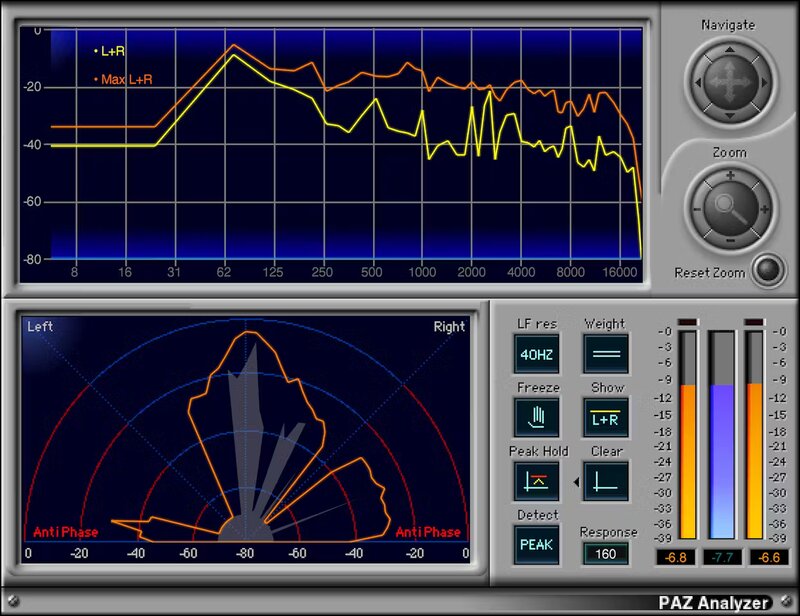
Reveal Your Audio’s Sonic Secrets
The more you know about your audio, the better—and PAZ shows what you need to know. Improve mixes and masters by seeing frequency response, stereo field loudness spread, phase anomalies, and adjacent peak and RMS level meters (with four different weighting curves).
PAZ Analyzer is amazingly accurate, and a breeze to use. Load the full analyzer to see all graphic representations simultaneously, or load separate components—even save results as a text file.
Features
- Choose Peak or RMS spectrum analysis, and response time
- 52 or 68 bands of precision spectrum analysis
- Indicates potential issues with out-of-phase audio
- Stereo Position Display shows stereo loudness distribution
- Meters can hold peak values, with independent reset
- RMS meter is between left/right peak meters for easy comparison
- Weighting curves are unweighted, dBA, dBB, and dBC
- Meters in the full plugin have resettable clip indicators
System Requirements
Mac
- macOS Monterey 12, Ventura 13, Sonoma 14, Sequoia 15
- VST / AU / AAX
PC
- Windows 10+
- VST / AAX
Installation Instructions












Customer Reviews
(1)


