/ Compressor / C1 Compressor
Waves

C1 Compressor

4.0 (1 Reviews)
$24.99 $99.00

74% off until Dec 07

Waves C1 Compressor
Waves C1 Compressor
Waves C1 Compressor
Waves C1 Compressor gallery thumbnail
Buy Now
Product information

C1 Compressor

Dynamics with Maximum Flexibility

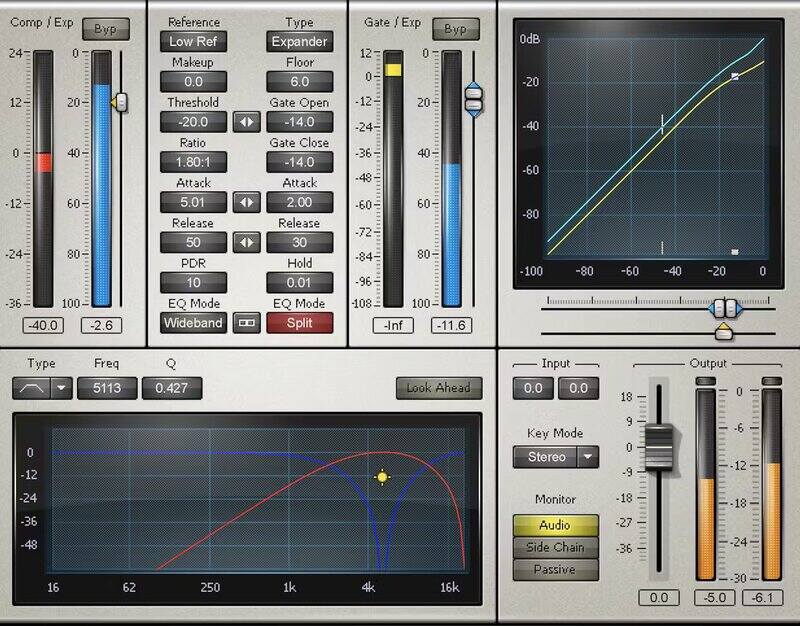
The classic C1 combines a musically pleasing dynamics sound with rich features and functionality: Compression, expansion, upward expansion, gating, dynamic filtering, sidechaining, and internal sidechain filtering—all in one plugin.

C1 isn’t about ‘color’—it’s about solving problems. The clean, neutral sound complements any sound, because its sole goal is to deliver every type of dynamics processing any project needs.

Features

  • Soft knee compression avoids the “squashed” sound of other types
  • Built-in limiter sets a ceiling for the maximum output level
  • Look-ahead function anticipates level changes correctly
  • Auto-release ensures correct dynamics tracking
  • Auto-makeup maintains levels for light or heavy compression
  • Parameter linking for ease of editing settings
  • Dynamics processing linking preserves cross-channel balance
  • Offers up to 3 sidechains to which any number of channels can link

System Requirements

Mac

  • macOS Monterey 12, Ventura 13, Sonoma 14, Sequoia 15
  • VST / AU / AAX

PC

  • Windows 10+
  • VST / AAX
Installation Instructions

1. Head to https://www.waves.com/create-account

2. Enter your email and choose a password to create an account (if you already have a Waves account, choose Log in, enter your details and head to Step 5) > click 'Submit'

3. Open your email inbox > click the activation link in the email from Waves

4. Click 'Log in here' > Log in to your Waves account

5. Click 'Register New Products'

6. Enter the Serial Number found in your Plugin Boutique user account > click 'Submit'

7. Click download in your Plugin Boutique user account or head to https://www.waves.com/downloads/central > download the Waves Central app for your operating system

8. Install Waves Central > Open Waves Central

9. Click 'Log in' > enter your log in details

10. Click the 'Install Products' tab

11. Tick the blue dot on all products you wish to install or click the top dot to install all products > click 'Install & Activate'

12. Click 'OK'

13. Open your DAW > open the Waves plugin

Your Waves plugins are installed and ready to use, enjoy!

Plugin Boutique Rewards

Discover the most rewarding loyalty programme among all plugin retailers.

  • Free Loopmasters Samplepacks
  • Discounts on products and courses
  • Extra Virtual Cash claimed immediately at checkout
Find out more

Follow us:

X (Twitter) Facebook YouTube Instagram
Logo Logo

Plugin Boutique Limited, Part of the Beatport Group LLC.

Copyright © 2011-2025 Plugin Boutique. All rights reserved