


 Log In

Free gifts available with your purchase
Product information
UltraPitch
Thicken, Spread and Shape Your Vocals
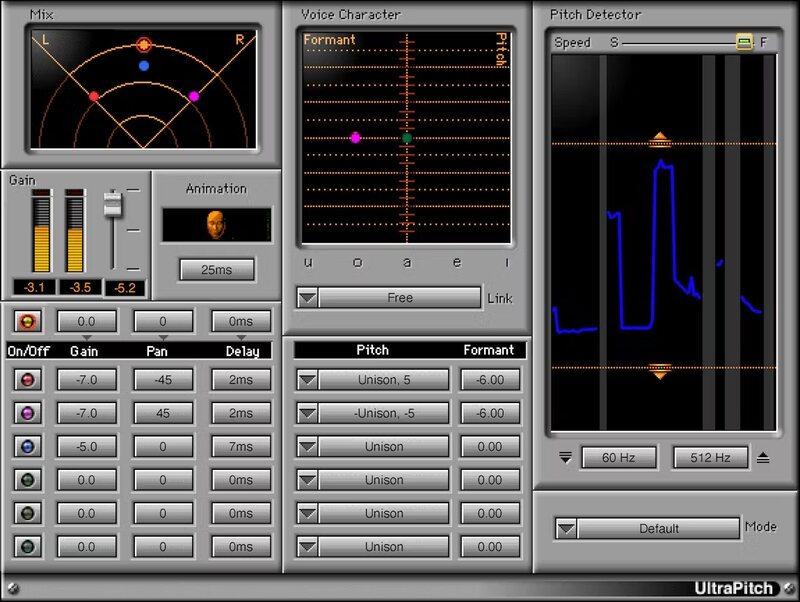
Ultrapitch is a sound design tool that spans the range from simple pitch shifts to complex, 6-voice harmonies with formant changes and panning. In addition to voice, it works with a variety of monophonic sources, and includes detection profiles for different voice characters as well as bass.
You can even transform the spoken word into different personalities—ideal for voicing multiple roles in audiobooks and podcasts, or creating robot voices. Ultrapitch is your key to vocal creativity.
Features
- 2 harmony components (3- and 6-voice), and pitch shift component
- Use automation to change note pitches for specific harmonies
- Change gain, panning, delay, pitch, and formant for any of the voices
- Pitch shift covers ±1 octave range, in 5 cent increments
- Choose pitch from a virtual keyboard, or a pull-down menu
- Create a six-voice choir from a single voice
- Link formant correction to vocal pitch, or adjust independently
- Animation option adds random time delays to voices
- Formant correction profiles for voice, brass, woods, strings, more
- Tune voice harmonies using even-tempered or other intonations
System Requirements
Mac
- macOS Monterey 12, Ventura 13, Sonoma 14, Sequoia 15
- VST / AU / AAX
PC
- Windows 10+
- VST / AAX
Installation Instructions














