/ Multi-Effect / Kaleidoscopes
Waves

Kaleidoscopes

5.0 (2 Reviews)
$27.99 $99.00

71% off until Dec 07

Waves Kaleidoscopes
Waves Kaleidoscopes
Waves Kaleidoscopes
Waves Kaleidoscopes gallery thumbnail
Buy Now
Product information

Kaleidoscopes

Give Your Tracks Color and Movement with Creative Modulation Effects

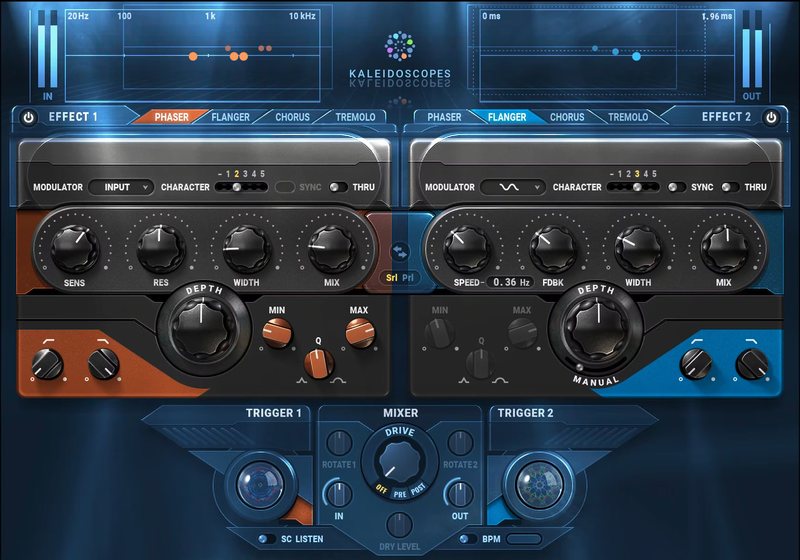
Kaleidoscopes combines classic modulation pedals—phaser, flanger, tremolo, and chorus—into a multi-FX playground. Create new production effects by combining the plugin’s two modulation engines. Use dynamic triggering to have the effects react to your live playing in real time.

Chop synth rhythms with tremolos. Change mod rates with guitar strums. Trigger sweeps from drums. Creatively combine effects in series or parallel—and add Kaleidoscopes’ ever-changing shapes and colors to your tracks.

Features

  • 2 independent modulation engines, series or parallel
  • Flanger, phaser, chorus, and tremolo effects per mod engine
  • Smart triggering reacts to your playing in real time
  • Select modulation source: input, sidechain, diverse waveshapes
  • Extend the effects with 5 analog tonal characters
  • Speed, Resonance, Width, Depth, Mix per modulation engine

System Requirements

Mac

  • macOS Monterey 12, Ventura 13, Sonoma 14, Sequoia 15
  • VST / AU / AAX

PC

  • Windows 10+
  • VST / AAX
Installation Instructions

1. Head to https://www.waves.com/create-account

2. Enter your email and choose a password to create an account (if you already have a Waves account, choose Log in, enter your details and head to Step 5) > click 'Submit'

3. Open your email inbox > click the activation link in the email from Waves

4. Click 'Log in here' > Log in to your Waves account

5. Click 'Register New Products'

6. Enter the Serial Number found in your Plugin Boutique user account > click 'Submit'

7. Click download in your Plugin Boutique user account or head to https://www.waves.com/downloads/central > download the Waves Central app for your operating system

8. Install Waves Central > Open Waves Central

9. Click 'Log in' > enter your log in details

10. Click the 'Install Products' tab

11. Tick the blue dot on all products you wish to install or click the top dot to install all products > click 'Install & Activate'

12. Click 'OK'

13. Open your DAW > open the Waves plugin

Your Waves plugins are installed and ready to use, enjoy!

Plugin Boutique Rewards

Discover the most rewarding loyalty programme among all plugin retailers.

  • Free Loopmasters Samplepacks
  • Discounts on products and courses
  • Extra Virtual Cash claimed immediately at checkout
Find out more

Follow us:

X (Twitter) Facebook YouTube Instagram
Logo Logo

Plugin Boutique Limited, Part of the Beatport Group LLC.

Copyright © 2011-2025 Plugin Boutique. All rights reserved