


 Log In

Free gifts available with your purchase
Manny Marroquin Delay
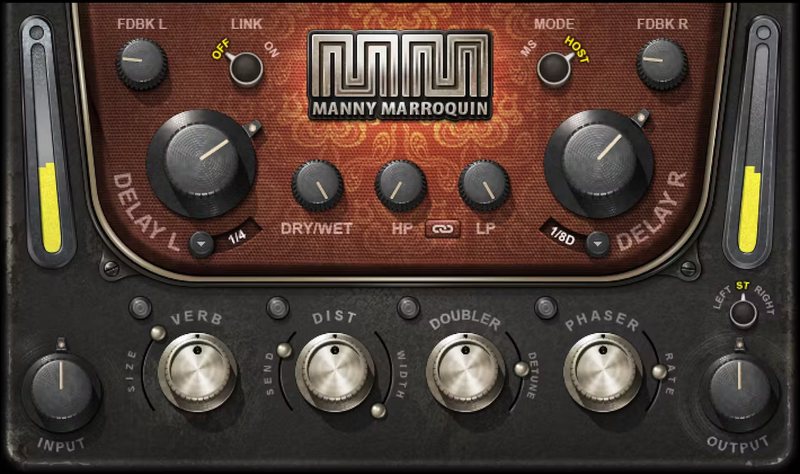
Imaginative Delay Multi-Effects that Shine on Vocals
Manny Marroquin’s pursuit of the perfect mix has won him 10 Grammy® Awards. And now, his creative approach to delay is available to you in this imaginative plugin.
Manny’s recipe for creative delay is to layer many different types of delay into one seamless effect, and spice it up with reverb, distortion, doubling, and phaser effects. The results are deep and evocative—especially on vocals.
“Delay is all about depth. It enhances the groove, and creates layers of sound which can make a mix more exciting and multi-dimensional. It usually takes me 5 or 6 different plugins to get those delay sounds; I wanted to put them all into one. I’ve also included all the little extras that make the sound even more interesting: Some nice reverb, a little bit of distortion, a doubler/harmonizer to fatten things up, plus a phaser when you want to add some movement or really go wild.” —Manny Marroquin
Features
- Created with mix engineer Manny Marroquin (Kendrick Lamar, Lizzo)
- Ideal for vocals and leads—the rich sound can fill out sparse lead lines
- Independent left and right delay times and feedback controls
- The delay feeds 4 parallel effects for extra depth and opulence
- Sync to 19 different delay times, or choose 0 to 2000 milliseconds
- Variable lowpass and highpass filters customize the reverb timbre
- Includes reverb, phaser, distortion, and tunable doubler
- Tune doubler within ±1 semitone range for extra-thick delays
System Requirements
Mac
- macOS Monterey 12, Ventura 13, Sonoma 14, Sequoia 15
- VST / AU / AAX
PC
- Windows 10+
- VST / AAX














