


 Log In

Free gifts available with your purchase
Maserati DRM
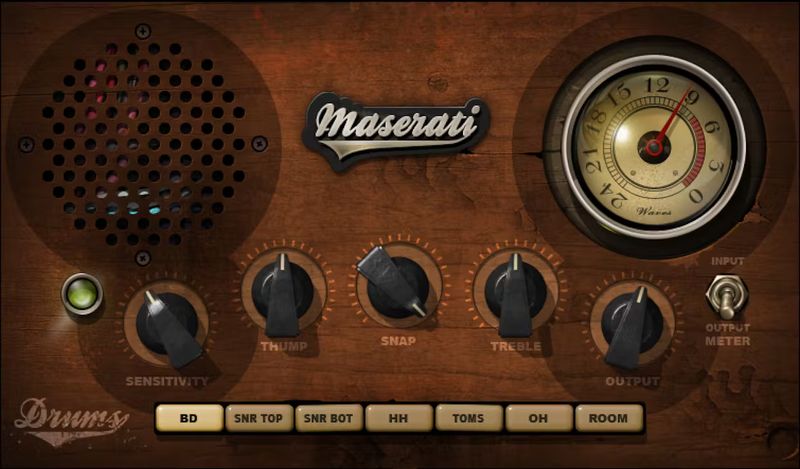
Pump Up the Power for Drums in Thick Mixes
DRM leverages its THUMP, SNAP, and TREBLE controls for individual drums: kick, snare top, snare bottom, hi-hats, toms, overheads, and room mics. Fine-tune every drum in a multi-output drum module to create a monster-sounding kit that fits into any mix—no matter how thick.
Designed in close association with Grammy winner Tony Maserati (Beyoncé, Jason Mraz, David Bowie), Maserati DRM will help you help your drums stand out even in the busiest mixes.
“The DRM was designed to help the excitement of percussive transients get heard through mixes which are thick with instrumentation and vocals. Whether on programmed or live drums, DRM is a great starting point for your mix.”—Tony Maserati
Features
- 7 modes, customized for individual drum sounds
- Thump adds depth and bottom to kick, snare, and toms
- Snap increases compression—great for room and overhead mics
- Treble adds definition and increases articulation
- Push any sound even harder by turning up Sensitivity to max
- Direct, uncluttered interface makes dialing in sounds easy
- 59 presets simplify choosing the right sound for the right drum
- Separate modes for use as an insert or send effect
System Requirements
Mac
- macOS Monterey 12, Ventura 13, Sonoma 14, Sequoia 15
- VST / AU / AAX
PC
- Windows 10+
- VST / AAX














