/ Multi-Effect / Eddie Kramer Guitar Channel
Waves

Eddie Kramer Guitar Channel

$27.99 $99.00

71% off until Dec 07

Waves Eddie Kramer Guitar Channel
Waves Eddie Kramer Guitar Channel gallery thumbnail
Buy Now
Product information

Eddie Kramer Guitar Channel
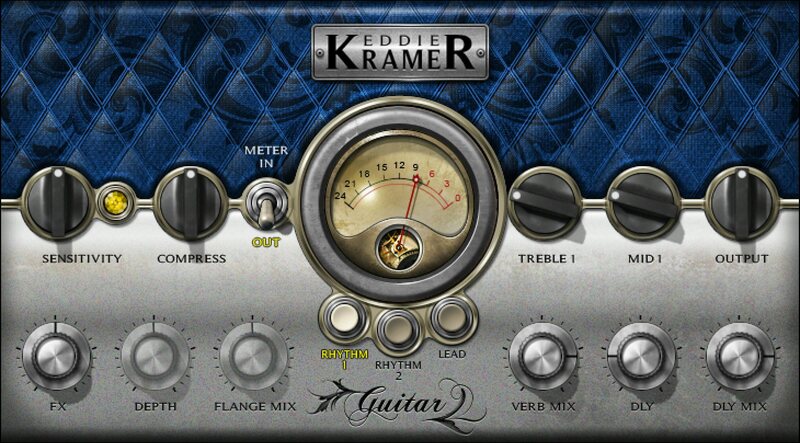
Lead & Rhythm Guitar Tones from the Man Who Produced Jimi Hendrix and Jimmy Page

Eddie Kramer produced and engineered the revered guitar tones of Led Zeppelin, Hendrix, Keith Richards and The Rolling Stones, Kiss, Johnny Winter and many more.

Now you can instantly access 3 of his favorite rock guitar settings—two for rhythm, one for lead. Under the hood, the plugin is packed with Kramer’s expertise; all you need to do is select one of the three starting points, then slightly tweak the desired amounts of compression, treble & midrange, as well as delay, reverb and flange – and dial in that classic guitar sound fast.

Features

  • 2 superb rhythm guitar settings help guitars pop in the mix
  • Full, defined, organic lead tone that isn’t crushed by fuzz
  • Spice up parts with delay, reverb, and Kramer’s signature flanging
  • Treble and midrange controls for tailoring tone
  • Choose your aggression, from lots of compression to none
  • Go from scratch tracks to final mix—quickly and easily

System Requirements

Mac

  • macOS Monterey 12, Ventura 13, Sonoma 14, Sequoia 15
  • VST / AU / AAX

PC

  • Windows 10+
  • VST / AAX
Installation Instructions

1. Head to https://www.waves.com/create-account

2. Enter your email and choose a password to create an account (if you already have a Waves account, choose Log in, enter your details and head to Step 5) > click 'Submit'

3. Open your email inbox > click the activation link in the email from Waves

4. Click 'Log in here' > Log in to your Waves account

5. Click 'Register New Products'

6. Enter the Serial Number found in your Plugin Boutique user account > click 'Submit'

7. Click download in your Plugin Boutique user account or head to https://www.waves.com/downloads/central > download the Waves Central app for your operating system

8. Install Waves Central > Open Waves Central

9. Click 'Log in' > enter your log in details

10. Click the 'Install Products' tab

11. Tick the blue dot on all products you wish to install or click the top dot to install all products > click 'Install & Activate'

12. Click 'OK'

13. Open your DAW > open the Waves plugin

Your Waves plugins are installed and ready to use, enjoy!

Plugin Boutique Rewards

Discover the most rewarding loyalty programme among all plugin retailers.

  • Free Loopmasters Samplepacks
  • Discounts on products and courses
  • Extra Virtual Cash claimed immediately at checkout
Find out more

Follow us:

X (Twitter) Facebook YouTube Instagram
Logo Logo

Plugin Boutique Limited, Part of the Beatport Group LLC.

Copyright © 2011-2025 Plugin Boutique. All rights reserved










