/ Compressor / Scheps 73
Waves

Scheps 73

4.5 (4 Reviews)
$29.99 $129.00

76% off until Dec 07

Waves Scheps 73
Waves Scheps 73
Waves Scheps 73
Waves Scheps 73 gallery thumbnail
Buy Now
Product information

Scheps 73

Colorful EQ with Mic Preamp Modeled from the Classic 1073 Console

The only way a preamp and EQ can remain coveted for over half-a-century is by checking all the boxes: a sonic character that still stands alone, strategic control and design choices that prioritize results over complexity, and reverence—that persists to this day—from world-class engineers.

The 1073’s EQ and preamp by themselves embody excellence, but combining the two creates magic. The way the EQ processes the fat, warm, inviting preamp sound is the key to the 1073’s enduring success.

With precision analog modeling of the original’s behavior—tweaked to perfection by Grammy-winning mixing engineer Andrew Scheps (Adele, Metallica, Jay Z)—Scheps 73 keeps the legend alive.

Features

  • Add the fat, warm sounds made possible by transformer saturation
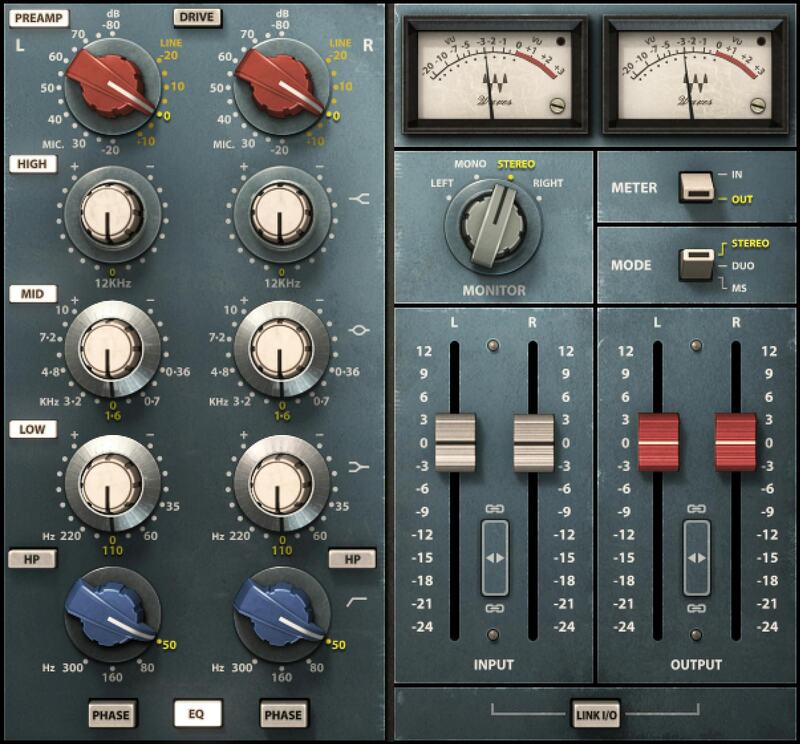
  • Reproduces the four classic bands of EQ with exacting detail
  • Equalize mid and sides individually with the included Mid-Side Matrix
  • Models the “secret ingredient”— the Marinair audio transformer
  • Mono, Dual Mono, or Stereo modes, and 4 monitoring options
  • Includes an exclusive midrange band from the original schematics
  • Designed with Grammy-winning mix engineer Andrew Scheps
  • Equalize left and right channels individually

System Requirements

Mac

  • macOS Monterey 12, Ventura 13, Sonoma 14, Sequoia 15
  • VST / AU / AAX

PC

  • Windows 10+
  • VST / AAX
Installation Instructions

1. Head to https://www.waves.com/create-account

2. Enter your email and choose a password to create an account (if you already have a Waves account, choose Log in, enter your details and head to Step 5) > click 'Submit'

3. Open your email inbox > click the activation link in the email from Waves

4. Click 'Log in here' > Log in to your Waves account

5. Click 'Register New Products'

6. Enter the Serial Number found in your Plugin Boutique user account > click 'Submit'

7. Click download in your Plugin Boutique user account or head to https://www.waves.com/downloads/central > download the Waves Central app for your operating system

8. Install Waves Central > Open Waves Central

9. Click 'Log in' > enter your log in details

10. Click the 'Install Products' tab

11. Tick the blue dot on all products you wish to install or click the top dot to install all products > click 'Install & Activate'

12. Click 'OK'

13. Open your DAW > open the Waves plugin

Your Waves plugins are installed and ready to use, enjoy!

Plugin Boutique Rewards

Discover the most rewarding loyalty programme among all plugin retailers.

  • Free Loopmasters Samplepacks
  • Discounts on products and courses
  • Extra Virtual Cash claimed immediately at checkout
Find out more

Follow us:

X (Twitter) Facebook YouTube Instagram
Logo Logo

Plugin Boutique Limited, Part of the Beatport Group LLC.

Copyright © 2011-2025 Plugin Boutique. All rights reserved