/ Utility / VU Meter
Waves

VU Meter

5.0 (5 Reviews)
$24.99 $49.00

49% off until Dec 07

Waves VU Meter
Waves VU Meter
Waves VU Meter
Waves VU Meter gallery thumbnail
Buy Now
Product information

VU Meter

The Time-Tested Reality Check for Mixes

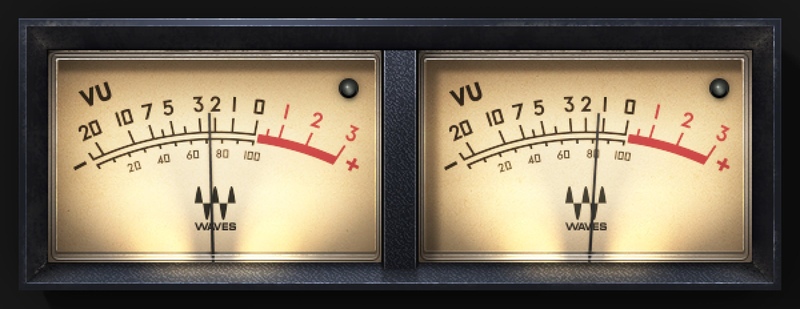
Digital meters are fine for showing peaks, but an analog VU meter’s moving needle ballistics accurately reflect audio’s average signal level. This correlates far more closely with how our ears perceive musical energy, giving you insight into perceived levels and helping you achieve better mixes and masters.

The challenge for this plugin wasn’t modeling sound, but mechanical realism. That challenge has been met—with the most accurate software emulation ever of the venerable VU meter.

Features

  • Averaging out short peaks shows real-world dynamics characteristics
  • Reveals audio characteristics that lead to better mixes
  • Smoother than the jittery readings from DAW meters
  • LED-style clip indicator lights at levels above -0.009 dBFS
  • Calibrate headroom to your DAW’s reference level
  • Scales for Volume Units and dB (based on reference adjustment)
  • Negligible CPU: Insert on as many channels as you want
  • Choose the stereo version’s meter size: small, medium, or large

System Requirements

Mac

  • macOS Monterey 12, Ventura 13, Sonoma 14, Sequoia 15
  • VST / AU / AAX

PC

  • Windows 10+
  • VST / AAX
Installation Instructions

1. Head to https://www.waves.com/create-account

2. Enter your email and choose a password to create an account (if you already have a Waves account, choose Log in, enter your details and head to Step 5) > click 'Submit'

3. Open your email inbox > click the activation link in the email from Waves

4. Click 'Log in here' > Log in to your Waves account

5. Click 'Register New Products'

6. Enter the Serial Number found in your Plugin Boutique user account > click 'Submit'

7. Click download in your Plugin Boutique user account or head to https://www.waves.com/downloads/central > download the Waves Central app for your operating system

8. Install Waves Central > Open Waves Central

9. Click 'Log in' > enter your log in details

10. Click the 'Install Products' tab

11. Tick the blue dot on all products you wish to install or click the top dot to install all products > click 'Install & Activate'

12. Click 'OK'

13. Open your DAW > open the Waves plugin

Your Waves plugins are installed and ready to use, enjoy!

Plugin Boutique Rewards

Discover the most rewarding loyalty programme among all plugin retailers.

  • Free Loopmasters Samplepacks
  • Discounts on products and courses
  • Extra Virtual Cash claimed immediately at checkout
Find out more

Follow us:

X (Twitter) Facebook YouTube Instagram
Logo Logo

Plugin Boutique Limited, Part of the Beatport Group LLC.

Copyright © 2011-2025 Plugin Boutique. All rights reserved