


 Log In

Free gifts available with your purchase
Product information
Electric Grand 80 Piano
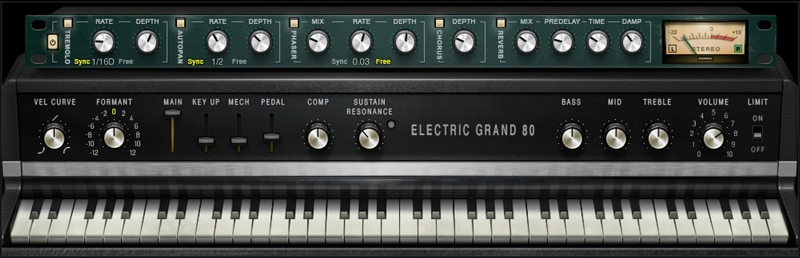
Sampled from the Iconic Instrument of Polished 80s Pop and R&B
The CP series of electro-acoustic pianos were integral to the sound of late 70s/early 80s pop giants, from Phil Collins and Elton John to ABBA, U2, Toto, Hall & Oates and Billy Joel. Occupying the space between acoustic and tine-based pianos, the CP series made touring with a piano possible—without needing to haul a grand.
With a more focused sound than acoustic pianos, and a more complex sound than tine-based electric pianos, Electric Grand 80’s reverberant chords and shiny, polished leads slide into mixes with ease.
Features
- Expertly sampled model of the CP-80, with its extended low end
- Sustain can simulate sympathetic resonance of unplayed strings
- Add realistic mechanical sounds from key up and sustain pedal
- Multi-effect section with tremolo, autopan, chorus, phaser, reverb
- Tailor tone with bass, mid, and treble controls
- Fine-tune dynamics with limiting and compression
- Formant control dials in sounds from mellow to brash
- Dynamic velocity response, with variable response curve
- For live performance, use in standalone app mode
- NKS-ready for NI Komplete Kontrol and Maschine
System Requirements
Mac
- macOS Monterey 12, Ventura 13, Sonoma 14, Sequoia 15
- VST / AU / AAX
PC
- Windows 10+
- VST / AAX
Installation Instructions














