


 Log In

Free gifts available with your purchase
Product information
Bass Fingers
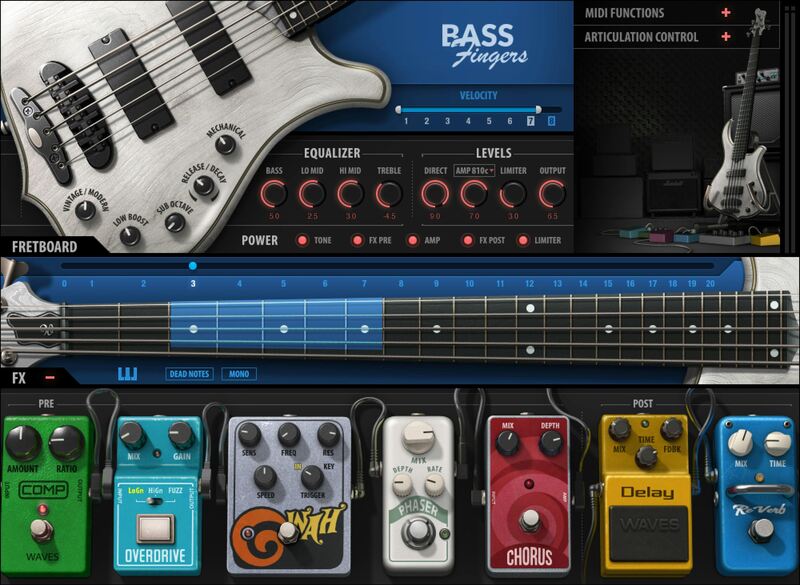
The Richest, Most Realistic Fingerstyle Bass
Bass Fingers captures the sound, and the naturally warm vibe, of finger-style bass. 14,000 samples feature multiple velocity layers, natural sustain, and “round robin” note rotation. Choose where on the neck to play notes, because the same note has different tones depending on where it’s played.
Keyswitching adds articulations like legato samples, up/down slides, squeaks, hammer-ons, and more. Control your velocity ranges, adjust tone for different bass characters, mute notes… Bass Fingers feels ultra-natural and real.
Features
- 15.5 GB sample library: Over 14,000 hand-crafted samples
- Use as a plugin or play as a standalone instrument
- 8 velocity layers, 6 round robins for every sampled note
- Full 5-string articulation: natural hammer-ons & pull-offs, release & decays, sampled slides and more
- 21 interactive playing positions with intelligent adaptive fretboard
- The amp sim delivers pure, classic tones—or pour on some growl
- Choose round, full vintage character, or bright modern tone
- 4-band equalizer for additional tone shaping
- Pre-amp FX: compressor, phaser, overdrive, triggered wah, chorus
- 5 legato modes, including “always” and “off”
- 4 amp sim + cab emulations, with delay and reverb post-amp FX
- Option to force E, A, D, G to play open string
- MIDI functions: velocity curve and depth, sustain, transpose, more
- NKS-ready for NI Maschine and Komplete Kontrol
- 97 artist and factory presets cover a wide range of popular bass styles
System Requirements
Mac
- macOS Monterey 12, Ventura 13, Sonoma 14, Sequoia 15
- VST / AU / AAX
PC
- Windows 10+
- VST / AAX
Installation Instructions














