


 Log In

Free gifts available with your purchase
Product information
Electric 88 Piano
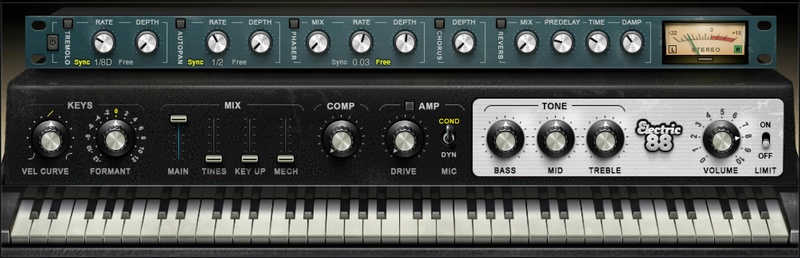
The Personality, and Soul of the Classic 70s Electric Piano
You’ve heard the unmistakable sound in classics by Stevie Wonder, Herbie Hancock, the Doors, Steely Dan, and so many others. Our goal was to sample the soul, not just the sound, of this classic electric piano.
We’ve searched for the best-sounding specimen of this vintage model, then sampled the instrument key by key, to capture every nuance of each key with full dynamic human feel and touch. The result is what master keyboardist Jason Miles (Michael Jackson, Miles Davis) has called “top of the class for E-Piano VSTs.”
Features
- Expert multisampling captures all the keyboard’s signature nuances
- Realistic dynamics and feel, with faithful velocity response
- Extra realism from controls for tine, key up, and key “thump”
- Tailor the timbre for any mix with tone and formant controls
- Evoke the 70s onstage sound with amp, drive, and mic controls
- Includes classic tremolo, autopan, phaser, chorus, and reverb effects
- Squeeze the sound with limiting and compression
- Match your touch perfectly by varying the velocity curve
- For live performance, use in standalone app mode
- NKS-ready for NI Komplete Kontrol and Maschine
System Requirements
Mac
- macOS Monterey 12, Ventura 13, Sonoma 14, Sequoia 15
- VST / AU / AAX
PC
- Windows 10+
- VST / AAX
Installation Instructions














