/ Multi-Effect / JJP Strings & Keys
Waves

JJP Strings & Keys

4.0 (1 Reviews)
$24.99 $99.00

74% off until Dec 07

Waves JJP Strings & Keys
Waves JJP Strings & Keys gallery thumbnail
Buy Now
Product information

JJP Strings & Keys
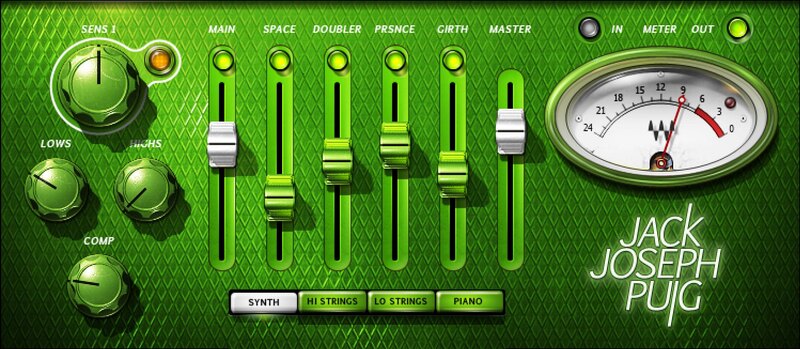
Mix Reality into Synths and String Samples

Created with multiple Grammy®-winning producer/engineer Jack Joseph Puig (John Mayer, U2, Lady Gaga, the Rolling Stones), JJP Strings & Keys brings out the zing of a bow, the pluck of a harp, and gives an almost physical presence to synth samples and pads—yet does this without overpowering the instruments’ inherent character.

As JJP says, “I want strings and keyboards to be radiant and beautiful—so when the song comes out of the speaker, it’s on another level.” Mission accomplished.

Features

  • Designed by Grammy winner Jack Joseph Puig (John Mayer, U2)
  • Layers up to 4 parallel effects, optimized for strings and keys
  • Core effects of compression, low EQ, and high EQ
  • Modes for Synth, Hi Strings, Lo Strings, and Piano
  • Warm up thin, sampled sounds by adding girth
  • Make the concert hall come to you with Space and Doubler
  • Enhance definition and detail with the Presence effects layer
  • Balance dry and effects layers for a realistic, blended sound

System Requirements

Mac

  • macOS Monterey 12, Ventura 13, Sonoma 14, Sequoia 15
  • VST / AU / AAX

PC

  • Windows 10+
  • VST / AAX
Installation Instructions

1. Head to https://www.waves.com/create-account

2. Enter your email and choose a password to create an account (if you already have a Waves account, choose Log in, enter your details and head to Step 5) > click 'Submit'

3. Open your email inbox > click the activation link in the email from Waves

4. Click 'Log in here' > Log in to your Waves account

5. Click 'Register New Products'

6. Enter the Serial Number found in your Plugin Boutique user account > click 'Submit'

7. Click download in your Plugin Boutique user account or head to https://www.waves.com/downloads/central > download the Waves Central app for your operating system

8. Install Waves Central > Open Waves Central

9. Click 'Log in' > enter your log in details

10. Click the 'Install Products' tab

11. Tick the blue dot on all products you wish to install or click the top dot to install all products > click 'Install & Activate'

12. Click 'OK'

13. Open your DAW > open the Waves plugin

Your Waves plugins are installed and ready to use, enjoy!

Plugin Boutique Rewards

Discover the most rewarding loyalty programme among all plugin retailers.

  • Free Loopmasters Samplepacks
  • Discounts on products and courses
  • Extra Virtual Cash claimed immediately at checkout
Find out more

Follow us:

X (Twitter) Facebook YouTube Instagram
Logo Logo

Plugin Boutique Limited, Part of the Beatport Group LLC.

Copyright © 2011-2025 Plugin Boutique. All rights reserved










