/ Multi-Effect / Maserati GRP
Waves

Maserati GRP

5.0 (2 Reviews)
$27.99 $99.00

71% off until Dec 07

Waves Maserati GRP
Waves Maserati GRP
Waves Maserati GRP
Waves Maserati GRP gallery thumbnail
Buy Now
Product information

Maserati GRP

Give Groups the Glue They Need

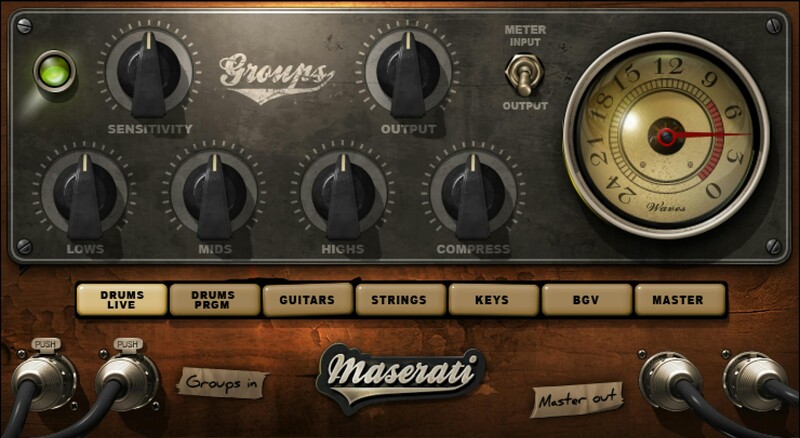
There are plenty of effects for individual tracks and sounds, but Maserati GRP—created with Grammy®-winner mixer Tony Maserati (Beyoncé)—addresses the crucial need to bring out the best in group channels: “glue” sounds together to turn individual tracks into a cohesive whole.

GRP is for background vocals, drums, layered guitars, strings, and the like. Loops and stems also benefit from being treated as a single entity, thanks to curated EQ and compression settings.

“This plugin will give your groups that extra final help—add a nice sheen on background vocals, compress a drum kit together, make it feel it’s got some nice air. It’s not about adding major effects—it’s about that extra touch of EQ and subtle compression.”—Tony Maserati

Features

  • Subtle group compression glues instead of squashes
  • Dedicated settings for backing vox, drums, keys, strings, masters
  • Master mode works on full mixes and stems
  • PRGM mode for drums breathes life into programmed drums
  • Low, mid, and high frequencies tailor the tone for groups
  • Unify groups into a single, interconnected sound
  • 13 presets for background vocals, drums, guitars, and more
  • Separate modes for use as an insert or send effect

System Requirements

Mac

  • macOS Monterey 12, Ventura 13, Sonoma 14, Sequoia 15
  • VST / AU / AAX

PC

  • Windows 10+
  • VST / AAX
Installation Instructions

1. Head to https://www.waves.com/create-account

2. Enter your email and choose a password to create an account (if you already have a Waves account, choose Log in, enter your details and head to Step 5) > click 'Submit'

3. Open your email inbox > click the activation link in the email from Waves

4. Click 'Log in here' > Log in to your Waves account

5. Click 'Register New Products'

6. Enter the Serial Number found in your Plugin Boutique user account > click 'Submit'

7. Click download in your Plugin Boutique user account or head to https://www.waves.com/downloads/central > download the Waves Central app for your operating system

8. Install Waves Central > Open Waves Central

9. Click 'Log in' > enter your log in details

10. Click the 'Install Products' tab

11. Tick the blue dot on all products you wish to install or click the top dot to install all products > click 'Install & Activate'

12. Click 'OK'

13. Open your DAW > open the Waves plugin

Your Waves plugins are installed and ready to use, enjoy!

Plugin Boutique Rewards

Discover the most rewarding loyalty programme among all plugin retailers.

  • Free Loopmasters Samplepacks
  • Discounts on products and courses
  • Extra Virtual Cash claimed immediately at checkout
Find out more

Follow us:

X (Twitter) Facebook YouTube Instagram
Logo Logo

Plugin Boutique Limited, Part of the Beatport Group LLC.

Copyright © 2011-2025 Plugin Boutique. All rights reserved