/ Filter / MetaFilter
Waves

MetaFilter

5.0 (1 Reviews)
$24.99 $149.00

83% off until Dec 07

Waves MetaFilter
Waves MetaFilter
Waves MetaFilter
Waves MetaFilter gallery thumbnail
Buy Now
Product information

MetaFilter

A Creativity Engine for Your Productions

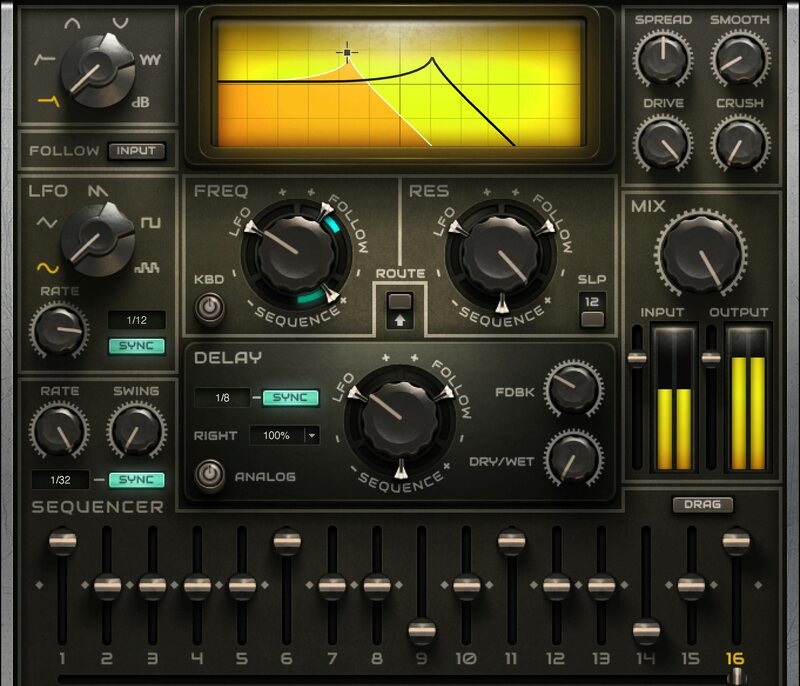
MetaFilter transforms filtering into a creativity machine—with 6 different modes, envelope following, LFO and sequencer control, drive and bit-crushing options, delay, sidechain, and MIDI learn. MetaFilter makes synths, drums, guitars, bass, and samples of all types breathe, move, and excite.

Have MetaFilter add subtle animation, or go for sequenced resonance and wild LFO textures. Shovel some dirt on the sound, or keep it clean—from DJ to sound design, MetaFilter does it all.

Features

  • 5 filter curves (HP, LP, BP, notch, comb) and VCA
  • Multiple modulation sources for cutoff, resonance, delay time
  • Envelope-follow the input, or an external sidechain
  • LFO for sweeps or wobbles, with 5 waveforms (including random)
  • Sequencer with 1 to 16 steps, variable level, swing, and sync
  • Delay with analog sound option, offset left and right channels
  • Rough up the audio with saturation and bitcrushing
  • Over 90 carefully crafted presets get you up and running fast

System Requirements

Mac

  • macOS Monterey 12, Ventura 13, Sonoma 14, Sequoia 15
  • VST / AU / AAX

PC

  • Windows 10+
  • VST / AAX
Installation Instructions

1. Head to https://www.waves.com/create-account

2. Enter your email and choose a password to create an account (if you already have a Waves account, choose Log in, enter your details and head to Step 5) > click 'Submit'

3. Open your email inbox > click the activation link in the email from Waves

4. Click 'Log in here' > Log in to your Waves account

5. Click 'Register New Products'

6. Enter the Serial Number found in your Plugin Boutique user account > click 'Submit'

7. Click download in your Plugin Boutique user account or head to https://www.waves.com/downloads/central > download the Waves Central app for your operating system

8. Install Waves Central > Open Waves Central

9. Click 'Log in' > enter your log in details

10. Click the 'Install Products' tab

11. Tick the blue dot on all products you wish to install or click the top dot to install all products > click 'Install & Activate'

12. Click 'OK'

13. Open your DAW > open the Waves plugin

Your Waves plugins are installed and ready to use, enjoy!

Plugin Boutique Rewards

Discover the most rewarding loyalty programme among all plugin retailers.

  • Free Loopmasters Samplepacks
  • Discounts on products and courses
  • Extra Virtual Cash claimed immediately at checkout
Find out more

Follow us:

X (Twitter) Facebook YouTube Instagram
Logo Logo

Plugin Boutique Limited, Part of the Beatport Group LLC.

Copyright © 2011-2025 Plugin Boutique. All rights reserved