


 Log In

Free gifts available with your purchase
Scheps Omni Channel 2
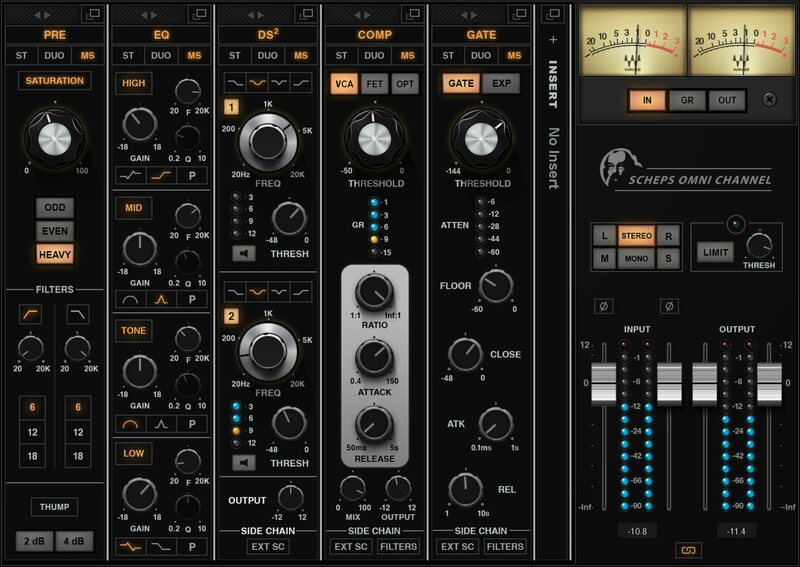
The Perfect Channel Strip. Now Expanded with New Features.
Designed with Grammy-winning mixer Andrew Scheps (Metallica, Jay Z, Adele, Low Roar), Scheps Omni Channel 2 combines the efficient design and cohesive sound of classic analog channel strips, with the diverse sonic color and flexible sound-shaping possibilities available only in digital.
Scheps Omni gives you Andrew’s time-tested combinations of compression, EQ, and saturation tones. Now you can mix and match four preamp saturation colors, four types of compression, and flexible EQ, de-essing, gating options—all combining to deliver a cohesive analog channel strip sound, thanks to Andrew’s careful design.
The new version of the plugin, Scheps Omni Channel 2, expands the palette into new sonic territories. The new features include: CRUSH, a fourth saturation flavor for aggressive distortion. SOFT, a new soft-knee compressor, in addition to the Omni’s VCA, FET, and OPT. A new 24dB-per-octave filter with serious resonance, perfect for creative effects such as filter sweeps. Plus, the ability to host absolutely any VST3 plugin, by any manufacturer, in the Omni’s insert point, in order to add any effect to the Omni signal flow.
“The original Omni plugin was my dream for a plugin. Everything I like to use in every mix—in one window. Now, after using the plugin for several years as my main mixing tool, I wanted to add even more options that I use on a regular basis. We’ve now expanded the plugin, to really push the envelope on what you can do with it.”—Andrew Scheps
Features
- 5 modules for preamp color, EQ, de-essing, compression, gating
- Choose from 4 analog preamp saturation colors with filtering
- Choose from 4 compression options with easy A/B/C/D comparison
- DS2 dual de-esser goes beyond conventional sibilance control
- Re-order the channel strip’s signal chain order however you want
- Internal and external sidechains with filters
- 250 presets by Andrew Scheps, plus more Grammy-winning mixers
- Andrew’s FOCUS presets help you focus on key controls for your mix
- Host any VST3 plugin (Waves or other brands) in Omni’s “Insert”*
- Internal MS, Duo, Stereo routing per module
- Zero latency, perfect for mixing in the studio and live
System Requirements
Mac
- macOS Monterey 12, Ventura 13, Sonoma 14, Sequoia 15
- VST / AU / AAX
PC
- Windows 10+
- VST / AAX












Reviews Summary
While it aims to provide a helpful overview, it may not capture every perspective or detail. We encourage you to read individual reviews to make an informed decision.
Users praise this channel strip plugin as a versatile, all-in-one 'Swiss Army knife' that is especially effective for voice-overs. They appreciate its intuitive interface, advanced customization options, harmonics features, and great sound quality, with several noting it stands out as one of Waves' best offerings.


