/ Utility / Abbey Road King’s Microphones
Waves

Abbey Road King’s Microphones

$29.99 $99.00

69% off until Dec 07

Waves Abbey Road King’s Microphones
Waves Abbey Road King’s Microphones gallery thumbnail
Buy Now
Product information

Abbey Road King’s Microphones

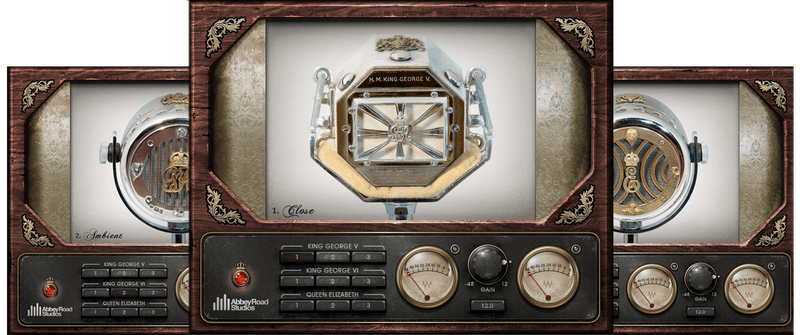
Microphones Fit for a King—and a Queen

In the 1920s and 30s, EMI crafted microphones for British Royalty—King George V, King George VI, and Queen Elizabeth—but these gorgeous mics sat neglected in the EMI Archive Trust for decades. Then, in a strange twist of fate, production started on the award-winning film, “The King’s Speech.”

After painstaking restoration, the mics came back to life to record the film’s orchestral sections, as well as “re-amp” the dialogue for authenticity. Then the Abbey Road engineers started experimenting with re-amping guitars and synths to get unique crunchy filter-like qualities. Clearly, the mics were never designed to be used in this fashion—but breaking the rules is how you stand out.

Features

  • Modeled in close collaboration with Abbey Road Studios
  • The King George V mic is the only known model of a carbon mic
  • Each mic has 3 range positions: close, natural, and ambient
  • 1920s and 30s mic characteristics provide “lost” mic timbres
  • Vibey sonic qualities for sound design and music production
  • Follow with reverb, for novel room and ambiance effects

System Requirements

Mac

  • macOS Monterey 12, Ventura 13, Sonoma 14, Sequoia 15
  • VST / AU / AAX

PC

  • Windows 10+
  • VST / AAX
Installation Instructions

1. Head to https://www.waves.com/create-account

2. Enter your email and choose a password to create an account (if you already have a Waves account, choose Log in, enter your details and head to Step 5) > click 'Submit'

3. Open your email inbox > click the activation link in the email from Waves

4. Click 'Log in here' > Log in to your Waves account

5. Click 'Register New Products'

6. Enter the Serial Number found in your Plugin Boutique user account > click 'Submit'

7. Click download in your Plugin Boutique user account or head to https://www.waves.com/downloads/central > download the Waves Central app for your operating system

8. Install Waves Central > Open Waves Central

9. Click 'Log in' > enter your log in details

10. Click the 'Install Products' tab

11. Tick the blue dot on all products you wish to install or click the top dot to install all products > click 'Install & Activate'

12. Click 'OK'

13. Open your DAW > open the Waves plugin

Your Waves plugins are installed and ready to use, enjoy!

Plugin Boutique Rewards

Discover the most rewarding loyalty programme among all plugin retailers.

  • Free Loopmasters Samplepacks
  • Discounts on products and courses
  • Extra Virtual Cash claimed immediately at checkout
Find out more

Follow us:

X (Twitter) Facebook YouTube Instagram
Logo Logo

Plugin Boutique Limited, Part of the Beatport Group LLC.

Copyright © 2011-2025 Plugin Boutique. All rights reserved