/ Compressor / eMo D5 Dynamics
Waves

eMo D5 Dynamics

$29.99 $149.00

79% off until Dec 07

Waves eMo D5 Dynamics
Waves eMo D5 Dynamics gallery thumbnail
Buy Now
Product information

eMo D5 Dynamics

1 Plugin, 5 Dynamics Processors, Endless Solutions

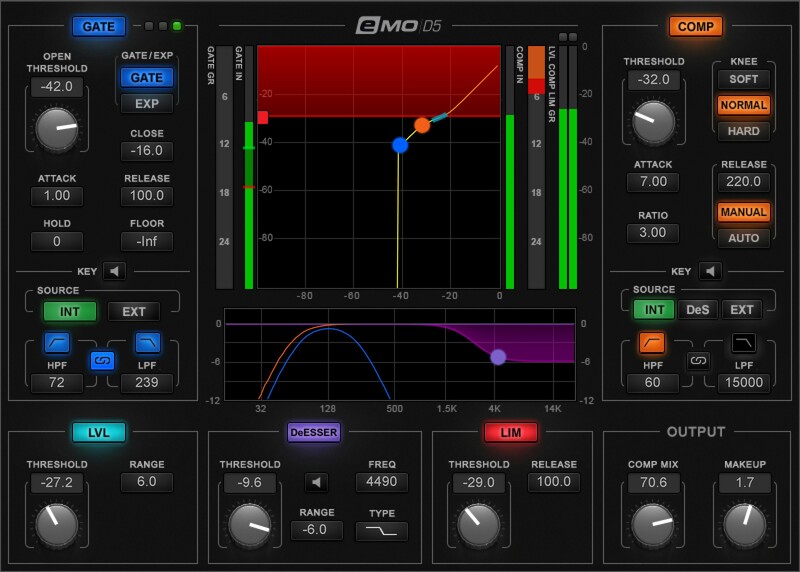
Whether for live mixing or for studio work on music, voiceovers, or narration, eMo D5 incorporates 5 essential dynamics processing solutions: Compressor, Gate/Expander, Leveler, Limiter, and DeEsser. The fast response, and clean, transparent sound, make eMo D5 a superstar on stage or in the studio.

This plugin is all about effective, seamless solutions—and dialing up those solutions fast, thanks to the single-window, touchscreen-friendly interface that places every parameter at your fingertips.

Features

  • Five dynamics tools in a single plugin: Gate, Leveler, DeEsser, Compressor, Limiter
  • Use as a separate plugin or as part of the eMotion LV1 live mixer’s channel strip
  • Zero latency with ultra-low CPU consumption
  • Compressor and Expander/Gate include sidechain input and filters
  • Parallel compression can return punch to compressed sounds
  • Exclusive dynamics detection process cuts pumping, breathing
  • Fast-attack limiter keeps peaks and overloads under control
  • Ultra-effective de-esser, with 3 filter types and pre/post routings
  • Informative displays change for the selected processor
  • 27 expertly crafted presets for multiple applications
  • Multi-touch compatibility
  • Optimized for live sound mixing

System Requirements

Mac

  • macOS Monterey 12, Ventura 13, Sonoma 14, Sequoia 15
  • VST / AU / AAX

PC

  • Windows 10+
  • VST / AAX
Installation Instructions

1. Head to https://www.waves.com/create-account

2. Enter your email and choose a password to create an account (if you already have a Waves account, choose Log in, enter your details and head to Step 5) > click 'Submit'

3. Open your email inbox > click the activation link in the email from Waves

4. Click 'Log in here' > Log in to your Waves account

5. Click 'Register New Products'

6. Enter the Serial Number found in your Plugin Boutique user account > click 'Submit'

7. Click download in your Plugin Boutique user account or head to https://www.waves.com/downloads/central > download the Waves Central app for your operating system

8. Install Waves Central > Open Waves Central

9. Click 'Log in' > enter your log in details

10. Click the 'Install Products' tab

11. Tick the blue dot on all products you wish to install or click the top dot to install all products > click 'Install & Activate'

12. Click 'OK'

13. Open your DAW > open the Waves plugin

Your Waves plugins are installed and ready to use, enjoy!

Plugin Boutique Rewards

Discover the most rewarding loyalty programme among all plugin retailers.

  • Free Loopmasters Samplepacks
  • Discounts on products and courses
  • Extra Virtual Cash claimed immediately at checkout
Find out more

Follow us:

X (Twitter) Facebook YouTube Instagram
Logo Logo

Plugin Boutique Limited, Part of the Beatport Group LLC.

Copyright © 2011-2025 Plugin Boutique. All rights reserved