/ Utility / Playlist Rider
Waves

Playlist Rider

$29.99 $149.00

79% off until Dec 07

Waves Playlist Rider
Waves Playlist Rider gallery thumbnail
Buy Now
Product information

Playlist Rider

Here’s that Assistant Engineer You Always Wanted

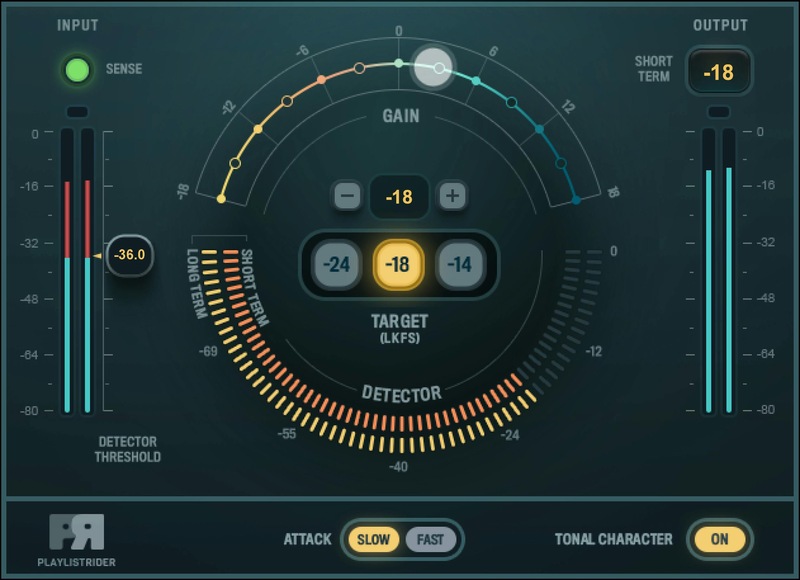
It’s such a hassle to balance levels of all the audio feeds involved in broadcasts, podcasts, panel discussions, theater groups, pre-show music and so on. Playlist Rider makes your life easier. Set the mixer input levels, load the master bus with Playlist Rider, and let it ride the output to your target level.

There’s even an option to match the tonal character of the various feeds, which adds the kind of professional touch that makes content stand out. Fast and easy to use, Playlist Rider is essential.

Features

  • Match the audio output to three target levels (-24, -18, -14 LKFS)
  • Rides the output level dynamically and accurately
  • Variable threshold preserves a natural, uncompressed sound
  • Detector can exclude low-level sections, like fades
  • Choose fast or slow attack times for dynamics control
  • Optional tone shaper smooths out tonal differences
  • Ideal with Waves eMotion LV1 and SuperRack plugin host
  • Real-time operation, and multipoint touch-compatible

System Requirements

Mac

  • macOS Monterey 12, Ventura 13, Sonoma 14, Sequoia 15
  • VST / AU / AAX

PC

  • Windows 10+
  • VST / AAX
Installation Instructions

1. Head to https://www.waves.com/create-account

2. Enter your email and choose a password to create an account (if you already have a Waves account, choose Log in, enter your details and head to Step 5) > click 'Submit'

3. Open your email inbox > click the activation link in the email from Waves

4. Click 'Log in here' > Log in to your Waves account

5. Click 'Register New Products'

6. Enter the Serial Number found in your Plugin Boutique user account > click 'Submit'

7. Click download in your Plugin Boutique user account or head to https://www.waves.com/downloads/central > download the Waves Central app for your operating system

8. Install Waves Central > Open Waves Central

9. Click 'Log in' > enter your log in details

10. Click the 'Install Products' tab

11. Tick the blue dot on all products you wish to install or click the top dot to install all products > click 'Install & Activate'

12. Click 'OK'

13. Open your DAW > open the Waves plugin

Your Waves plugins are installed and ready to use, enjoy!

Plugin Boutique Rewards

Discover the most rewarding loyalty programme among all plugin retailers.

  • Free Loopmasters Samplepacks
  • Discounts on products and courses
  • Extra Virtual Cash claimed immediately at checkout
Find out more

Follow us:

X (Twitter) Facebook YouTube Instagram
Logo Logo

Plugin Boutique Limited, Part of the Beatport Group LLC.

Copyright © 2011-2025 Plugin Boutique. All rights reserved