/ Utility / eMotion LV1 Live Mixer – 16 Stereo Channels
Waves

eMotion LV1 Live Mixer – 16 Stereo Channels

$1,399.00 $1,399.00

0% off until Dec 07

Waves e Motion LV1 Live Mixer – 16 Stereo Channels
Waves e Motion LV1 Live Mixer – 16 Stereo Channels gallery thumbnail
Buy Now
Product information

eMotion LV1 Live Mixer – 16 Stereo Channels

Step Up to the Next Level of Live Sound

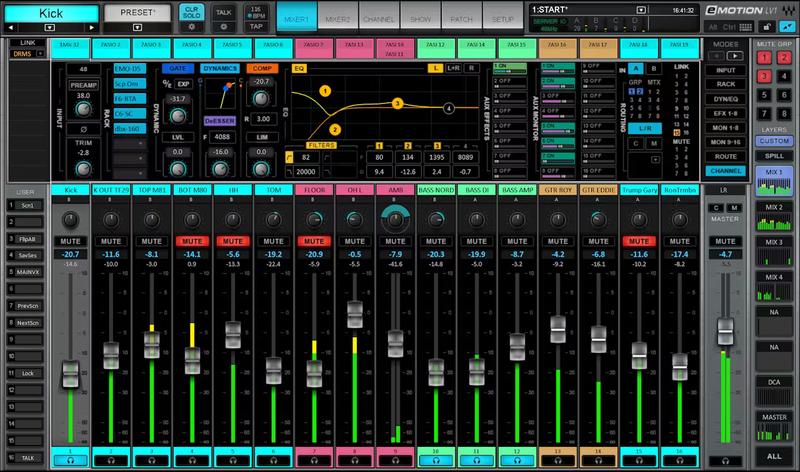
Bring pristine, industry-acclaimed sound quality to any show, venue, or streaming event. With up to 16 stereo channels of unbeatable audio, full Waves plugin integration, and a customizable design to accommodate your personal workflow, eMotion LV1 addresses any live sound challenge.

Seamless integration with Waves’ 200+ plugins brings the award-winning signal processors used in studios around the world to live sound—for unlimited creative possibilities and precision control.

Features

  • 32-bit, double-precision audio engine for headroom and clarity
  • Run eight SoundGrid-compatible plugins directly on each channel
  • Up to 16 stereo/mono input channels
  • Live-optimized Waves eMo plugins provide channel strip processing
  • Create custom layers for super-quick, personalized workflow
  • Supports 44.1 to 96 kHz sample rates
  • Connect & share up to 16 stage boxes, converters & computers
  • Compatible with industry-standard controllers, including Waves FIT
  • Windows and Mac 64 bit-compatible
  • Smooth integration with Dugan Speech automixer plugin
  • Practically unlimited processing power using multiple servers
  • Mobile/tablet remote control from FOH, stage, or anywhere in the venue

System Requirements

Mac

  • macOS Monterey 12, Ventura 13, Sonoma 14, Sequoia 15

PC

  • Windows 10+
Installation Instructions

1. Head to https://www.waves.com/create-account

2. Enter your email and choose a password to create an account (if you already have a Waves account, choose Log in, enter your details and head to Step 5) > click 'Submit'

3. Open your email inbox > click the activation link in the email from Waves

4. Click 'Log in here' > Log in to your Waves account

5. Click 'Register New Products'

6. Enter the Serial Number found in your Plugin Boutique user account > click 'Submit'

7. Click download in your Plugin Boutique user account or head to https://www.waves.com/downloads/central > download the Waves Central app for your operating system

8. Install Waves Central > Open Waves Central

9. Click 'Log in' > enter your log in details

10. Click the 'Install Products' tab

11. Tick the blue dot on all products you wish to install or click the top dot to install all products > click 'Install & Activate'

12. Click 'OK'

13. Open your DAW > open the Waves plugin

Your Waves plugins are installed and ready to use, enjoy!

Plugin Boutique Rewards

Discover the most rewarding loyalty programme among all plugin retailers.

  • Free Loopmasters Samplepacks
  • Discounts on products and courses
  • Extra Virtual Cash claimed immediately at checkout
Find out more

Follow us:

X (Twitter) Facebook YouTube Instagram
Logo Logo

Plugin Boutique Limited, Part of the Beatport Group LLC.

Copyright © 2011-2025 Plugin Boutique. All rights reserved










