Buy BigKick Expansion V3 - Drum & Bass Kicks with DLR, get a free gift with purchase:
BigKick Expansion V3 Comes From the Hands of Drum & Bass Artist DLR, who has had Numerous Releases on Such Record Labels as Metalheadz, Dispatch, Symmetry, Utopia Music and More!
Having previously collaborated with Octane on the ‘Method In The Madness’ album, DLR has quickly established his own signature sound; an instantly recognizable groove mischievously poking through the mix, terrorizing dancefloors in a truly unique way.
A Word From DLR...
"Here we have a selection of mostly tight kick drums to be used in electronic music production. Use creatively to beef up your tracks, think about creating organic interesting music with solid fundamentals, always think outside of the box!" DLR.
Features
- 64 crafted kick drum presets
- 32 attack presets
System Requirements
- The full version of BigKick is required to run this expansion pack
Important Note: Plugin Boutique's BigKick Drum Generator is required to run this software!
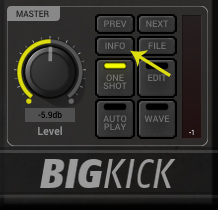
Note: Kilholm expansion used as the example.
Mac
1. Download the .zip folder from within your User Account, and double-click it to open and reveal its contents.
2. Open BigKick within your DAW and click the ‘Info’ tab.

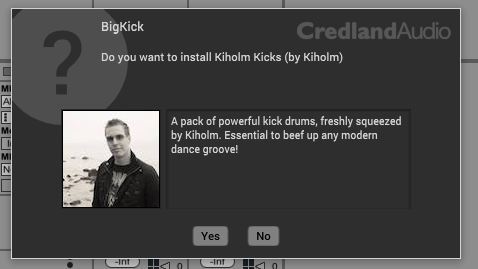
3. Click ‘Yes’ to confirm that you wish to install the expansion pack.

4. Locate the .big file from within the extracted folder and click ‘Open’.

5. Click ‘Yes’ to confirm that you wish to install the expansion pack.

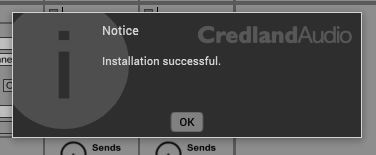
6. Once the installation is complete you will receive this message > click ‘OK’ to finish the installation.
The Expansion Pack is now Ready for Use Within BigKick!

Windows
1. Download the .zip folder from within your User Account, and double-click it to open and reveal its contents.
2. Open BigKick within your DAW and click the ‘Info’ tab.

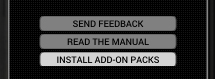
3. Click ‘Install Add-On Packs’.

4. Locate the .big file from within the extracted folder and click ‘Open’.


5. Click ‘Yes’ to confirm that you wish to install the expansion pack.

6. Once the installation is complete you will receive this message > click ‘OK’ to finish the installation.
The Expansion Pack is now Ready for Use Within BigKick!