


 Log In

Free gifts available with your purchase
The ultimate collection of classic Fender® tube amps
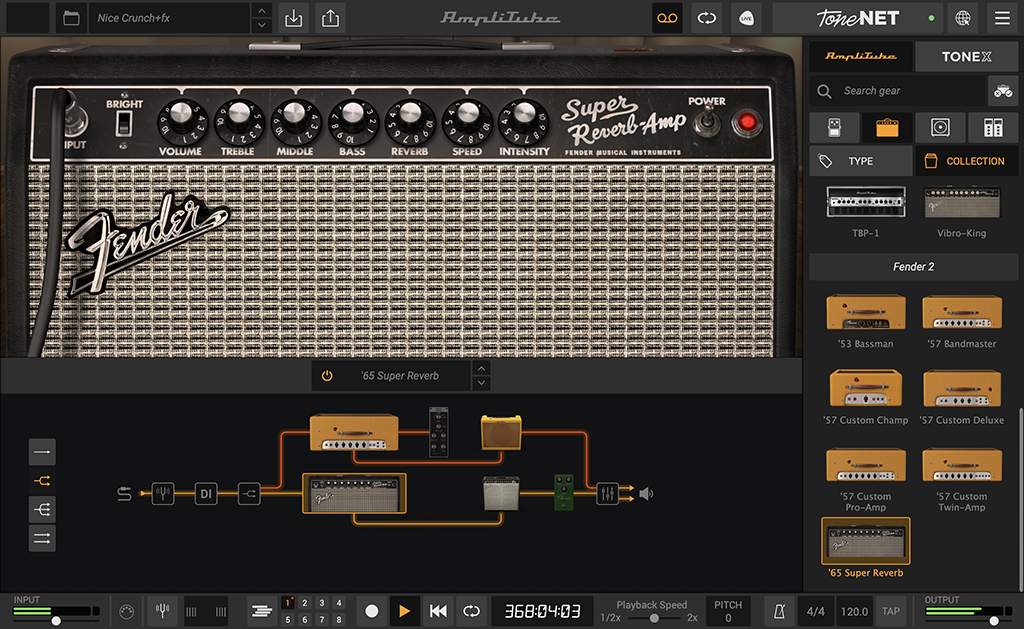
Fender® Collection 2 draws inspiration from some of the most historic and iconic Fender amplifiers, adding a modern touch to the timeless classics and re-issues that fit and define a multitude of genres. Fender Collection 2 captures the vintage vibe, feel and sound of Fender’s classic amps and puts them into your production toolbox on your Mac or PC.
Classic Fender tube tone
The Fender Collection 2 for AmpliTube is the ultimate collection of original Fender amplifiers and reissues from the 1950s and 1960s. Take a trip back in time when the electric guitar and bass were new… when a “what if” mindset and some pretty wild and crazy ideas lead to some of the most toneful machines ever produced by one company, machines used to completely redesign the musical landscape from that point in time until today.
Gear available in Fender Collection 2
In Fender Collection 2 you’ll get all of the glorious “tweeds” from the '57 Custom Series, a refined, player-centric take on a classic platform that includes the ’57 Deluxe, the ’57 Champ, ’57 Pro, ’57 Twin and ’57 Bandmaster. Plus you get a spot-on model of an original 1953 Bassman and a 1965 blackface Super Reverb. With the ability to tweak every aspect of each, you’ll find exactly the tone you’re looking for.
7 Amplifiers
- ’57 Custom Twin-Amp™
- ’57 Custom Pro-Amp
- ’57 Custom Deluxe™
- ’57 Custom Champ®
- ’57 Bandmaster™
- ’53 Bassman®
- ’65 Super Reverb®
7 Cabinets
- 2x12 ’57 Custom Twin-Amp™
- 1x15 ’57 Custom Pro-Amp
- 1x12 ’57 Custom Deluxe™
- 1x8 ’57 Custom Champ®
- 3x10 ’57 Bandmaster™
- 1x15 ’53 Bassman®
- 4x10 ’65 Super Reverb®
It all comes down to this
Fender® Collection 2 loads your studio with an arsenal of historic models from the '50s and '60s, all certified by Fender. With complete control over seven iconic amps and as many cabs, you’ll find all the vibe, feel and sound your vintage-loving soul desires. What this means to you is pure authentic Fender amp tone, just as you'd expect it in the physical world, with a sound and feel so true you won't believe your ears... or your fingers.
No matter which AmpliTube you use, you’ll find that the Fender Collection 2 lifts your performance, taking your tone back to where it all began and beyond.
Features
- Gear collection for AmpliTube Custom Shop
- 7 officially certified Fender® amps and matching cabs
- Breakthrough DIM™ technology for unparalleled realism
- Sound-certified and approved by Fender®
- No previous version of AmpliTube required
System Requirements
Mac®
- Minimal: Apple M1 or Intel® Core i5 Processor, 8 GB of RAM, macOS® 10.15 or newer (macOS 11 or newer required for Apple Silicon Processors). 3 GB of hard drive space.
- Requires an OpenGL 2 compatible graphics adapter.
- Supported Plug-in formats (64-bit): Audio Units, VST 3, AAX.
Windows®
- Minimal: Intel® Core i5 Processor or equivalent, 8 GB of RAM, Windows 10 (64 bit) or newer. 3 GB of hard drive space.
- Requires an ASIO compatible sound card.
- Requires an OpenGL 2 compatible graphics adapter.
- Supported Plug-in formats (64-bit): VST 3, AAX.
Important note: Internet connection is required to authorise the application and access ToneNET.


