


 Log In

Free gifts available with your purchase
Tones from Hell to eternity
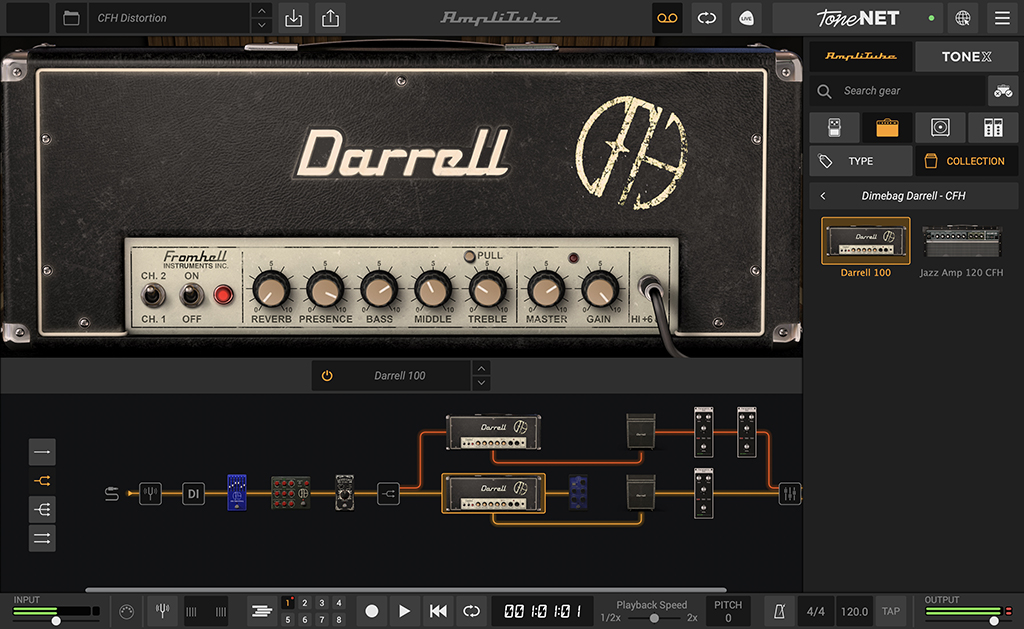
The Dimebag Darrell CFH Collection comes straight from the source. Ferocious. Blistering. Soulful. Those are just three of many words one would use to describe the guitar tone of “Dimebag” Darrell Lance Abbott. Dime is considered one of the most influential guitarists of all-time and a legendary, genre-defining musician. Most will 333% agree that Dime’s legacy is rich, particularly his work on "Cowboys From Hell."
Everything like the real thing
IK Multimedia utilized all of Dime’s personal guitar effects, amplifiers and cabinets that he used in the studio while recording Pantera’s groundbreaking album "Cowboys From Hell," which in-turn started the revolution of the “Power Groove” in metal. Available in a convenient desktop app and plug-in for your DAW, now you can play and record using the same gear and settings Dime did.
Gear available in Dimebag Darrell CFH Collection
The Dimebag Darrell CFH Collection features 9 brand new models including 2 amps, 2 cabinets and 5 stomps created to precisely mirror the rig that Dime used to record the classic album "Cowboys From Hell." This includes a meticulously modeled reproduction of the highly coveted Randall® RG 100 ES Amplifier, a completely re-modeled 1986 Roland® JC-120™ stereo combo amp, along with all the pedals Dime used while recording the album.
2 Amplifiers
- Darrell 100
- Jazz Amp 120 CFH
2 Cabinets
- Darrell 412
- JP Jazz CFH
5 Stompboxes
- 6-Band EQ
- Pre EQ 3
- Flanger Doubler
- Dime Wah
- Dime Noise Gate
Dime’s monumental tone lives on
IK Multimedia worked meticulously for this collection with Dime’s long-time guitar tech and right-hand man, Grady Champion. We utilized Dime’s personal guitar effects, amplifiers and cabinets from those studio sessions to precisely model all of Dime’s guitar tones on "Cowboys From Hell." Now you can play and record using the same gear and settings as Dime did on Pantera’s groundbreaking album.
Let Dime's legacy push you towards a new level of crushingly heavy riffs and ferocious leads with the sound and feel of his actual gear.
Features
- Gear collection for AmpliTube Custom Shop
- 9 models recreated using Dime's actual gear
- Breakthrough DIM™ technology for unparalleled realism
- Sound-certified and approved by Dime's long-time guitar tech
- No previous version of AmpliTube required
- Works seamlessly with the new Custom Shop updates
System Requirements
Mac®
- Minimal: Apple M1 or Intel® Core i5 Processor, 8 GB of RAM, macOS® 10.15 or newer (macOS 11 or newer required for Apple Silicon Processors). 3 GB of hard drive space.
- Requires an OpenGL 2 compatible graphics adapter.
- Supported Plug-in formats (64-bit): Audio Units, VST 3, AAX.
Windows®
- Minimal: Intel® Core i5 Processor or equivalent, 8 GB of RAM, Windows 10 (64 bit) or newer. 3 GB of hard drive space.
- Requires an ASIO compatible sound card.
- Requires an OpenGL 2 compatible graphics adapter.
- Supported Plug-in formats (64-bit): VST 3, AAX.
Important note: Internet connection is required to authorise the application and access ToneNET.


