


 Log In

Free gifts available with your purchase
Warped frequency modulation
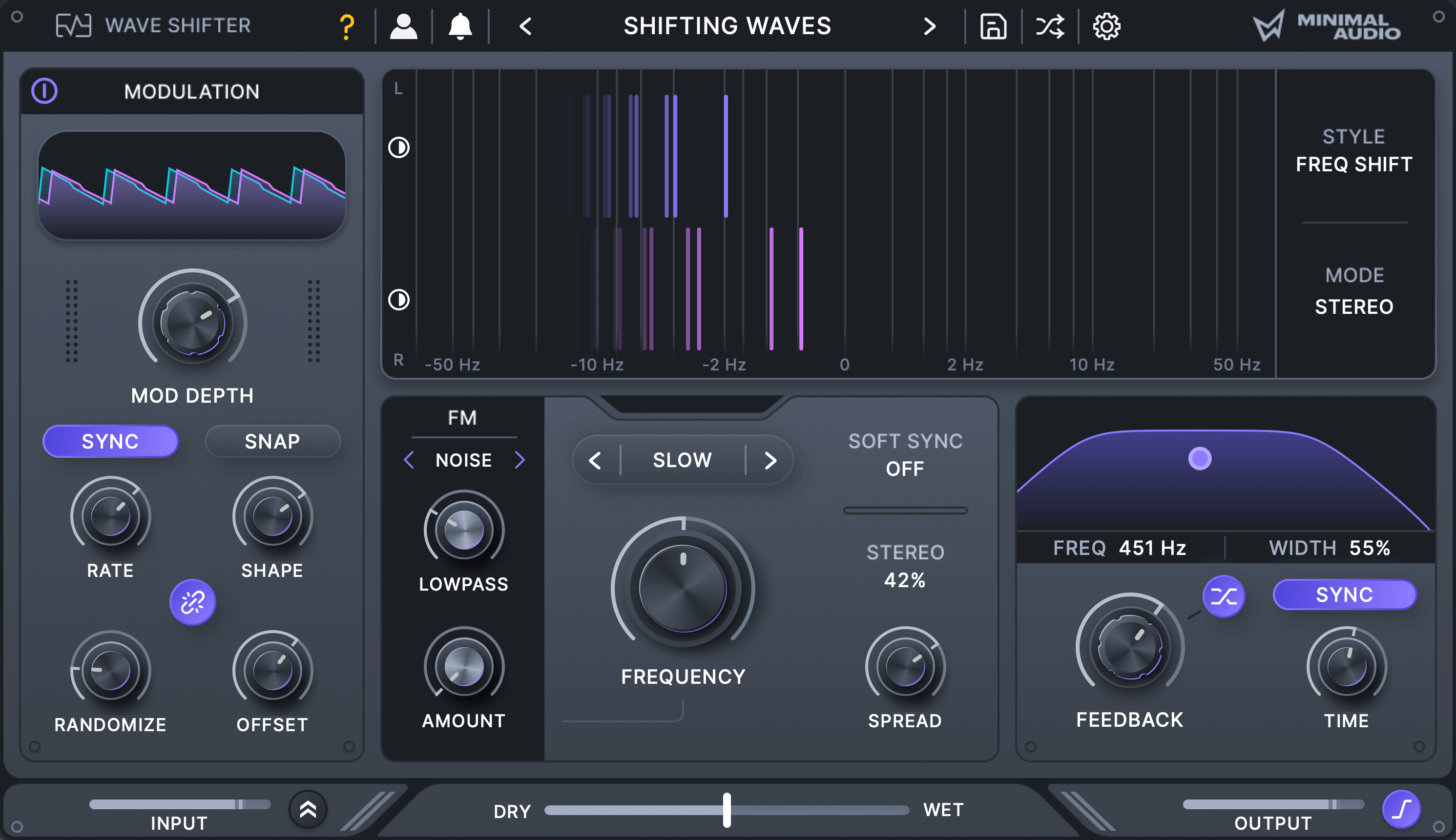
Create high-tech sound effects and unique harmonic distortion.
Transform your sound.
Explore precise frequency shifting, ring modulation, and amp modulation with flexible frequency controls like BPM sync, tuning, and stereo spread. Use feedback and filtering to create rich resonances and cascading spatial effects, all guided by clear visual feedback.
Frequency modulation playground.
Internal FM and soft sync routing unlock effects typically found only in synthesizers. Dive into FM feedback routing for chaotic textures, add grit with noise operators, or use the external sidechain input to turn any sound into a frequency modulation source.
Animated effects.
Use the onboard morphing LFO to design anything from high-tech data rhythms to complex harmonic movement. Customize its behavior with adjustable waveforms, randomization, and stereo offset to create unique, evolving effects.
Inspiring preset library.
Discover a diverse collection of presets, ranging from futuristic sound effects to high-powered distortion and beyond.
Features
- Three Modes: Transform your sounds with precise frequency shifting, ring modulation, and amp modulation.
- Deep Frequency Controls: Set the shift frequency with BPM sync, tuned note values, and stereo spread controls.
- Feedback and Delay: Use feedback and time controls to create resonances, comb filtering, and cascading delay effects.
- FM: Modulate the internal oscillators with seven FM sources, including tuned operators, filtered noise, feedback routing, and external sidechain input.
- Soft Sync: Create unique distortion effects with a unique soft sync mode that forces the internal oscillators to follow the input signal.
- Modulation: Use the built-in morphing LFO to build rhythms, stereo effects, and randomized movement.
- Inspiring Presets: Explore over 70 presets, from sci-fi gestures to distinctive harmonic distortion.
- In-app tooltips: Become an expert with built-in tooltips that make learning Wave Shifter a breeze.
System Requirements
- Formats: 64 bit AU, VST, VST3, and AAX
- Works on: macOS 10.11 or higher, Windows 10 or higher
- Activation: An internet connection is required for activation.
Reviews Summary
While it aims to provide a helpful overview, it may not capture every perspective or detail. We encourage you to read individual reviews to make an informed decision.
Users praise the plugin for its exceptional sound quality, flexibility, and ability to deliver both subtle movement and aggressive sound design, making it especially popular for electronic music and basslines. While universally appreciated as a fun, high-value tool typical of Minimal Audio, some reviewers noted a desire for even more options and additional presets.


