Log In

Free gifts available with your purchase
3 Unique Tube Circuits Meticulously Modeled to Compliment Every Element of Your Mix!
Tubetizer brings 3 Tube Saturation circuits, alongside built-in compression to be the perfect color-box for any element in your mix!
From subtle warmth to aggressive distortion, the 3 included circuits have you covered for any element in your mix!
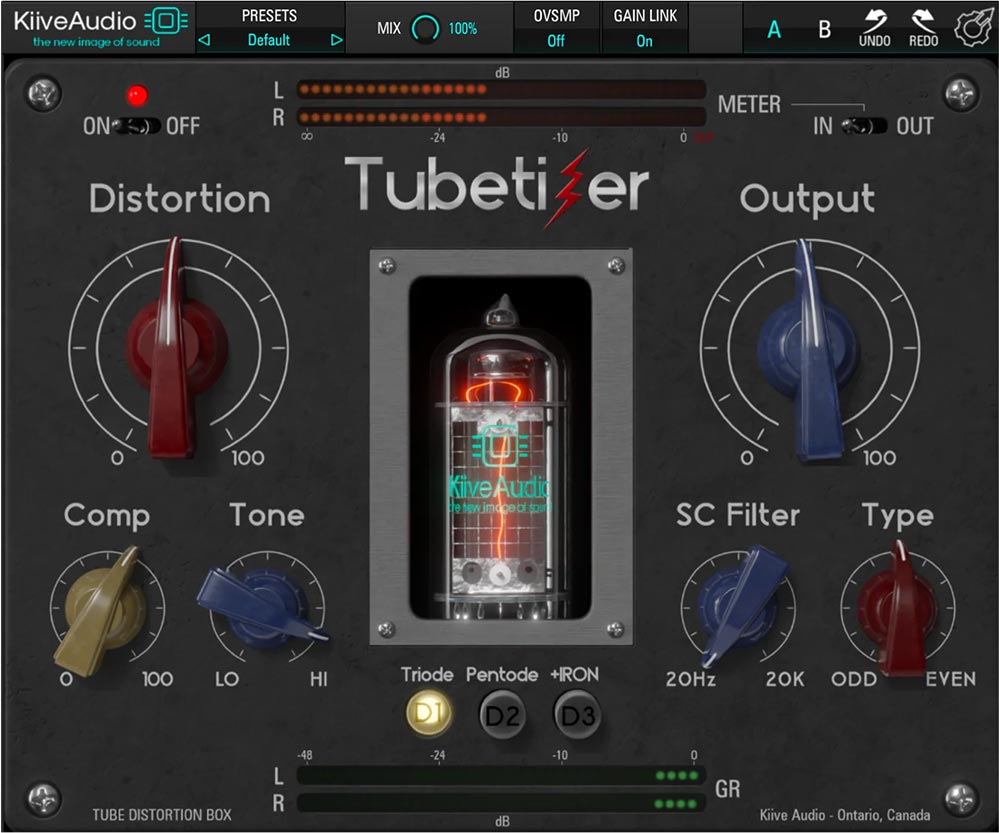
Meet Tubetizer!
It's no secret that tube saturation is many producers go-to saturation type when they want to make their mix feel expensive.
With complete control over the tonality, through various controls like the Type, Tone, and Mode controls, you'll find just how easy Tubetizer will fit into your mixing projects as it brings life, and excitement to any signal!
Features
- 3 unique tube saturation circuits for subtle warmth to aggressive distortion
- Built-in compression for added control and cohesion
- Type, Tone, and Mode controls for precise tonal shaping
- Perfect for adding color and excitement to any element in your mix
System Requirements
Mac
- Mac OS X 10.7 or higher (macOS 10.14 or higher recommended) (64-bit only)
- Processor - 1 GHz Intel Dual Core or higher
- Screen Resolution - 1024 x 768 or higher
- Plugin Formats - VST, AU, AAX
Windows
- Windows 7 and above (64-bit only)
- Processor - 1 GHz Intel Dual Core Processor or AMD equivalent
- Screen Resolution - 1024 x 768 or higher
- Plugin Formats - VST, AAX