/ Mix & Master / Pulsar Audio Mastering Bundle
Pulsar Audio

Pulsar Audio Mastering Bundle

$229.00 $449.00

48% off until Dec 08

Mastering Bundle
Mastering Bundle
MP-EQ
VM-COMP
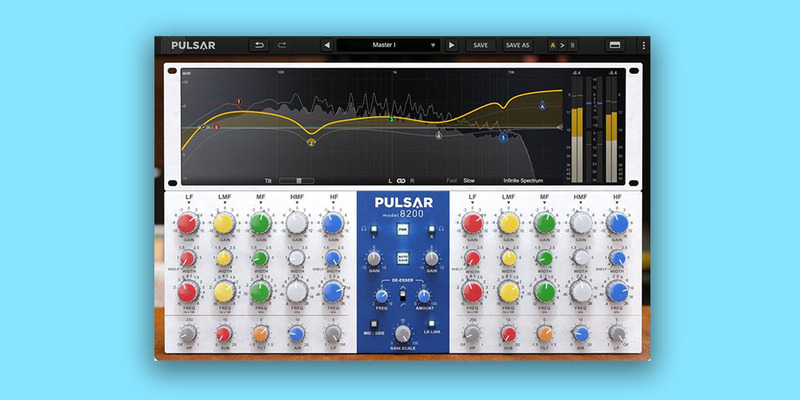
8200
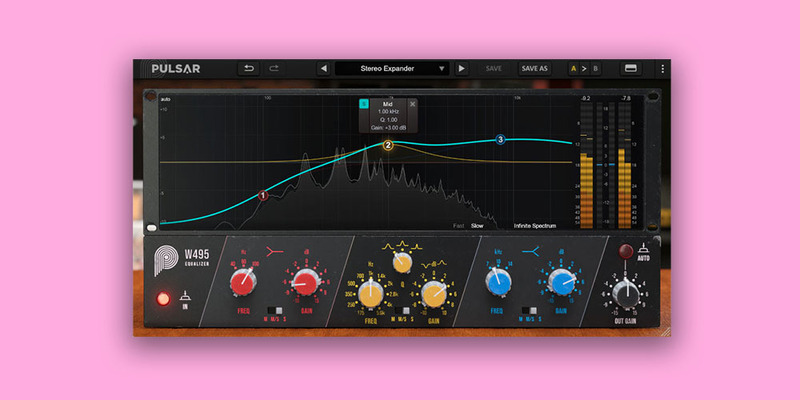
W495
Buy Now
Product information

A complete analog-modeled mastering chain

Your go-to toolkit for mastering

Master your recordings with the musical and versatile Mastering Bundle, featuring four premium mastering tools: Massive, 8200, Mu and W495. Designed for engineers and producers who strive for studio-quality masters with analog personality.

Each plugin brings its unique strengths, from Massive’s warm sound of tube-powered hardware, to Mu’s smooth, glue-style compression. The 8200 adds a clean, transparent EQ for subtle shaping, while the W495 offers warm, analog-style EQ curves ideal for enhancing tonal richness. Together, these plugins provide everything you need to finalize a track, delivering polished, radio-ready masters.

With their seamless integration and modern features, the Pulsar Audio Mastering Bundle ensures your projects are handled with the utmost clarity and precision.

Bundle Contents

MP-EQ

Pulsar MP-EQ is an emulation of a legendary analog EQ found in almost every mastering studio worldwide. Designed as a synthesis of the best passive equalizers of the past 70 years, its fully parallel topology offers a unique and musical frequency response compared to digital EQs with the same settings. Because of this design, the bands naturally interact, producing a more musical overall response.

Learn more about MP-EQ

VM-COMP

The most faithful emulation of a modern yet legendary tube compressor/limiter – perfect glue for mixing and mastering.

Variable-bias tube compressors deliver smooth, transparent gain control, and naturally “glue” buses, mixes, and masters together.

Unfortunately, the original hardware is expensive and difficult to integrate with in-the-box workflows. Software emulations exist, but most owners of the hardware agree that they cannot be compared to the original unit, as there’s always “something” missing.

With its unique Topology Preservation Technology, Pulsar VM-COMP sounds objectively identical to the hardware in every production context, but also introduces improvements such as visual sidechain EQ editing and extended timing ranges.

Learn more about VM-COMP.

8200

Precise & versatile, Pulsar 8200 holds a key role in your master bus. It offers clinical precision when you want to open up the side and focus the center of your mix. The tilt feature allows you to effortlessly adjust the tonal balance of your mix. You can easily create complex EQ curves that can take your mixes and masters from slightly corrected to noticeably polished. It faithfully recreates the Class-A analog circuitry that made the GML 8200 a staple in the 80s. Its parallel topology and unique filters offer smooth, natural curves, preserving the analog warmth and character.

Learn more about 8200.

W495

Transparent and musical, the w495 is an easy-to-use mastering equalizer, with just three bands to consider, for faster mix balancing. It has the ability to broaden the whole sound stage without ever being too harsh, even at extreme settings.

Learn more about W495.

Installation Instructions

Important - You need to have an account at ilok.com to be able to use Pulsar software.

Please note: Pulsar Smasher is used as an example.

Mac

iLok Registration

1. Go to the iLok website and create a new account if you are not currently registered and do not have the iLok License Manager installed on your computer.

Note: Skip to the 'Pulsar Software Installation' procedure if you are already an iLok registered user.

2. Download and install the iLok License Manager.

Pulsar Software Installation

1. Download the .dmg file from within your Plugin Boutique User Account and open it > Double-click the .pkg file to begin the installation.

2. Click 'Continue'.

3. Click 'Continue'.

4. Click 'Agree'.

5. Click 'Install'.

6. Enter your computer Username and Password > Click 'Install Software'.

7. Click 'Close'.

iLok Activation

1. Open the iLok License Manager > Click 'Sign In'.

2. Enter your iLok User ID and Password > Click 'Sign In'.

3. Click the redeem icon in the top right-hand corner of the iLok License Manager window.

4. Enter the Activation Code in of your Plugin Boutique User Account > Click 'Next'.

5. Select your account that you wish to redeem your product to > Click 'Redeem'.

6. Click 'Ok'.

7. Select your redeemed product > Click the tick icon in the top-right hand corner of the iLok License Manager.

8. Select your computer from the list of activation locations > Click 'Activate'.

9. Click 'Ok'.

Your product is now activated and ready to use within your DAW.

Windows

iLok Registration

1. Go to the iLok website and create a new account if you are not currently registered and do not have the iLok License Manager installed on your computer.

Note: Skip to the 'Pulsar Software Installation' procedure if you are already an iLok registered user.

2. Download and install the iLok License Manager.

Pulsar Software Installation

1. Download the installer file from your Plugin Boutique User Account.

2. Double-click the .zip folder to reveal the installer file > Double-click the .exe installer file to begin the installation process.

3. Select 'I Accept the Agreement' > Click 'Next'.

4. Select the components you wish to install > Click 'Next'. (Note: Untick 'PACE iLok license support' if you already have it installed on your computer).

5. Click 'Next'.

6. Click 'Install'.

7. Click 'Finish'.

iLok Activation

1. Open the iLok License Manager > Click 'Sign In'.

2. Enter your iLok User ID and Password > Click 'Sign In'.

3. Click the redeem icon in the top right-hand corner of the iLok License Manager window.

4. Enter the Activation Code in of your Plugin Boutique User Account > Click 'Next'.

5. Select your account that you wish to redeem your product to > Click 'Redeem'.

6. Click 'Ok'.

7. Select your redeemed product > Click the tick icon in the top-right hand corner of the iLok License Manager.

8. Select your computer from the list of activation locations > Click 'Activate'.

9. Click 'Ok'.

Your product is now activated and ready to use within your DAW.

Plugin Boutique Rewards

Discover the most rewarding loyalty programme among all plugin retailers.

  • Free Loopmasters Samplepacks
  • Discounts on products and courses
  • Extra Virtual Cash claimed immediately at checkout
Find out more

Follow us:

X (Twitter) Facebook YouTube Instagram
Logo Logo

Plugin Boutique Limited, Part of the Beatport Group LLC.

Copyright © 2011-2025 Plugin Boutique. All rights reserved