


Buy Studio Bundle, get a free gift with purchase:
sonible's Trailblazing Plug-ins Bundled Up

The Source-adaptive Reverb

smart:reverb 2 is a content-aware reverb plug-in that combines intelligent processing with seamless multi-track integration, offering intuitive control over space and depth – whether on single tracks or full arrangements.
Key Features
- Inter-plugin communication for easy depth staging across multiple tracks
- AI-processing for custom-tailored reverb
- Reverb matrix for seamless browsing between room, hall, spring and plate reverb
Group Mode: One space, multiple tracks
Featuring inter-plugin communication, smart:reverb 2 allows multiple plug-in instances to work together in real-time – making it easier than ever to position sound sources in a shared acoustic space. The intelligent processing enables intuitive depth-staging while automatically maintaining clarity and control, all from a single window. This feature redefines how reverb behaves in complex mixes and allows for smooth tinkering with new sonic ideas.
A reverb that listens
The first version of smart:reverb introduced the source-adaptive reverb – one that analyzes the audio material and builds a reverb response that complements both the sonic texture and dynamics of the source. Instead of generic presets, users get a reverb that fits naturally. For version 2, this has been widened to a holistic, content-aware approach. The processing has also been massively improved and there’s more intuitive functionality to discover as well.
New parameters – not just in name
For smart:reverb 2, sonible rethought conventional parameters that reflect a reverb’s inner workings (like Decay Time and Pre-Delay) and created perception-based synergies. With smart:reverb 2’s main controls – Distance, Size and Width as well as Color and Clarity – users can make decisions in the context of their musical choices, not analog circuitry.
Four styles, one matrix and endless options
While smart:reverb 2 uses content-aware analysis to ensure the reverb’s frequency response is a perfect match for the source signal, users still have full control over the spatial character. The Reverb Matrix allows for intuitive shaping between four classic reverb types: Room, Hall, Plate and Spring. Using the 2D interface, users can blend multiple styles to create a reverb that aligns precisely with their creative intentions.
A workflow that thinks alongside the mix
smart:reverb 2 introduces an intelligent workflow that adapts seamlessly to a user’s creative process. They can define an acoustic space using intuitive, perception-based controls, position multiple sources within this environment, and rely on AI-driven processing to maintain clarity and cohesion across the mix. As creative adjustments are made, the plug-in automatically ensures spatial integrity, allowing for exploration and creativity without compromising the overall sound quality. This integration of intelligent processing and user control streamlines complex mixing tasks, making smart:reverb 2 an indispensable tool for modern audio production.
Features
- Cross-channel communication: Coordinate multiple reverb instances across tracks for a clear, cohesive spatial mix from just a single window.
- Automatic reverb unmasking: Automatically maintains clarity and spatial integrity, even in dense sessions.
- Content-aware Reverb Design: AI tailors the reverb to each source’s characteristics for a natural fit to the signal source and in the mix.
- Perception-Based Parameters: Enables control of Distance, Size, Width, Color, and Clarity with musical intuition
- Reverb Matrix: Allows for seamlessly blending between Room, Hall, Plate and Spring types to craft custom characters.
Learn more about smart:reverb 2.

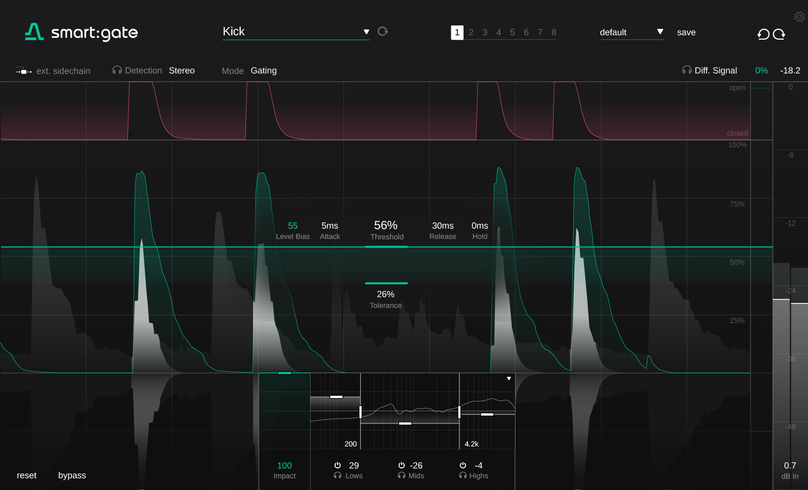
smart:gate is the answer to reliable gating. The plug-in automatically detects the presence of a chosen target source (e.g. vocals, keys, kick) and allows to focus on this source when gating. Unlike conventional gates, smart:gate does not open or close depending on the overall level of the input signal, but it only reacts to signal components belonging to the target. This content-awareness helps to make the gate much more stable and easier to parametrize than conventional gates and it even allows to use the gate, if some background signal occasionally exceeds the level of the target source.
Now for the first time, gating can be as simple as selecting a target source from a drop-down menu. Whether you’re targeting vocals, electric guitar, piano or a suite of other options, the result is a gate that delivers reliably even if a target source varies in level, or if a competing instrument is louder than the signal you want to keep.
Simple Setup, Powerful Control
smart:gate’s visualizer traces the level of the detected target signal, not the entire input signal, making parametrization straightforward and faster. With sonible’s ‘Instant Replay’, when you change a parameter, the visualized signal changes the whole signal history, predicting the impact on the entire signal.
With Level Bias, the gating behavior can follow the detected signal more or less closely – great for refining the response on transient material like drums, or keeping non-transient material like vocalsmore natural. You can also use smart:gate without its content-aware AI features, for operation as a conventional gate.
Gating response can be customized further with the ‘Impact control’, which scales back the amount of gain reduction applied when the gate is closed. smart:gate also offers a Ducking mode to reduce the target signal instead of passing it through. A three-band suppression network helps to weight gating across the frequency spectrum.
Going For The Signal Source
Gating can be a tricky task – with smart:gate, it’s as simple as selecting a target source from a drop-down menu. Whether you’re targeting vocals, electric guitar, piano or one of many other options, the intelligent gate reliably delivers even when the target source varies in level, or a competing instrument is louder than the signal you want to keep. smart:gate’s content-aware processing unlocks its full power where conventional gate plug-ins struggle.
Insights For Faster Workflows
Finally, a gate that is truly able to differentiate between a mix and the signal component contained within it. Both the target signal’s activity and the gating are visualized in detail. Together with Instant Replay, you are provided with all the insights you need to get your parametrization and tweaking done much faster – all with familiar controls and without any guesswork.
Intuitive Interface Packed With Great Features
Besides its intelligent target source detection, smart:gate sports a host of features for fine-tuning, such as a three-band suppression network for weighting the gating across the frequency spectrum. The level bias enables you to increase the level-dependency of the processing – extremely handy when you want refine the response to transient target sources. And, since gating and ducking are closely related in their processing, the gate plug-in can be switched to ducking mode, offering you the same target-focused functionality. You can also use smart:gate without its content-aware AI features as a conventional gate.
Features
- Content-aware gate processing
- Wide range of instrument and sound profiles to determine the target source
- Familiar control over gating response: Threshold, Attack/Release, Hold, Tolerance
- Visual guidance on target source detection for easier parametrization
- ‘Instant replay’ prediction after parameter changes
- With ‘No Target’, conventional, non-AI gating is still possible
- Content-aware ducking mode to reduce selected target signal
- Tailor gating across the frequency spectrum with three-band suppression control
- External sidechain input; detection in mono/mid or side signals
- Available Formats: AAX, VST, VST3 and AU
- Apple Silicon: native support for M1 and M2 chips (including AAX)
Learn more about smart:gate.

The Content-Aware Limiter
Loudness and Dynamics in tune
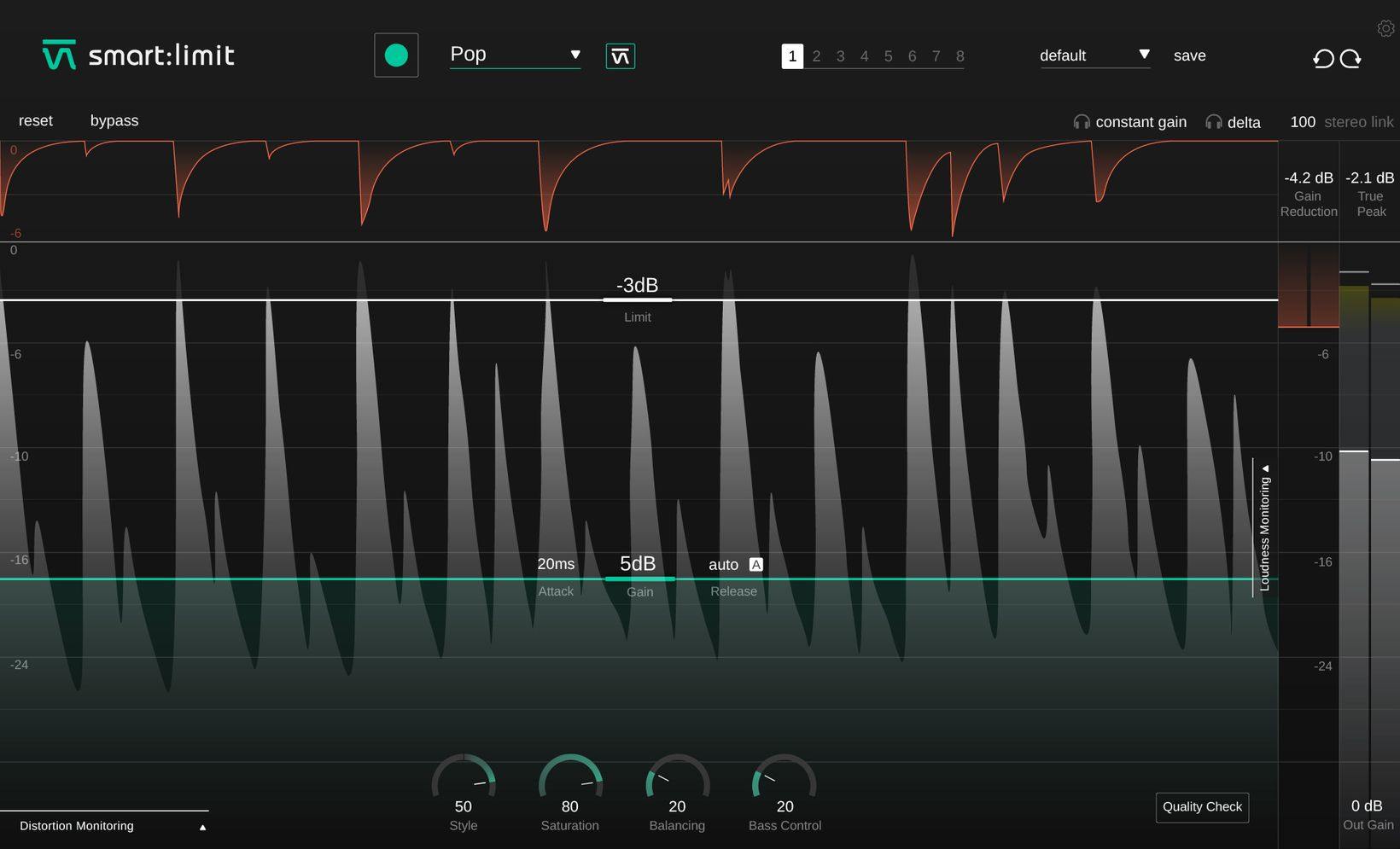
smart:limit delivers limiter settings that let your mix breathe and gives you all the loudness and dynamics info you need for confident publishing.
- Automatic parametrization in just a few seconds
- Extensive loudness and dynamics monitoring
- Unique set of sound-shaping tools
The one-stop-shop limiter
Straightforward “set – check – publish”
smart:limit is all about worry-free limiting: Its intelligent processing will preserve the detail of your track and provide a transparent, uncompromised limiting quality. With smart:limit's extensive loudness and dynamics monitoring, you won’t have to use any additional metering plug-ins. Besides providing you with all the necessary loudness information in real-time for confident publishing, smart:limit guides you towards hitting the safe zone requirements of streaming platforms or loudness standards and gives you feedback via interactive Quality Check hints.
Transparent sound with just one click
AI-powered parametrization for confident limiting.
Speed up your workflow with smart:limit. Its intelligent processing analyzes your signal and finds limiting parameters that let your mix breathe – all in just a few seconds. By choosing a genre-based profile that fits your mix, you can prime the plug-in for different limiting characteristics. Or instead, upload a reference track, if you are aiming for a specific limiting style. You can use smart:limit with or without the automatic parametrization – or go for a combination of both.
Everything under control in real-time
Extend the Loudness Monitoring section to access an extensive information hub on loudness and dynamics: Here you will find all relevant loudness readouts, visual guidance regarding different publishing targets, and information on the dynamics of your track. With the revolutionary Instant Impact Prediction feature, you won’t have to restart the loudness measurements every time you change a parameter – the change will be reflected in real-time without having to repeatedly playback the entire input signal.
Monitor all relevant key metrics at a glance:
- Loudness [LUFS] - integrated, short-term, momentary
- Loudness Range [LU] - integrated, short-term, momentary Dynamics [dB ] - based on Peak to Loudness Ratio
- True Peak [dbTP] – using high-resolution oversampling
- Gain Reduction [dB]
Vibe is in the detail
Shape your sound to perfection.
When your sound is in need of a little bit of extra vibe, smart:limit has got you covered. Use the Style dial to freely choose between either a soft or hard limiting style. Play with saturation to add some subtle warmth or to really inflate your signal. Adapt the Balance to give your track that perfect spectral polish prior to publishing and tweak the Bass Control for a rich and compact low end.smart:limit is packed with great features that will help your sound get all of the attention it deserves.
Learn more about smart:limit.

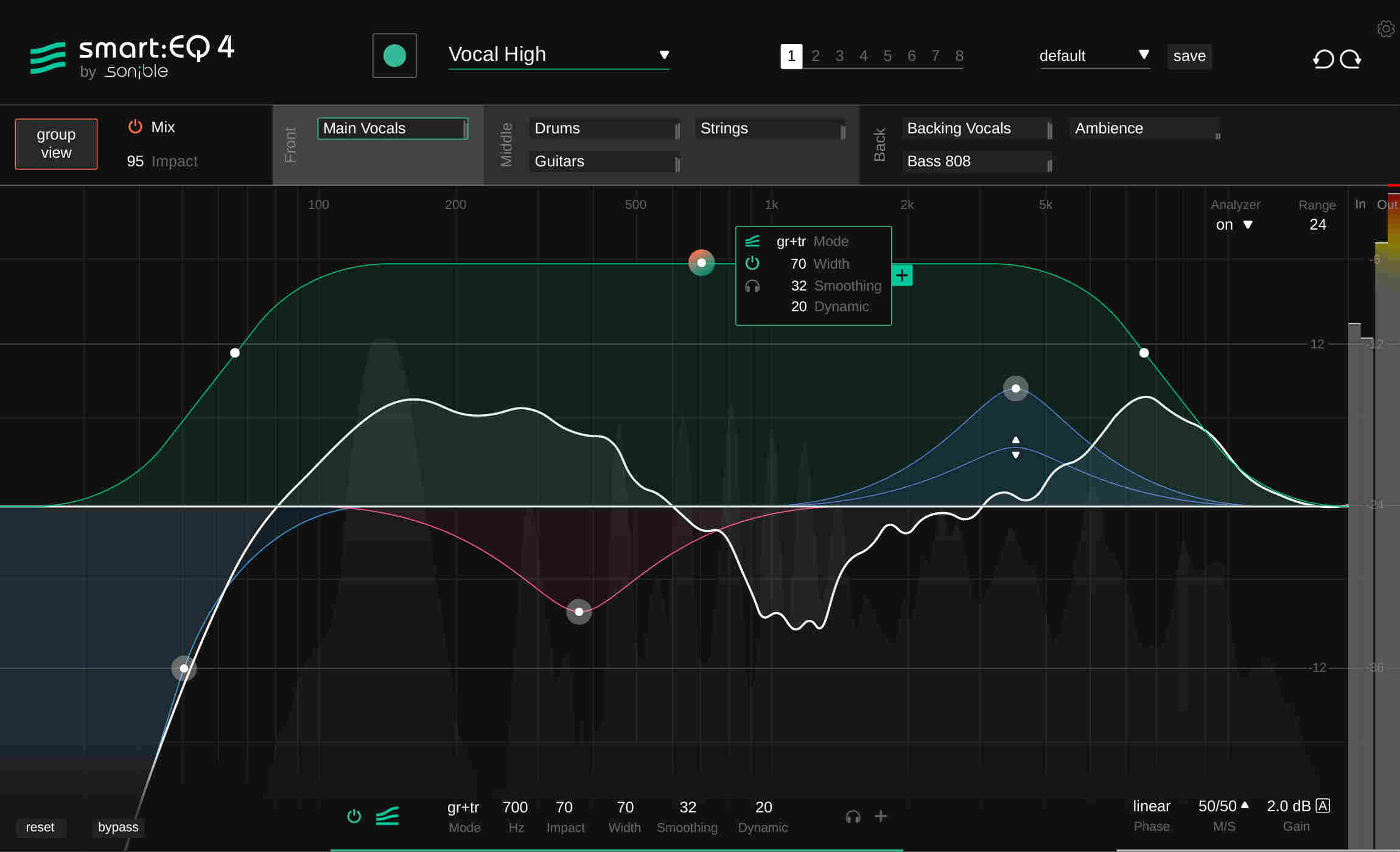
smart:EQ 4 is an intelligent EQ that analyzes your audio material and uses AI to equalize it in order to correct spectral problems and achieve tonal balance.
Top-down or Bottom-up Mixing
The traditional way to mix a project, starting with individual elements and building a mix piece-by-piece, is the bottom-up method for mixing music. This tried-and-tested approach is still possible in smart:EQ 4, with simple control over the character of each channel of a mix thanks to the plugin’s spectral shaping, but another tactic is possible as well. In Group mode, you can define the mix from the top down, creating an unmasking hierarchy between up to 10 instances of smart:EQ. This set priorities for each smart:filter, bringing some elements to the forefront of the sonic stage, leaving some in the middle, and pushing some into the background. smart:EQ 4’s smart:filter can be used in three modes: 'Track' balances the channel; 'Group' doesn’t affect the channel but reduces masking between it and other group members;
'Track and Group' applies balancing to the channel and makes it subject to unmasking.
AI-powered smart:filter Take on New Profiles
The smart:filter is the centerpiece of smart:EQ, balancing the signal based on a target Profile such as drums, bass, vocals or the default Universal Profile. smart:EQ 4 has new Mix Profiles trained on entire mixes from specific genres.
A new Reference Profile feature allows you to load an entire finished track or individual instrument and have smart:EQ 4 emulate its character and balance on your channel or buss.
‘Remote Control’ for Spectral Mixing
In version 4 you don’t just see how other smart:EQ instances within the same group are reacting– you can view their behavior and change their parameters from any single instance with in the same group. In 'Group View', two entire EQ curves can be selected before being edited on-screen, and all instances can have profiles selected and analyzed.
In-depth control in Track View
In 'Track View' , the current instance takes priority, but the group properties and placements are still accessible and can be changed. In addition to the smart:filter, smart:EQ’s regular EQ bands now sport dynamic behavior, with Threshold, Ratio, Attack, Release and Range controls. These regular EQ bands can be used alongside or instead of the main smart:filter bands for any instance of smart:EQ 4.
Learn more about smart:EQ 4

The Spectro-dynamic Compressor
Putting Dynamics Into Shape
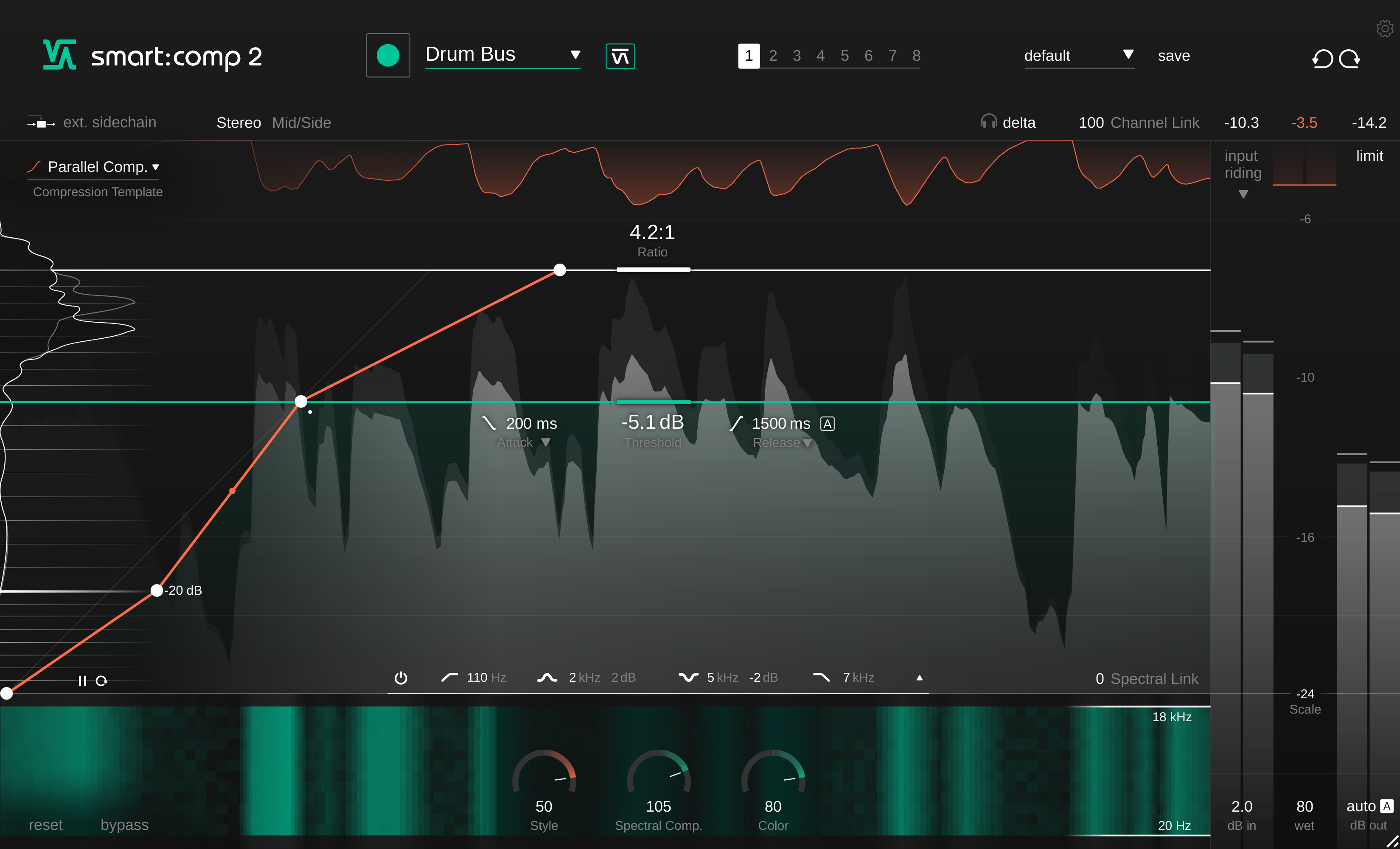
smart:comp 2 automatically delivers transparent, precise results; providing you with the creative tools that will transform your sound from nice to extraordinary.
- Spectral processing for tonal and dynamic balance
- Automatic parametrization with a single click
- Tools for creative dynamics shaping
Up Your Compression Game - Audio Compression Powered by AI
Incredible Sound – Your Tracks Deserve Nothing Less
smart:comp 2’s AI-powered automatic parametrization, spectral compression, and ducking abilities when used with an external sidechain all aim for one goal: clean, well-balanced compression results that remain true to your input signal – no matter whether you are working on single instruments, instrument busses or entire mixes. By analyzing the characteristics of your material, its intelligent processing will enhance transparency and preserve crucial details without compromising the integrity of the signal. Supported by such a sound base you are free to go ahead and let your creativity flow. sonible’s smart:engine drives the intelligent processing of smart:comp 2. It’s a content-aware system based on deep learning technology, a vast amount of data, psychoacoustic principles and extensive hands-on mixing experience. Choose a profile and let smart:comp 2 learn your track. The plug-in takes only a few seconds to deliver extremely precise compression results.
Tap The Full Potential Of Shaping Dynamics - Inspiration hits with more possibilities
Shaping dynamics to achieve distinctive sounds has never been easier than with smart:comp 2. This exceptionally versatile compressor is packed with features that enable you to give any track your unique vibe. Gradually shape the character of the compressor with the style dial and give your results a darker or brighter vibe using the color dial. The free-form transfer function with its templates allows you to achieve sophisticated level mapping. You can also fine-tune the temporal attack and release behavior without restrictions and apply a different compression to the ambience and center by using mid/side processing.
Everything You Need At A Glance - Smooth handling and real-time monitoring
Working with smart:comp 2 is straightforward and intuitive. All crucial compression parameters take center stage – their handling will feel as familiar as working with a common single band compressor. With input level riding you can focus directly on shaping the dynamics of your track instead of worrying about level issues. Having more insight means making better informed decisions. smart:comp 2 provides you with real-time monitoring elements such as instant impact prediction which immediately reflects every parameter change across the entire signal, compression mapping and an RMS level histogram that outlines the overall dynamics of a track.
smart:comp 2 is an invaluable assistant – whether you're a mastering/mixing professional or an aspiring talent.
Features
- Automatic compression parametrization with a single click
- Spectral processing for tonal and dynamic balance
- Frequency-dependent ducking to create space for the sidechain signal
- Free-form transfer function and templates for complex compression goals
- Color and Style dials to change the character of the compression results
- Automatic output gain, mid/side processing, input level riding, surround sound support
Learn more about smart:comp 2.

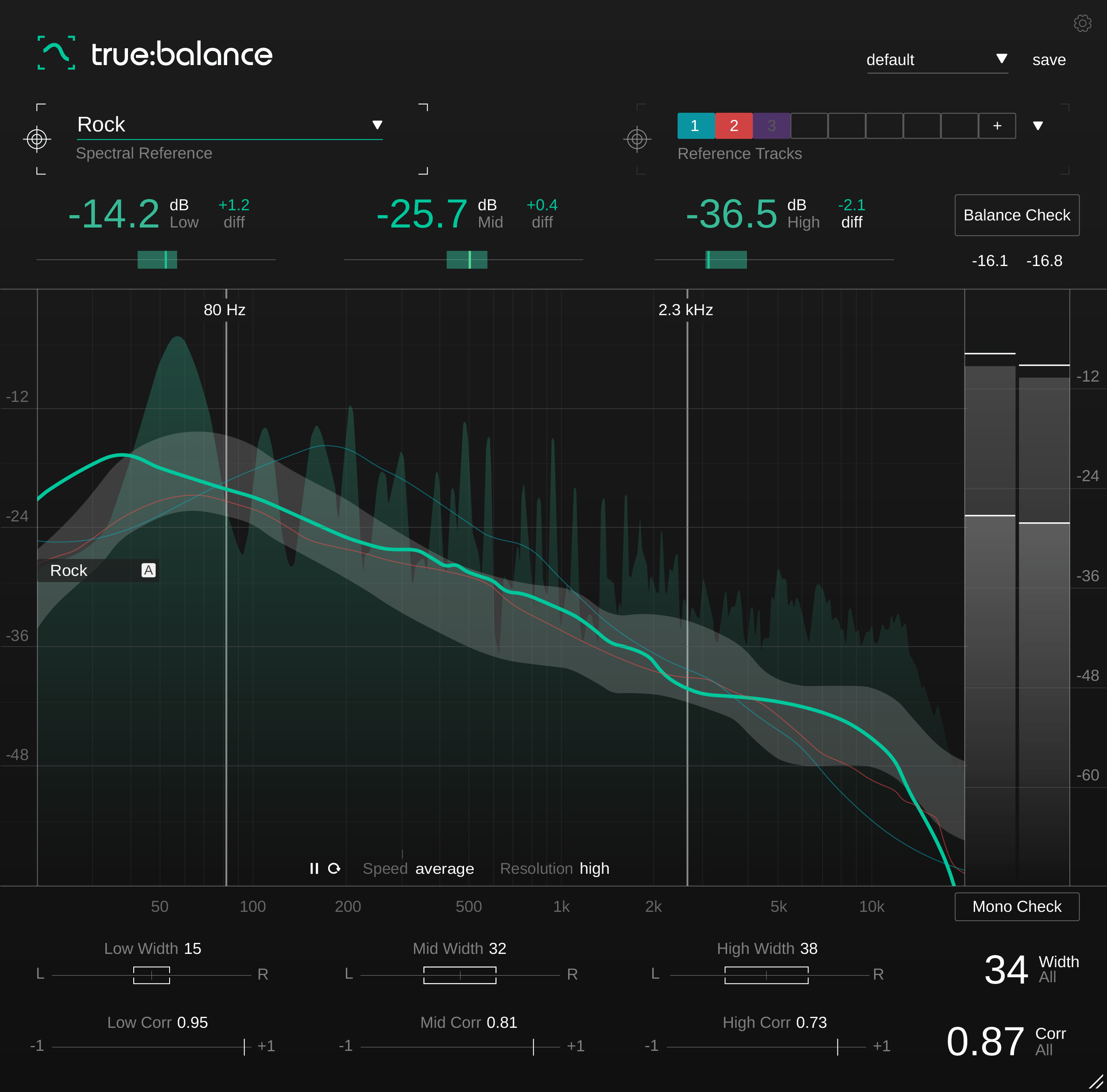
The Tool For Analyzing and Metering Spectral Distribution
true:balance is a metering plug-in that offers you all the necessary info and guidance for taking the right steps towards optimizing the spectral balance and mono compatibility of your mix.
- Real-time spectrum analyzer and the average spectrum
- Genre-based references and custom reference option
- Info on stereo width and stereo correlation values
With true:balance, users have access to all the information and guidance they need for a well-balanced mix. An adjustable spectrum analyzer displays both the real-time spectrum of the input signal and the average spectrum over time. To meet listening expectations, true:balance allows to compare the spectral distribution of a mix in reference to either different genres or custom reference tracks.
The plug-in’s ability to display level-values—in the lows, mids, and highs—relative to the chosen reference, lets the user focus on the overall balance of their mix and avoids the distraction of too many details. At a quick glance, target indicators show whether input signal levels are close to the suggested values of the reference. For those who appreciate additional guidance, a Balance Check suggests what actions to take in order to achieve a distribution similar to the chosen reference. For precise insight into the proportion of the left and right channels and consequently the mono compatibility of a mix, true:balance also sports a channel data section with all the essential info concerning stereo width and correlation values.
true:balance provides all the information and guidance you need for a well-balanced mix. An adjustable spectrum analyzer displays both the real-time spectrum of the input signal and the average spectrum over time. To meet listening expectations, true:balance also allows to compare the spectral distribution of a mix in reference to either different genres or custom reference tracks. Additionally, the plug-in provides you with information on the width and correlation of your track to avoid issues with mono compatibility or a blurry low end.
Features
Advanced Spectral Balance Metering
true:balance is a metering plug-in that will make sure you've got all the info you need on the spectral distribution of your mix. All the displayed readouts as well as their visualizations are designed to ensure that you won’t have to second-guess what you are seeing. true:balance’s key readouts are supported by target indicators, allowing you to see whether your track is close to the values of your chosen reference. The channel data section displays all you need to know about the stereo width and correlation of your mix and, hence, the mono compatibility of your mix.
Reach Your Goal With The Help Of References
Since the “right” spectral distribution has a lot to do with listening expectations, genre-based references are great to compare your mix with. true:balance's included references draw from a vast amount of audio data and hands on mixing experience. When you want consistency across an entire project – go for the option of loading up to 8 reference tracks.
Guidance Just A Click Away
true:balance is designed for professionals as well as ambitious bedroom producers. The latter will appreciate the hints on which modifications their mix requires to approach the reference values. true:balance has got you covered: There is a Balance Check that analyzes the current spectral distribution of your signal then compares it with your reference and gives you text-based suggestions. Mono Check points out any potential problems concerning the mono compatibility of your mix.
Learn more about true:balance.

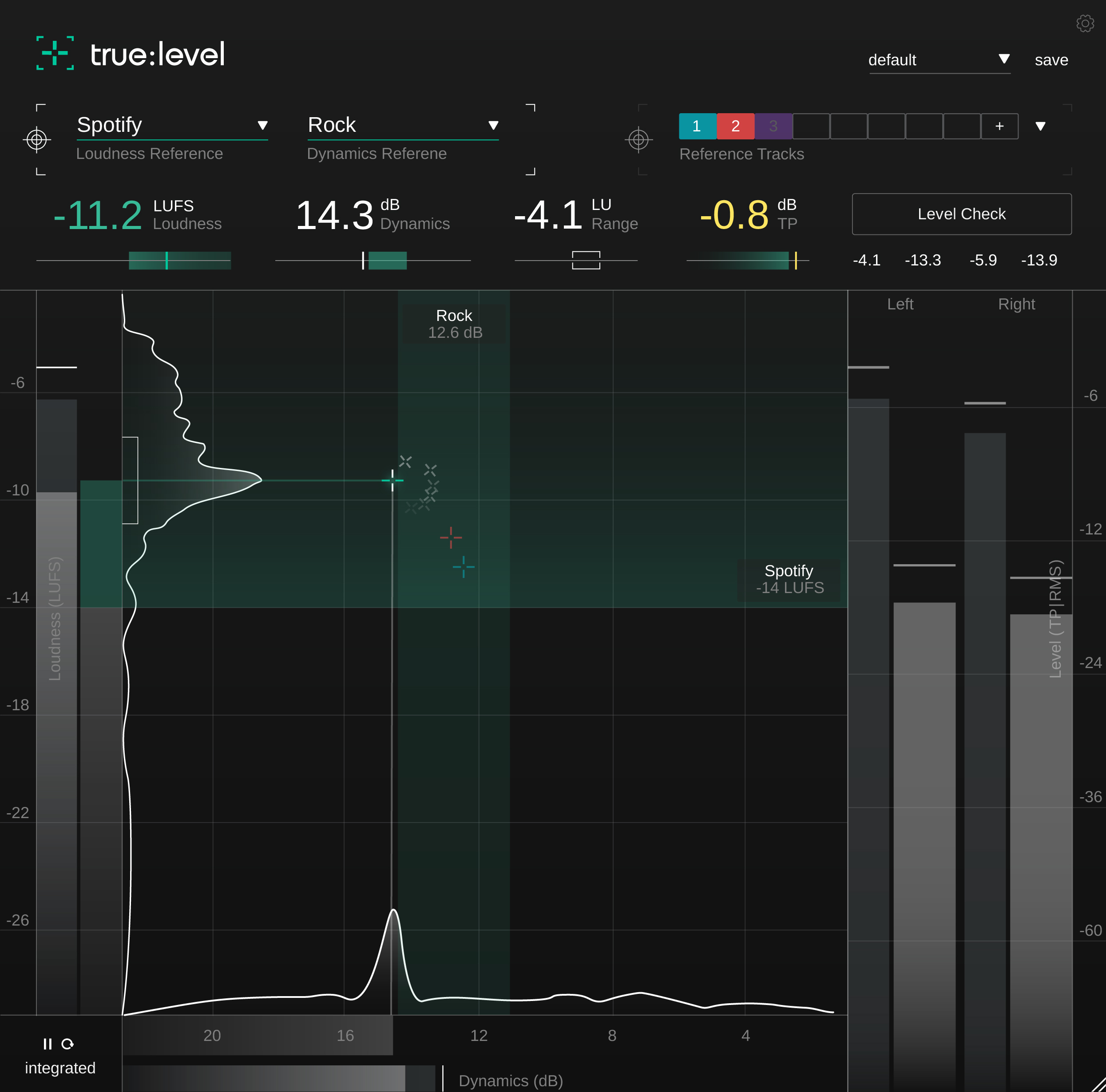
The Metering Tool For Loudness And Dynamics
true:level is a metering plug-in that visualizes the interplay between loudness and dynamics in a meaningful way, making it immediately apparent if a mix is ready to publish.
- Real-time metering of true peak, loudness and dynamics
- Predefined references and custom reference options
- Level check with text-based suggestions
By popular demand, sonible has developed true:level as a stand-alone metering plug-in based on smart:limit’s extensive loudness and dynamics monitoring section. Its unique visualization of the interplay between loudness and dynamics makes true:level a revolutionary metering tool for finding just the right trade-off between these qualities in a track.
When finalizing a track for publication, users can draw from a range of common references, including the loudness values required for different streaming platforms and the dynamics appropriate for various genres—or they can upload custom reference tracks. With a final Level Check, the plug-in then suggests any necessary actions to achieve the specifications of the reference. Additional features, such as loudness and dynamics histograms, give users a detailed but coherent overview of the audio material’s overall quality.
true:level is a versatile and precise loudness, dynamics and true peak metering plug-in. Its unique visualization of the interplay between loudness and dynamics makes true:level a great metering tool for finding just the right trade-off between these qualities in a track. When finalizing a track for publishing, users can draw from a range of common references, including the loudness values required for different streaming platforms and the dynamics appropriate for various genres - or they can upload custom reference tracks to easily compare them to the mix.
Features
Gain Productive Insights With The Help Of References
true:level comes with a range of predefined references – including the loudness standards of publishing platforms and dynamic references for different genres. Aiming for these reference values avoids unpleasant surprises when you publish your a mix. To ensure consistency across an entire project, you can load up to 8 reference tracks to compare your mix with.
Easily Find And Make The Right Trade-Offs
true:level makes the link between loudness and dynamics of a mix immediately apparent and provides you with a holistic overview of both values. The calculated reference zone is specified either by your chosen loudness and dynamics reference or the custom reference tracks that you’ve uploaded. In case you need a little guidance regarding how to modify your track to bring it within the reference zone, just hit the Level Check. That will provide you with hints as to what actions are needed.
Focus On Readouts That Really Matter
All displayed readouts as well as their visualizations are designed so that you don’t have to second-guess what you are seeing – or become distracted by too many details. true:level’s key readouts are supported by target indicators, allowing you see if your track is close to the values of your chosen reference.
Monitor all relevant key readout at a glance:
- Loudness [LUFS] – integrated, short-term, momentary
- Loudness Range [LU] – integrated, short-term, momentary
- Dynamics [dB] – based on Peak to Loudness Ratio
- True Peak [dBTP] – using high-resolution oversampling
Learn more about true:level.
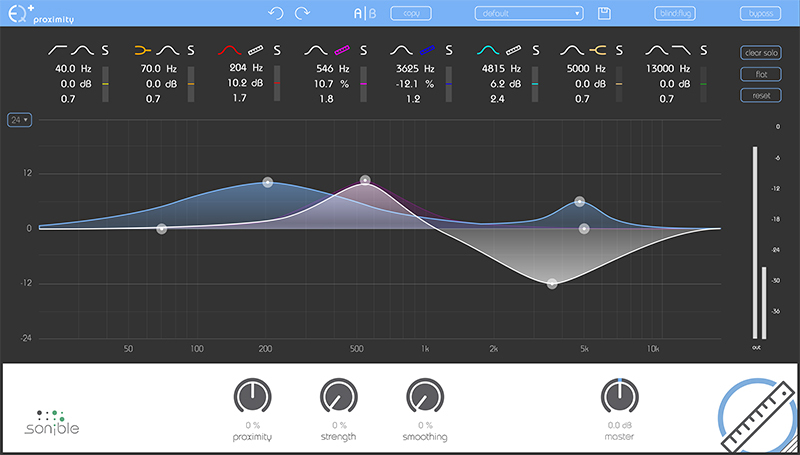
Mix | Create | Repair
proximityEQ+ lets you move audio sources closer, add space to your mix and optimize recorded room acoustics in post-production. Frequency-selective dereverberation allows you to precisely separate direct from indirect components of the signal.
It’s a rare occasion when you actually manage to put on tape the perfect mix you’ve had spinning around in your head. Maybe you're been there: entering postproduction with high hopes, only to realize that the sound of your first few seconds of recording takes you right back to your old rehearsal room in the basement. It’s to fix this problem that sonible developed the proximity:EQ+.
Thanks to its adjustable settings for direct sound and reverberation, this plug-in lets you retrospectively shape the room’s acoustics, any way you can imagine. This intuitive tool lets you turn fuzzy recordings into crisp statements, diplomatically put an overambitious singer in the back, or give that muffled bass the kick it needs.
Features
Get Closer to the Source: When you’re out doing interviews to record valuable content, the acoustics can be merciless. Didn’t manage to get the mic close enough to your interviewee’s mouth? The proximity:EQ+ lets you pull the voice closer to the listener. By amplifying direct sound, you can put emphasis on the voice, making it much clearer. This neat little procedure also comes in handy when a piano recording sounds fuzzy. By reducing the room acoustic particles, the individual sound pieces fall perfectly into place to create a clean sound pattern.
Create More Room: Alternatively, you may have gotten your mic too close to your sound source. This phenomenon can occur quite frequently when you're sitting in the studio post-producing choir recordings. Luckily, the sophisticated proximity:EQ+ provides the room the polyphony it requires. At the push of a button, it increases the natural room acoustic particles, making the individual voices harmonic in the bigger orchestral body. Amplifying the reverberation can also create a nice ambience effect, which you can easily use for movie postproduction. With the proximity:EQ+, you can acoustically fade out a scene, or even simulate tracking shots - simply amplify the reverberations, and you’re doing tricks fit for Hollywood.
Ideal Room Acoustics at One Click: Even when you have the microphones meticulously planned out and perfectly positioned, you can hardly change the room’s acoustics. However, with the technical refinements of the proximity:EQ+, you can remove spatial hurdles with the click of a mouse, even when bad acoustics are jeopardizing the set. The plug-in instantly separates direct sound from the echo, and makes it easy for you to improve your audio tracks.
Learn more about proximityEQ+.
Mix | Create | Repair
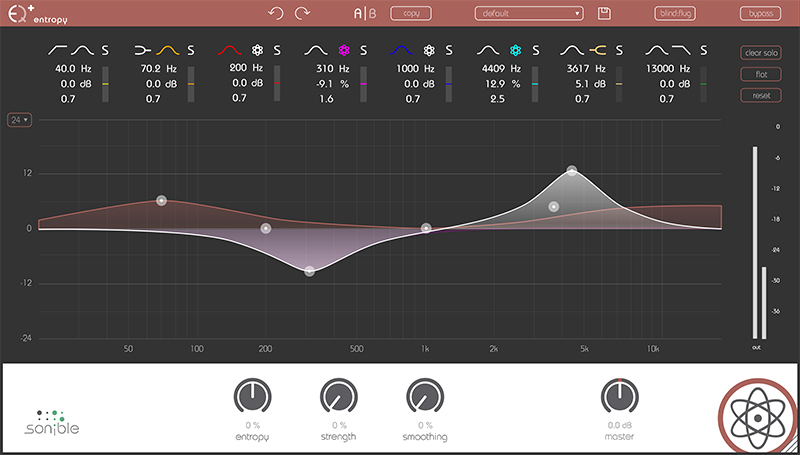
entropyEQ+ equips you with the tools to manipulate selected frequencies ranges in isolation from each other. It makes the editing process of impact noises easier and introduces you to a whole new world of post-production creativity.
Features
Enhanced Drumbeat at the Tap of a Finger - The entropy:EQ+ identifies the different frequencies of an audio track and allows you to filter out the individual drums of a drum set or percussion ensemble. This means you can refine that solo on the toms and rim clicks. It catches all of the impact noise – as weak or fierce as it may be. Ultimately, this lets you edit each frequency separately so that you end up with the track of your dreams without the nightmare of frustration.
Intelligible in All Language: From that quote for the TV report to the breathy final words of your new song – the entropy:EQ+ makes sure that every single word in your mix is rendered in clear and crystalline sound. To do so, those inharmonic consonants – so important to an optimized level of understanding – must be raised. The plug-in assists you in an easy, straightforward way, and amplifies the noise portions of speech at your command.
Rhythmic or Ruining? Sometimes it’s the grove of the string instruments that brings a record to life – whether it’s the plectrum sound of an electric guitar or the rhythmic plucks of a violin string. Other times this impact noise can ruin the harmonic sound of your record. The entropy:EQ+ provides a handy solution in both cases. By either amplifying or silencing exactly those sound portions, you’re sure to get the results you want.
Learn more about: entropy:EQ+.

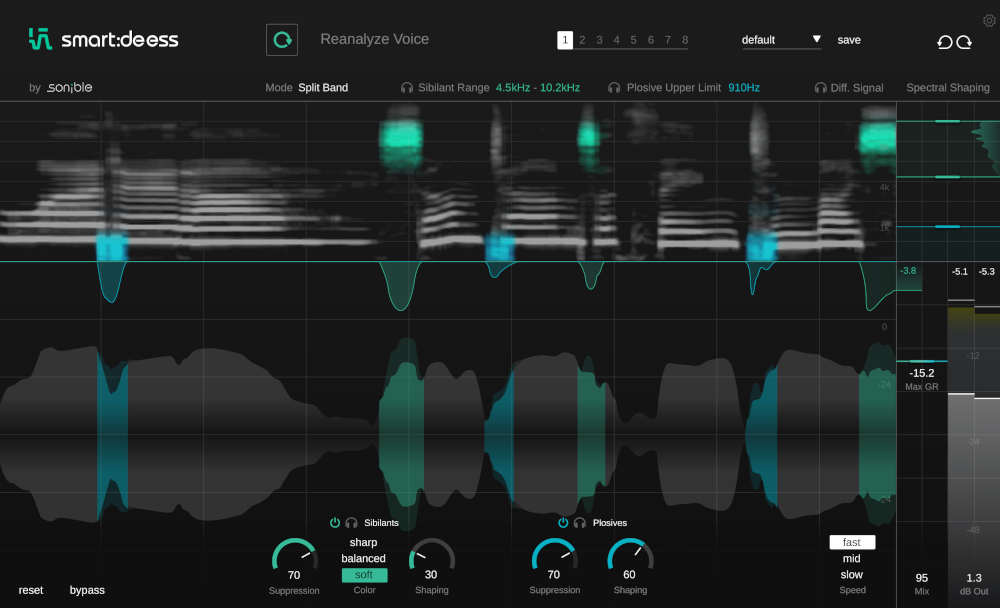
Where other de-essers just reduce volume– smart:deess goes far deeper and creates a more natural, better balanced sound. By harnessing the power of a fully trained neural network, smart:deess identifies the exact start and end points of phonemes without the need to set a threshold. And thanks to its ability to process the entire phoneme using spectral processing, you’ll never want to go back to your old de-esser.
- Tackle de-essing and plosives with a single plugin
- AI processing instantly adjusts the settings according to the source material
- “Ess” sounds can be fully shaped and refined, not just turned down
The world’s first de-esser that combines phoneme detection with advanced spectral de-essing.
The content-aware approach
Simply tackling sibilance and plosives
smart:deess analyzes the signal’s actual content– not just the level of one frequency band– before it decides what to do. As soon as you load the plugin on a channel, smart:deess builds a ‘voiceprint’ of the input voice signal and starts balancing any sibilants and plosives that are present. Your job then is to review the analysis and refine the results. smart:deess allows you to spend time on getting the sound you want, rather than correcting the sound you don’t want.
The power of AI
Looking deeper than ever before
smart:deess identifies specific individual phonemes– S, Z, Sh, Ch, T, P...– in real time, determining the exact start and end point of each sibilance without you having to set a threshold. The entire sibilant is then processed, rather than just the loudest part, making the final result far more natural sounding. Each phoneme type is identified and processed independently, an “Ess” is treated differently than a “Ch”, which is treated differently than a “T”. The result is as though the original recording had simply been better balanced.
Spectral processing
Shape and refine
Other de-essers are just automatic volume controls. smart:deess does contain a broadband component, but it also draws on additional spectral processing to shape and refine harsh sounds at a deeper level. Use the Color controls to tune the sibilant character (soft, balanced or sharp) and achieve the desired balance without losing edge. What’s more, dull and lisping sibilants can be revived and given new life by applying smart:deess' spectral processing.
With smart:deess, tedious clip-gaining of sibilants is history.
Learn more about smart:deess
System Requirements
Mac:
- OS X 10.14 or higher
- 4GB RAM or higher
- CPU - Intel DualCore i5 or higher
- Plugin formats - AU, VST2, VST3, AAX (64-bit only)
- iLok License Manager is required to install sonible software (activation is optional)
PC:
- Windows 10 or higher
- 4GB RAM or higher
- CPU - Intel DualCore i5 or higher
- Plugin formats - VST2, VST3, AAX (64-bit only)
- iLok License Manager is required to install sonible software (activation is optional)
Important Notes:
- smart:reverb, smart:comp 2 and smart:EQ 3 are only available in 64-bit formats.
- In order to install this sonible product, you must have the iLok License Manager installed on your computer. You DO NOT need an iLok account or a physical iLok USB Dongle.
- macOS 11 Big Sur is only supported on Intel-based Mac systems.
- To use sonible plugins on an M1 Mac, you may need to launch your DAW under Rosetta (right-click the application icon, select "Get Info" and then select "Open using Rosetta"). Note that many DAWs do not yet support macOS Big Sur, so it is important to check your DAW's website for compatibility info before updating.

John Nathaniel
"The starting points of using the automatic features are amazing, but if you're like me and you like to tweak, smart:reverb will inspire you!"

James Towler
"smart:reverb sounded great added to the snare and sits in the mix."

Dennis J. Wilkins
"WOW! smart:reverb is impressive and unique in my experience!"
Note: frei:raum is used as an example
To install and activate your product directly within the plugin authorisation window, you must have the iLok License Manager application installed on your computer. You aren't required to activate your plugin through the iLok licence manager, but you can activate your software on an iLok USB dongle if you have one.
If you don't already have the iLok License Manager installed please check out this article - Getting Started with the iLok License Manager.
Mac Installation
1. Download the installer file from your Plugin Boutique account.
2. Double Click and open the installer file > Double-click the ‘frei:raum installer mac.mpkg’ file.
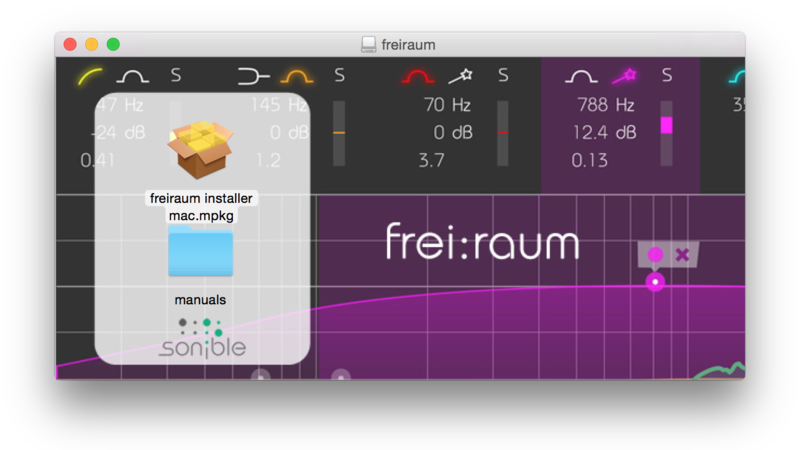
3. Begin the Installation Process > Click Continue.
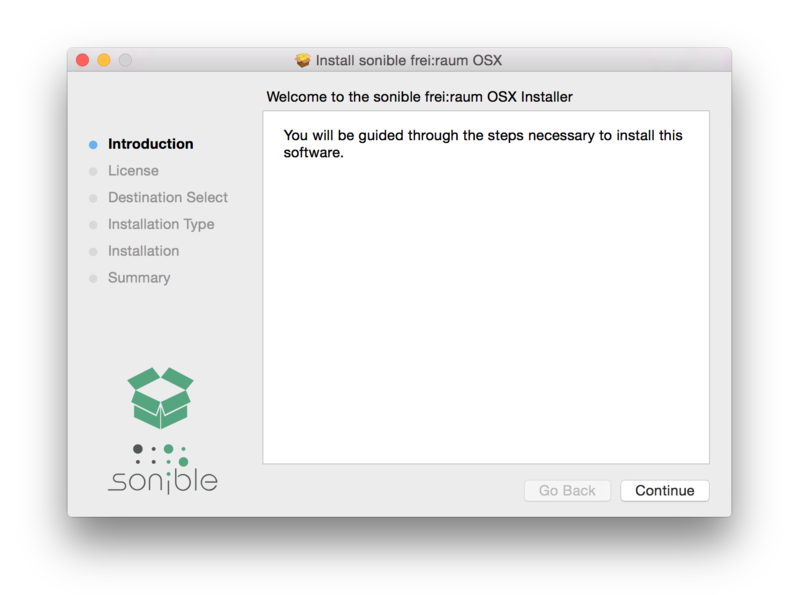
4. Read through the Terms & Conditions of the Licence Agreement > Click Continue > Click Agree.
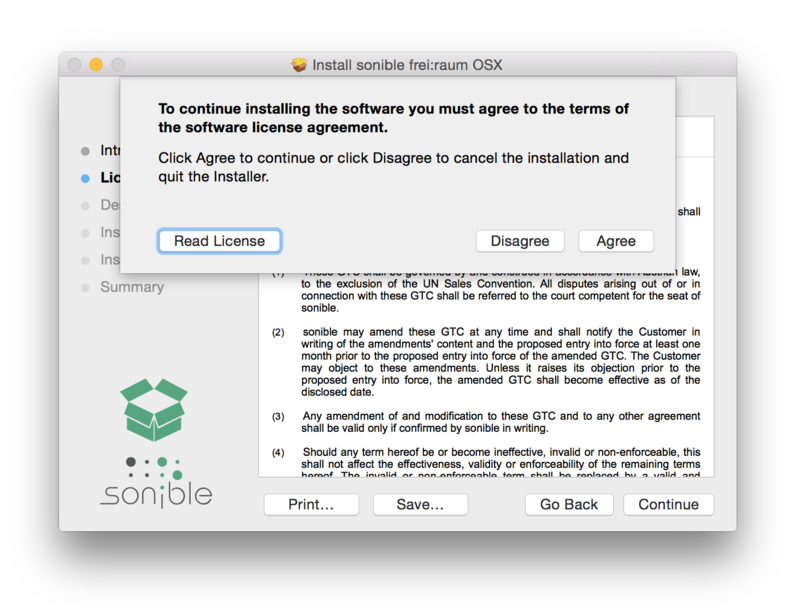
5. Select a computer disk location in which to save your software onto > Click Continue.
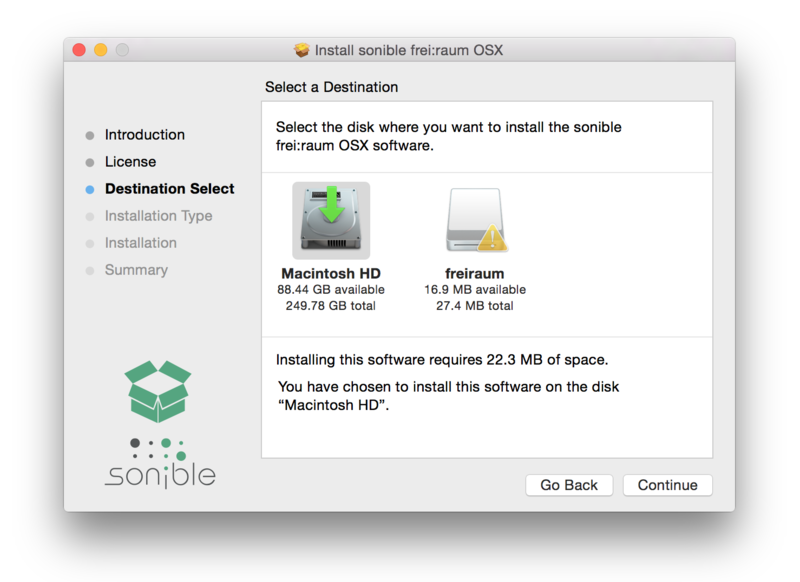
6. Select which software formats you wish to Install > Click Continue.
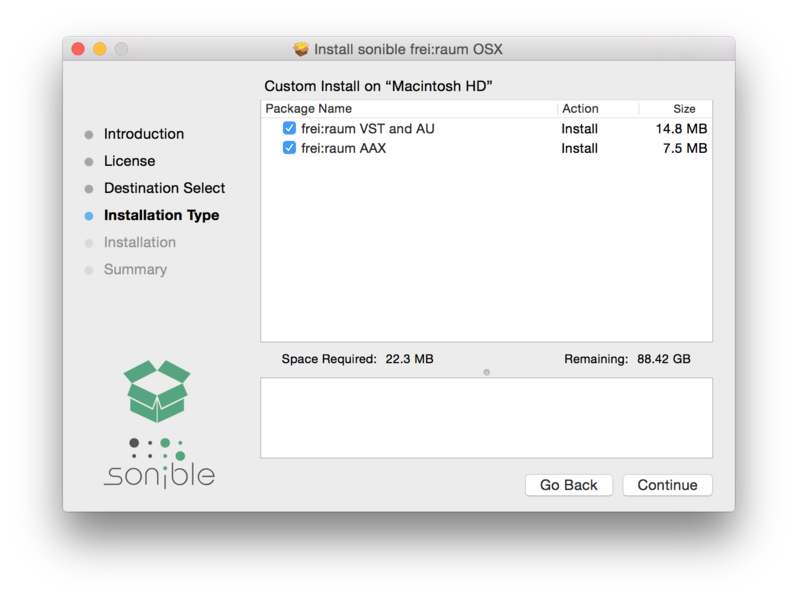
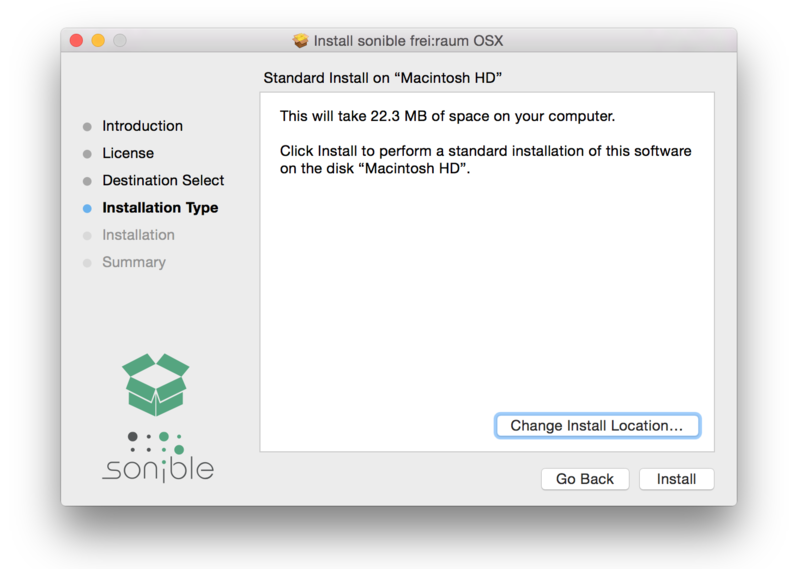
7. Confirm the Installation > Click Install.
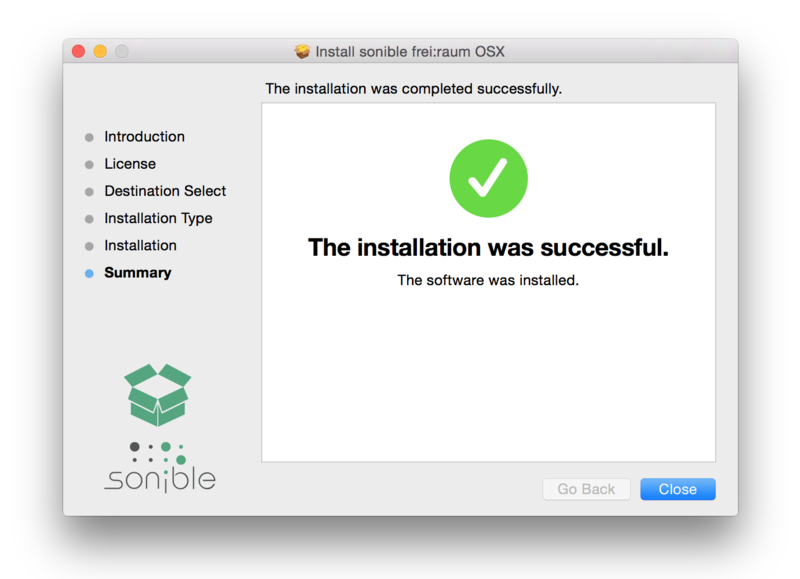
8. The Installation of your software has completed > Click Close.
9. Open/restart your DAW and load your sonible software. Please note that you may need to refresh/rescan your DAW plugin list if you can't locate it.
Standard Activation Instructions
1. Locate and open the sonible software in your DAW.
2. Copy & paste/manually enter the licence key/serial code that is available in your Plugin Boutique account > Click Register.
3. Your sonible software has now been successfully registered and authorised > Click Close.
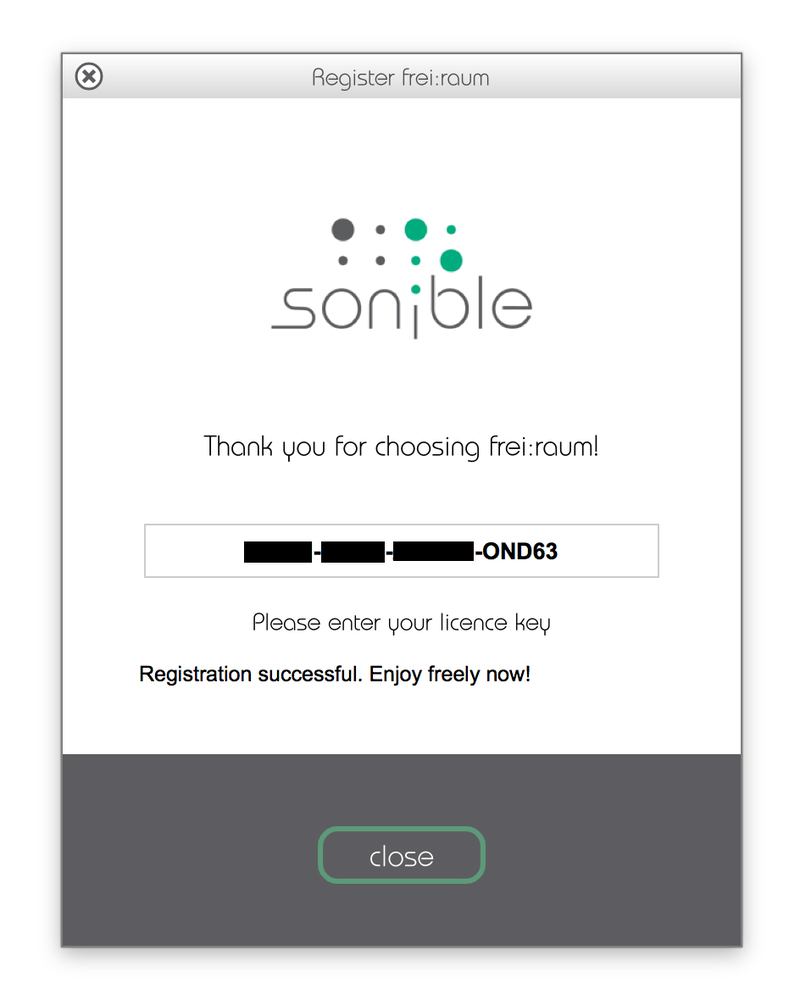
Your software is now activated and ready to use in your DAW!
iLok Activation Instructions
You can now easily manage your sonible license(s) in the sonible User Area Dashboard and can either use both activations on two different computers or have one activation on an iLok USB dongle and the other one on a computer.
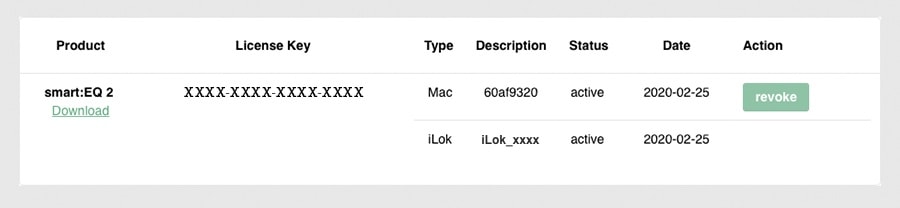
If you would like to add one activation to your iLok USB dongle, please visit the sonible My account page, enter your code and click 'Register license key'.
For more information, check out the following article from sonible - Your User Area Dashboard.
PC Installation
1. Download the installer file from your Plugin Boutique account.
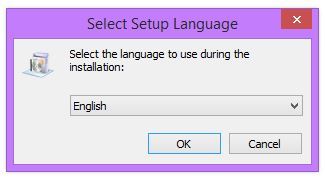
2. Unzip the downloaded folder and Double click the file to open/run the installer > Select your preferred language (English/German) and Click OK.
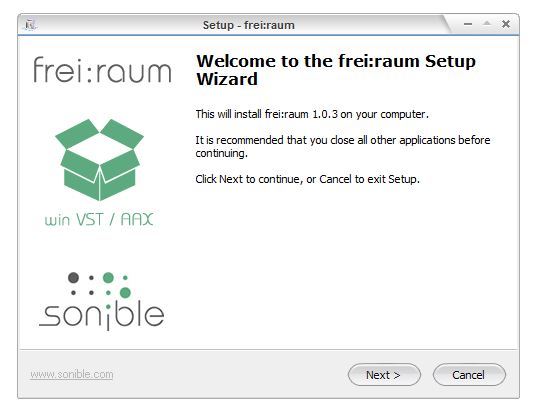
3. The Installation process has now begun > Click Next.
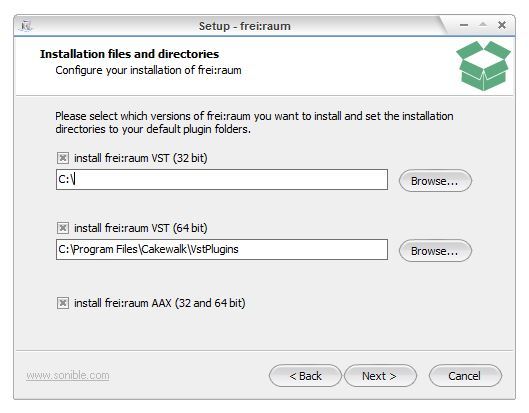
4. Select which version or versions of the software that you wish to install (32/64-Bit) > Click Next.
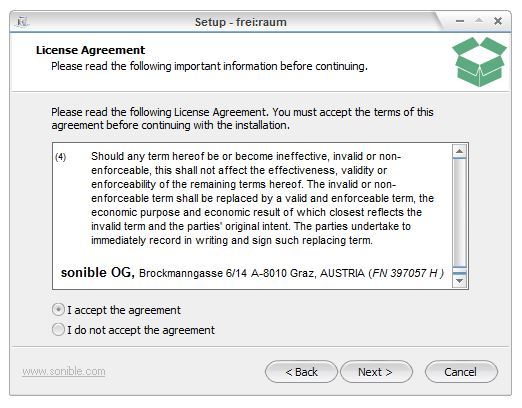
5. Read the Terms & Conditions of the Licence Agreement > Select 'I Accept the Agreement' if you accept the terms > Click Next.
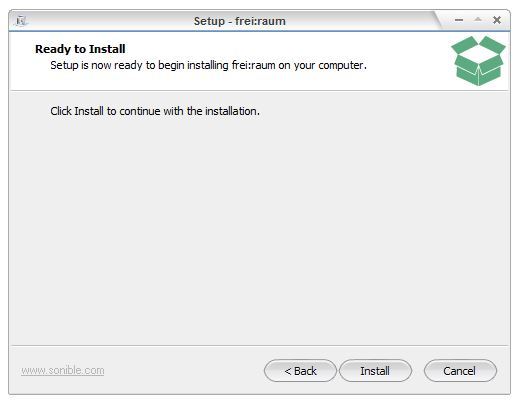
6. Your software is now ready to install on your computer > Click Install.
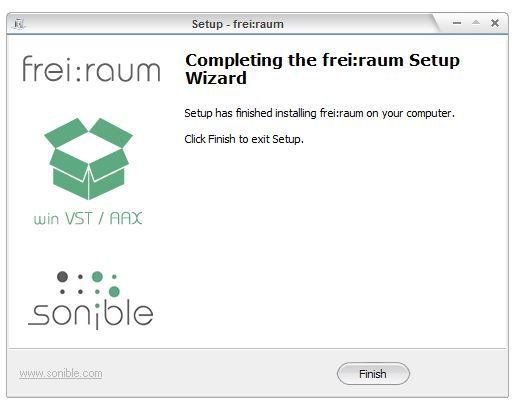
7. Your software is now installed > Click Finish.
8. Open/restart your DAW and open your sonible software. Please note that you may need to refresh/rescan your DAW plugin list if the software fails to appear.
Standard Activation Instructions
1. Locate and open the sonible software in your DAW.
2. Copy & paste or manually enter the licence key/serial code that is available in your Plugin Boutique account > Click Register.
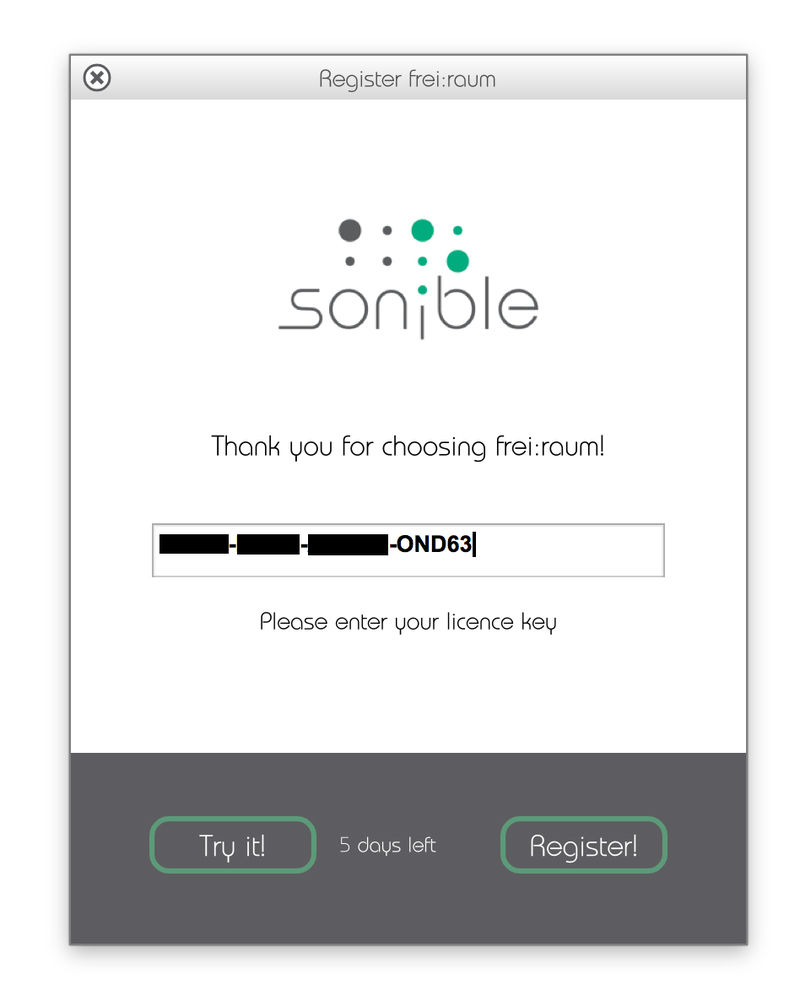
3. Your sonible software has now been successfully registered and authorised > Click Close.
Your software is now activated and ready to use in your DAW!
iLok Activation Instructions
You can now easily manage your sonible license(s) in the sonible User Area Dashboard and can either use both activations on two different computers or have one activation on an iLok USB dongle and the other one on a computer.
If you would like to add one activation to your iLok USB dongle, please visit the sonible My account page, enter your code and click 'Register license key'.
For more information, check out the following article from sonible - Your User Area Dashboard.


