/ Synth / Emulation II+
UVI

Emulation II+

4.8 (5 Reviews)
$149.00
Main Image
Main Image
Main UI
UVI Emulation II+ | Trailer gallery thumbnail
UI 2
UI 3
UI 4
Buy Now
Product information

The Ultimate ‘80s Sampler Suite

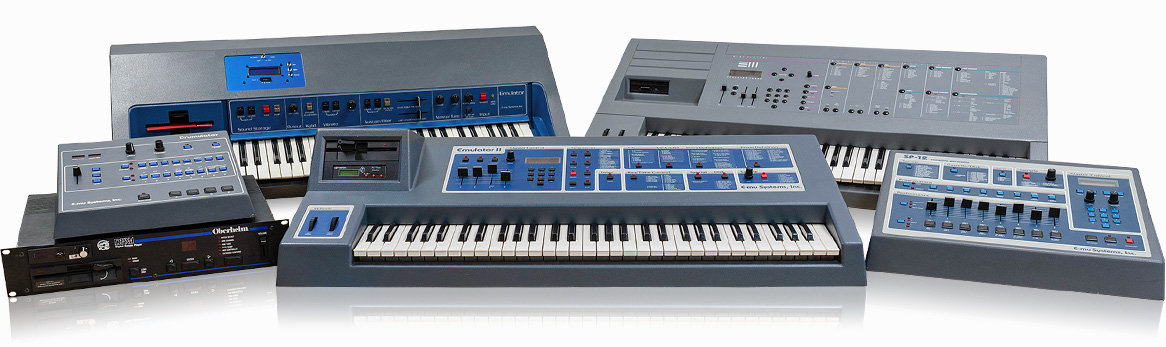
UVI Emulation II+ | Machines

Not 1 but 3 iconic sampler-synths from the '80s plus a massive lo-fi drum machine, the original officially licensed sounds plus tons of new ones, all recorded from the vintage hardware, available as individual instruments or in a multi capable of huge stacked sounds and inspiring 4+1 part phrases, we are extremely excited to present you with UVI's most ambitious library yet: Emulation II+!

Explore the authentic hardware sounds of the Emulator, Emulator II and Emulator III, then dive into Drumulation+, an old-school drum machine packed with thousands of drum samples from the Drumulator, SP12, and EI, II, and III, with a creative sequencer, MIDI drag-and-drop, and more.

Whether you're a fan of '80s music or just love the lo-fi flavor of vintage samplers, Emulation II+ is a powerful, dynamic and massively playable instrument with heaps of inspiration for musicians, composers, producers and sound designers of all backgrounds.

Features 

  • 4 instruments loaded with authentic hardware sounds
  • Over 1,300 presets, 270 multis, 800+ layers, 2400+ drums, and more
  • Inspiring ready-to-go sounds and patterns, all fully-editable

System Requirements
  • Runs in UVI Workstation version 3.0.25+, and Falcon version 2.1.8+
  • iLok account (free, dongle not required)
  • Internet connection for the license activation
  • Supported Operating Systems:
    • macOS 10.14 Mojave to macOS 15 Sequoia
    • Windows 10 to Windows 11 (64-bit)
  • 12 GB of disk space
  • Hard Drive: 7,200 rpm recommended or Solid State Drive (SSD)
  • 4GB RAM (8 GB+ highly recommended for large UVI Soundbanks)
Installation Instructions

Please note: UVI Falcon is used as the example

1. Visit the UVI website > enter your email address > click Create your account (skip to step 3 if you already have an account)

2. Enter your details > click CREATE YOUR ACCOUNT

3. Visit https://www.uvi.net/uvi-portal#download or click DOWNLOAD in your Plugin Boutique User Account > download the version of UVI portal for your OS > install UVI Portal

4. Open UVI Portal > enter the details used at Step 2 > click Login

5. Click Redeem Serial

6. Enter the serial number found in your Plugin Boutique User Account > click OK

7. If you already have an iLok account click I already have an iLok account and enter your details - if not click Create an iLok account and follow the instructions > agree with UVI's EULA > click REGISTER

8. Click My Products > click Install

9. Click Activate 

10. iLok Cloud Manager will open > login if necessary > find your UVI product > right-click > click Activate

11. Select an activation location > click Activate

12. Click OK

13. Return to the UVI Portal > click Synchronize

Your software is installed and ready to use. Enjoy!

Plugin Boutique Rewards

Discover the most rewarding loyalty programme among all plugin retailers.

  • Free Loopmasters Samplepacks
  • Discounts on products and courses
  • Extra Virtual Cash claimed immediately at checkout
Find out more

Follow us:

X (Twitter) Facebook YouTube Instagram
Logo Logo

Plugin Boutique Limited, Part of the Beatport Group LLC.

Copyright © 2011-2025 Plugin Boutique. All rights reserved