/ Multi-Effect / Transfigure
Sugar Bytes

Transfigure

5.0 (1 Reviews)
$129.00
Transfigure - UI
Transfigure - UI
Transfigure - UI
Transfigure - UI
Transfigure - UI
Transfigure - UI
Transfigure - UI
Buy Now
Product information


Redesign Sound

Transfigure Your Audio

Transfigure is your creative partner in sound. With just a few clicks, it turns any track into a living, breathing sonic landscape full of depth, motion, and emotion. Its clean, intuitive interface makes complex processes feel effortless. Whether you’re refining details or creating entirely new textures, Transfigure gives you the freedom to shape sound your way. The central XY pad allows for simultaneous parameter control and expressive automation, perfect for performative sound design and evolving text.


Key Idea

Transfigure isn’t just another multi-effect. It’s a sound design tool that creates something entirely new and unrelated to your original audio.

With powerful modulation and an XY pad, you can intuitively shape sound in truly creative ways.

Subtle tweaks. Glitchy mayhem. Transfigure is your playground.


Spectral

The spectral engine lets you manipulate your sound in the frequency domain, unlocking a variety of unique effects. By isolating specific frequencies, you can freeze your sound in place. Delaying different frequency bands individually produces stunning, evolving results.

Well-crafted algorithms allow you to adjust particular frequency ranges with precision, opening up wide-ranging sound design possibilities. Most algorithms come with detailed control options.

Need to place your 100 Hz kick drum just right in the stereo field? Sugar Bytes have got you covered. From delicate textures to alien chaos, unleash your sonic imagination.


Resynthesis

The resynthesis engine analyzes your input signal to detect which pitches are present. It then uses this information to generate new audio with its own internal sound engine. The results can be close to the original or completely transformed.

Combined with Sugar Bytes' powerful modulation system and easy-to-use XY pad, you can create highly dynamic and individual sounds. As with the spectral engine, there’s plenty of depth for fine-tuning. Let some notes have a release tail while others get modulated. Everything is possible.

The Sugar Bytes team have included a wide selection of standard and unique scales, enabling the engine to create complex musical progressions. The resynthesis engine really shines with non-harmonic input like drum loops, where it can generate rich, inspiring harmonics.


Generic Effects

Transfigure includes two general-purpose effect slots.

Delay and reverb let you shape space and depth. The phaser provides modulation options, while the filter with its drive section gives you a classic tool for shaping tone. Capture and looper effects offer the glitch capabilities Sugar Bytes is known for.

Since all parameters are tied to the modulation section, you can create vibrant and dynamic results. When connected to the XY pad, multiple parameters become accessible at once, making it easy to build your very own signature sound.


Sounds & Presets

Get inspired instantly with an extensive library of ready-to-use presets.

Transfigure empowers musicians, sound designers, and creators to reshape their audio into something truly unique. Set your audio free and redefine what’s possible with sound today.


Features

  • Spectral manipulation
  • Harmonizing sound
  • Easy control of complex effect setups (XY Pad)
  • Complete redesign of your sound
  • Multiple effects (modulation, vinyl, filter, looping)
  • Freeze your sound
  • Complex modulation possibilities
System Requirements

macOS

  • Requires macOS 10.13 or higher
  • Audio Unit, VST2, VST3, AAX, Standalone
 

Windows

  • Requires Windows 7 or higher
  • VST2, VST3, AAX, Standalone
Installation Instructions

Notes:

  • Looperator is used as the example
  • Pop up windows must be allowed within your browser's 'Settings' for the download link to be triggered

Mac

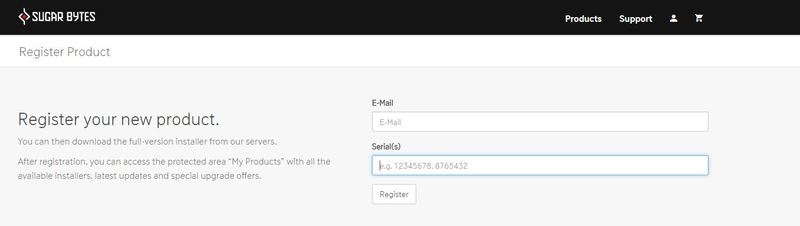
1. After purchasing your product, visit Sugar Bytes to register your software.

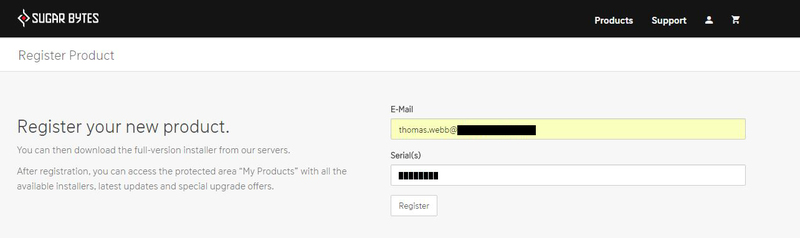
2. Enter the email address that you wish to register the software to, as well as copy and paste/manually enter the serial number provided within your User Account > click ‘Register’.

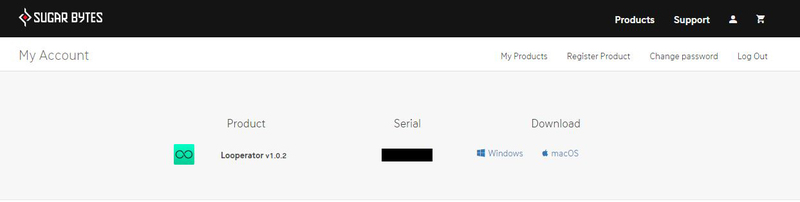
3.  Your software has successfully been registered > download your Apple (Mac) installer.

Note: An email containing your Sugar Bytes login details and temporary password (in the form of a code) will be sent to the inbox of the email that you used to register the software with > this may have landed in the junk/spam folder of your email. After logging into your account, you can select the 'Change Password' option to personalise your secret password.

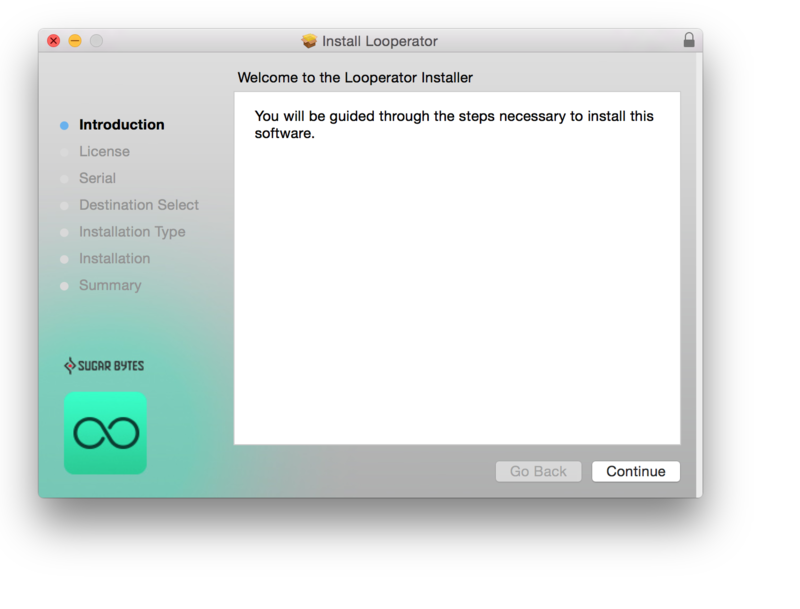
4. Double-click the .dmg installer file to begin the installation process > click ‘Continue’.

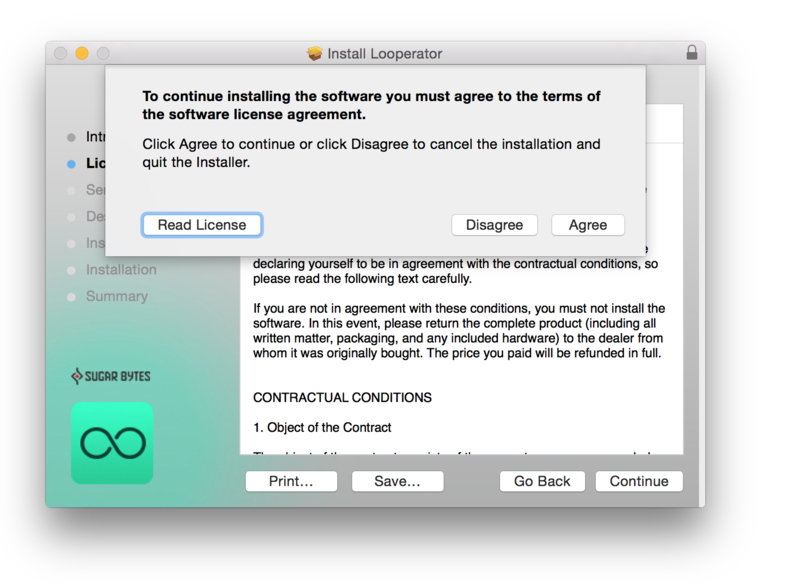
5. Read the Software License Agreement > click ‘Continue’ and then ‘Agree’.

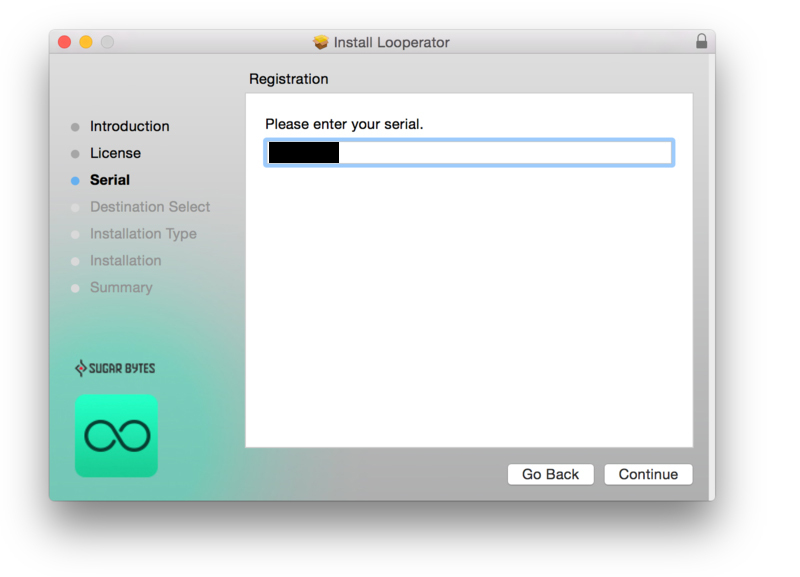
6. Copy and paste/manually enter the 8-digit serial code that exists in your Sugar Bytes account.

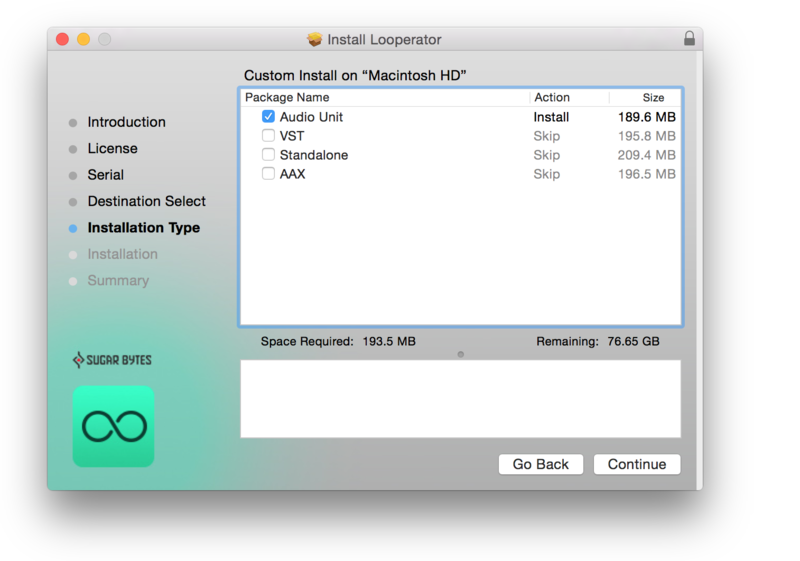
7. Select the software format (s) that you wish to install, depending upon the DAW (s) you are using > click ‘Continue’.

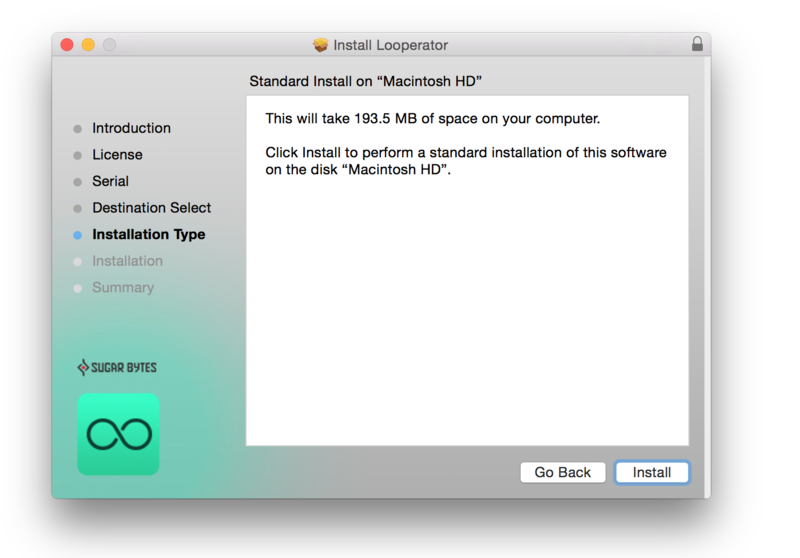
8. Review the installation and click ‘Install’.

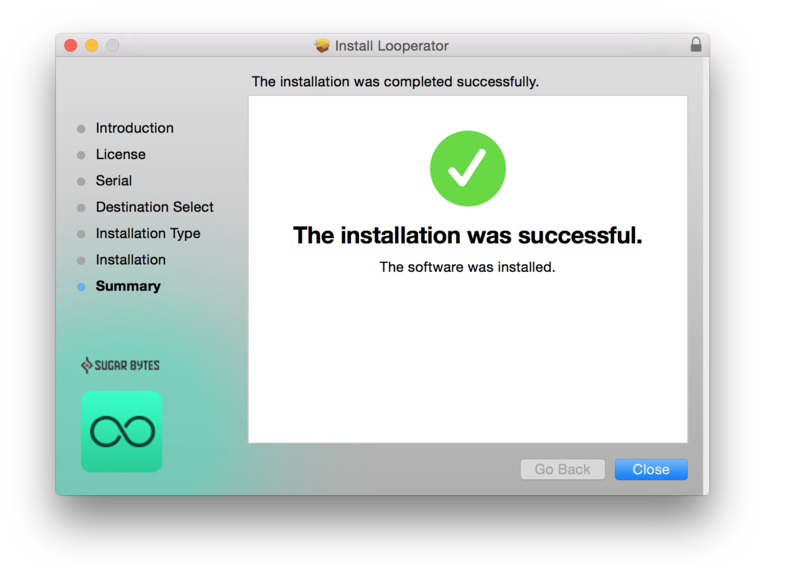
9. The installation of the software has successfully completed > click ‘Close’. 

10. Restart your DAW and locate/open your purchased Sugar Bytes software from the plug-in selection.

Note: You may need to Refresh/Rescan your DAW's Plug-in List, if the software fails to appear.

The Software is now Activated and Ready for Use Within Your DAW!

Windows

1. After purchasing your product, visit Sugar Bytes to register your software.

2. Enter the email address that you wish to register the software to, as well as copy and paste/manually enter the serial number provided within your User Account > click ‘Register’.

3. Your software has successfully been registered > download your Windows (PC) installer.

Note: An email containing your Sugar Bytes login details and temporary password (in the form of a code) will be sent to the inbox of the email that you used to register the software with > this may have landed in the junk/spam folder of your email. After logging into your account, you can select the 'Change Password' option to personalise your secret password.

4. Double-click the .zip folder to extract and reveal its contents.

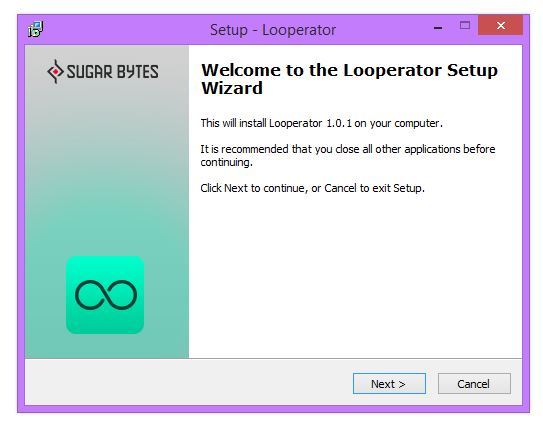
5. Double-click the .exe installer file to begin the installation process > click ‘Next’.

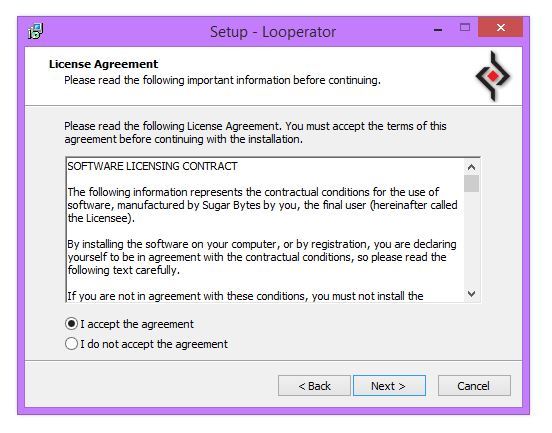
6. Select 'I accept the agreement’ > click ‘Next’.

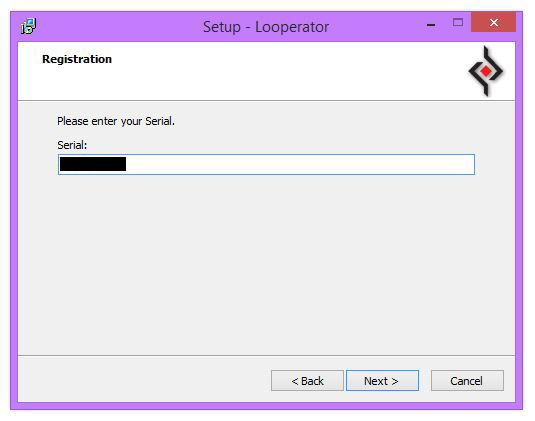
7. Copy and paste/manually enter the 8-digit serial code that exists in your Sugar Bytes account.

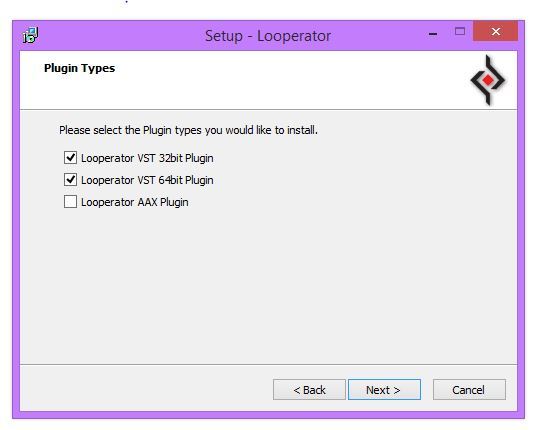
8. Select the format (s) that you wish to install > click ‘Next’.

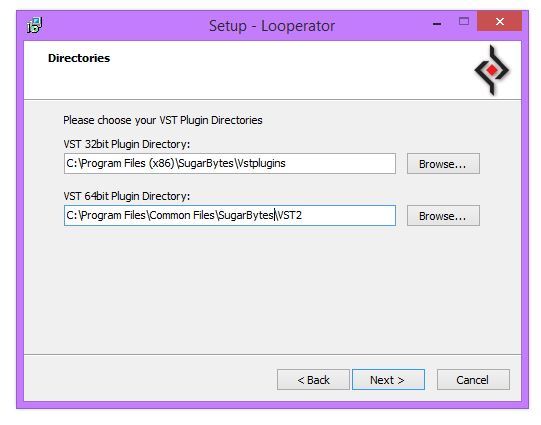
9. Select the software directories in which to install the software formats (32 and/or 64-Bit) to > click ‘Next’.

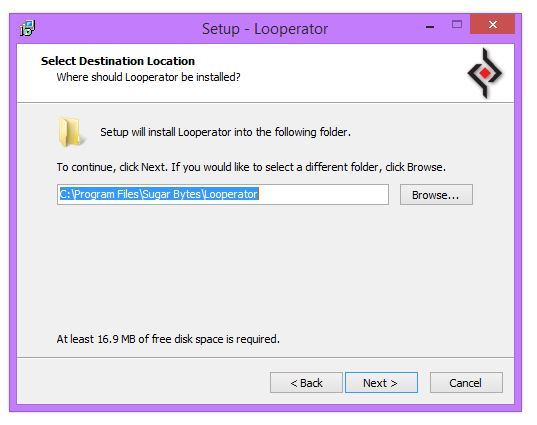
10. Select a folder in which to install the software to > click ‘Next’.

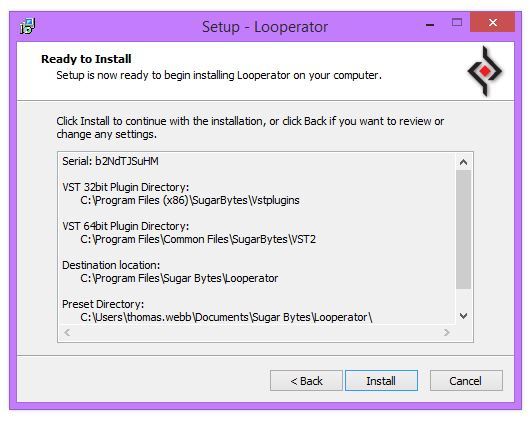
11. Review the installation and click ‘Install’.

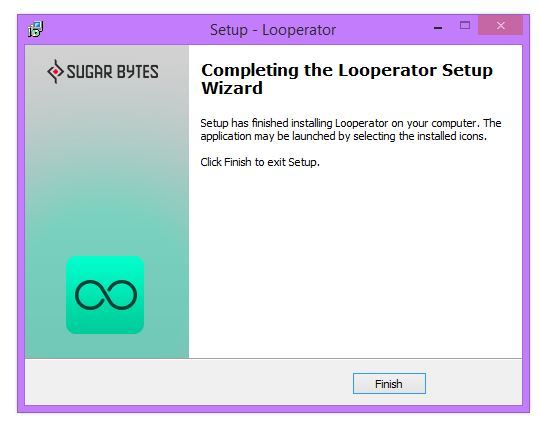
12. The installation of the software has successfully completed > click ‘Finish’.

13. Restart your DAW and locate/open your purchased Sugar Bytes software from the plug-in selection.

Note: You may need to Refresh/Rescan your DAW's Plug-in List, if the software fails to appear.

The Software is now Activated and Ready for Use Within Your DAW!

Plugin Boutique Rewards

Discover the most rewarding loyalty programme among all plugin retailers.

  • Free Loopmasters Samplepacks
  • Discounts on products and courses
  • Extra Virtual Cash claimed immediately at checkout
Find out more

Follow us:

X (Twitter) Facebook YouTube Instagram
Logo Logo

Plugin Boutique Limited, Part of the Beatport Group LLC.

Copyright © 2011-2025 Plugin Boutique. All rights reserved