


 Log In

Free gifts available with your purchase
The Dynamics Bundle contains 2 of sonible's unmissable FX plugins: smart:comp 3 and smart:limit.
sonible's smart:comp 3 is a one-of-a-kind compressor which delivers transparent, precise results whilst giving you the creative tools to transform your sound. smart:limit on the other hand is a unique limiter plugin that allows you to let your mixes breathe whilst giving you all the loudness and dynamic info needed for confident publishing.

Sonic Intelligence driving the future of production
sonible’s development approach has long used AI to achieve two goals: maximum precision in processing tailored to any audio material and the design of new, more intuitive workflows that go beyond what has been possible so far. Combining data-driven analysis with real-world mixing expertise, sonible’s design philosophy "Sonic Intelligence" unites technical accuracy, intuitive usability, and a distinctly human creative workflow.
Musical intention over plain numbers
In smart:comp 3, this design philosophy comes to life in the new Compression Matrix, a system that sharply reduces trial and error in compression. The tool achieves this by visualizing a spectrum of viable compressor settings derived from the input signal’s characteristics. This gives users immediate insight into how far the material can be shaped in terms of its dynamic range. Instead of generating a single suggested setup, the plug-in maps out a field of possible configurations that can be explored in real time and lets users approach compression in ways that align with common musical intentions and terminology.
smart:comp 3 also extends its functionality to group processing. Multiple instances can be linked and controlled together for consistent compression across several tracks.
Like its predecessor, smart:comp 3 uses sonible’s spectral compression technology to distribute high-resolution gain reduction across the frequency spectrum in real time. This approach maintains clarity and balance while avoiding the need for manual multiband setup.
Learn more about smart:comp 3

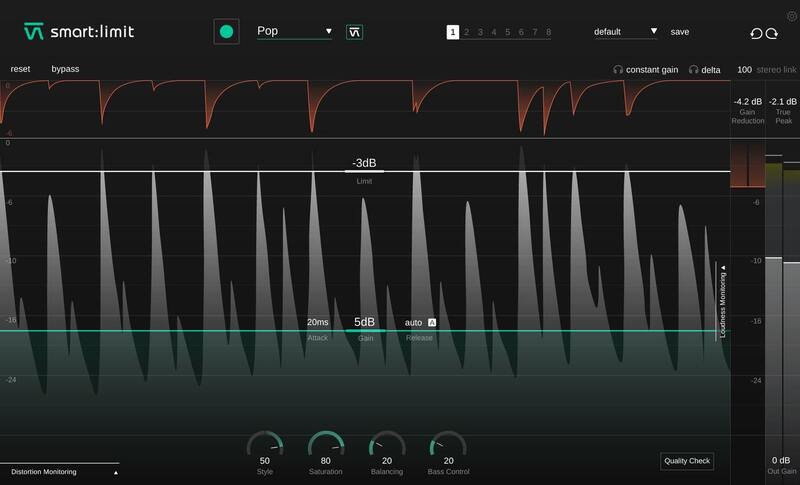
The Content-Aware Limiter
Loudness and Dynamics in Tune
smart:limit delivers limiter settings that let your mix breathe and gives you all the loudness and dynamics info you need for confident publishing.
- Automatic parametrization in just a few seconds
- Extensive loudness and dynamics monitoring
- Unique set of sound-shaping tools
The One-Stop-Shop Limiter - Straightforward “Set – Check – Publish”
smart:limit is all about worry-free limiting: Its intelligent processing will preserve the detail of your track and provide a transparent, uncompromised limiting quality. With smart:limit's extensive loudness and dynamics monitoring, you won’t have to use any additional metering plug-ins. Besides providing you with all the necessary loudness information in real-time for confident publishing, smart:limit guides you towards hitting the safe zone requirements of streaming platforms or loudness standards and gives you feedback via interactive Quality Check hints.
Transparent Sound with just One Click - AI-Powered Parametrization for Confident Limiting
Speed up your workflow with smart:limit. Its intelligent processing analyzes your signal and finds limiting parameters that let your mix breathe – all in just a few seconds. By choosing a genre-based profile that fits your mix, you can prime the plug-in for different limiting characteristics. Or instead, upload a reference track, if you are aiming for a specific limiting style. You can use smart:limit with or without the automatic parametrization – or go for a combination of both.
Learn more about smart:limit.
Mac
- macOS 10.9 or later (Intel / M1 Apple Silicon supported) (64-bit only)
- RAM - at least 4 GB (recommended)
- CPU - at least Intel DualCore i5 (recommended)
- Plugin Formats - AU, VST2, VST3, AAX, MultiRack Native
- Supported Sample Rates - 44.1 kHz to 192 kHz
Windows
- Windows 10 or later (64-bit only)
- RAM - at least 4 GB (recommended)
- CPU - at least Intel DualCore i5 (recommended)
- Plugin Formats - VST2, VST3, AAX, MultiRack Native
- Supported Sample Rates - 44.1 kHz to 192 kHz


