


 Log In

Free gifts available with your purchase
Swell and impact designer
Designed for and by composers, sound designers and musicians, Meteor is a creative tool that delivers instant swells, dramatic crescendos, and powerful impacts. Outfit 7 sample layers with an accessible collection of sounds from field recordings and effects to exclusive orchestral sessions. Intuitively mix, modulate and apply effects to polish and perfect your sounds, then perform them synced to the action or musically with polyphony and velocity support. Meteor provides a fast and intuitive workflow, yielding everything from futuristic builds and impacts to rich and emotive musical environments.
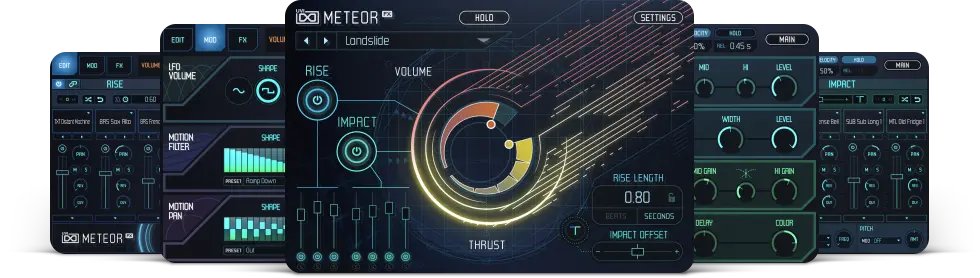
A creative sound design tool with an immediate and intuitive workflow, Meteor delivers emotive orchestral gestures, dynamic risers and thunderous impacts perfect for film, games, music and more.
Features
- Create rich and direct sound effects for film, games, music and more
- 7-layer architecture with editable sounds, modulation & FX
- Comprehensive library with foley, orchestral and synthetic sounds
- Runs in UVI Workstation version 2.6.15, and Falcon version 1.4.1
- iLok account (free, dongle not required)
- Internet connection for the license activation
- Supported Operating Systems:
- MacOS 10.14 Mojave to macOS 26 Tahoe
- Windows 10 to Windows 11 (64-bit)
- 7GB of disk space
- Hard Drive: 7,200 rpm recommended or Solid State Drive (SSD)
- 4 GB RAM


