


 Log In

Free gifts available with your purchase
The most powerful loudness solution for your DAW
Precise, efficient, trusted
Loudness Toolkit is the leading solution for loudness compliant delivery. Everything you need to produce reliable, loudness-normalised audio, seamlessly integrated into your audio production workflow.
Mix towards compliance without breaking the creative flow, listen to True Peak audio ‘in-place’, and achieve faster than real-time quick-check-and-fix processing.
Complete solution
The most powerful loudness solution available for your NLE/DAW today. Three products working in concert to deliver unsurpassed quality and workflow efficiency.
- Leading NLE/DAW solution
- Measurement & correction
- Real-time metering
- Off-line options
- True Peak limiting
- Log file documentation
- DynApt dynamics adaptation included
Breathtaking speed
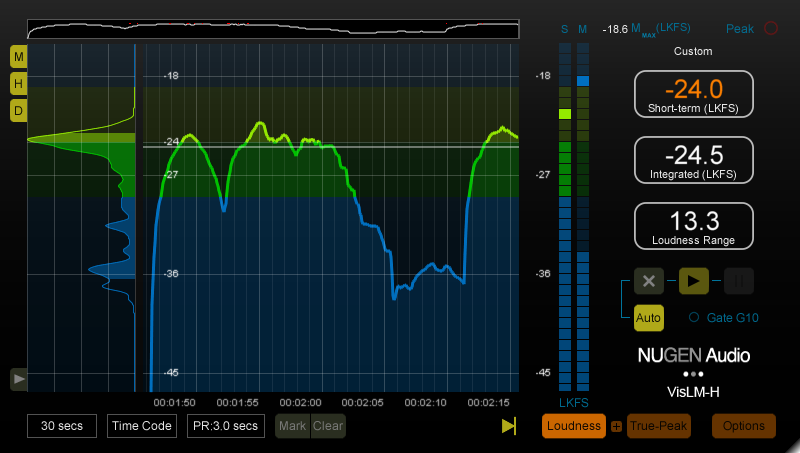
Using an industry standard gives you confidence and peace of mind. VisLM delivers everything you need – intuitively, accurately and immediately. With a unique design focused on primary loudness parameters, VisLM combines an instant overview with detailed historical information, enabling you to hit your target first time, every time. Additional loudness logging and time-code functions allow for proof of compliance reporting and postmortem analysis with frame accurate referencing.
Enhanced transparency
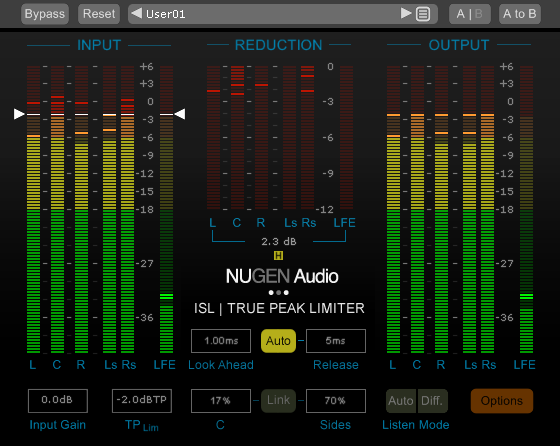
ISL is a transparent look-ahead limiter designed to allow you to get on with creative audio production while it takes care of True Peak compliance for you.
ISL uses the standardised True Peak algorithms of ITU-R B.S. 1770 and related standards (including Apple ‘afclip’ true-peak detection), and is suitable for the control of audio for post production, music mastering and broadcast applications. True Peak limiting can also be used to ensure that downstream codecs (mp3, AAC etc.) do not introduce distortion into the signal.
Ultimate peace of mind
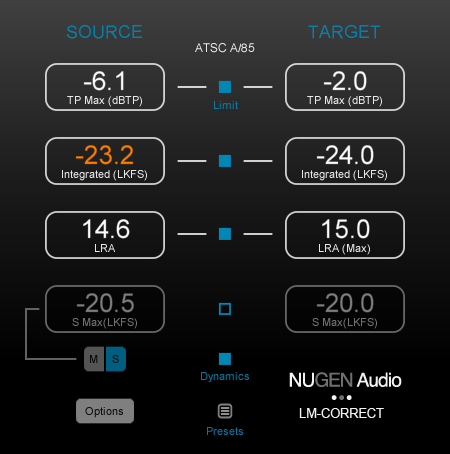
LM-Correct gives you a unique, immediate and hassle-free route to loudness-compliant audio in your day-to-day loudness workflow, saving you time and preventing costly mistakes.
Either within your NLE/DAW or as a standalone application, LM-Correct delivers automated compliance with True Peak correction, solving your compliance issues on the spot. Used in conjunction with a real-time meter, LM-Correct saves iterative adjustments to the mix as you approach target levels, allowing transparent in-edit 'quick-touch' finishing of your audio. It’s an essential part of your loudness toolkit.
DynApt extension
Included with the Loudness Toolkit bundle is the DynApt Extension for LM-Correct. Powered by technology developed for our server-side solutions, even complex specifications can be met with great sounding algorithms and smooth efficiency. Uniquely, the new DynApt extension also allows immediate correction for LRA and dynamics, whilst preserving dialog intelligibility and correctly identifying and respecting intentional dramatic transitions.
For post and broadcast
VisLM is an ideal tool to achieve average loudness harmonisation from differing sources, consistently balancing music, dialog and special effects in order to hit specification easily and intuitively.
World class, broadcast quality limiting is an essential requirement for any broadcast production, and the latest standards also demand true-peak compliance. ISL delivers both, giving you superb sound with complete confidence when meeting True Peak delivery criteria.
LM-Correct is ideal for use in situations where time is of the essence, providing an automatic method of rapidly conforming audio to current loudness standards. The plug-in can be used within a project to measure and correct audio without needing to leave the editing environment, enabling rapid in-place loudness normalisation of mono, stereo or multi-channel audio.
Typical applications
- Take control of audio quality at source
- Produce broadcast compliant audio
- Transparent end of chain limiting
- Preserving quality for podcast material
- Faster than real-time loudness analysis
- Final compliance checks for mixed audio
- Integrated True Peak limiting
- Manage live broadcast levels rapidly and objectively
- Consistently balance music/dialog/special effects
System Requirements
Available Formats
- AAX, VST, VST3, AU and AudioSuite in both 64-bit and 32-bit versions. RTAS is also available as 32-bit only.
- VisLM-H and LM-Correct are also available as a stand alone application for Windows and OSX
Mac
- OSX 10.6.x, 512 MB RAM
Windows
- XP or above, 512 MB RAM
Full ReMEM functionality requires a time-code lock to be provided to the plug-in by the NLE/DAW.





















