/ Maschine Expansions / Dirty Bass House
Niche Audio

Dirty Bass House

5.0 (46 Reviews)
$29.00
Dirty Bass House - Main Image
Dirty Bass House
Buy Now
Product information

Niche Audio is proud to present our latest journey into the world of the House Underground with a full fat collection of Dirty Bass House samples, primed and prepared to jettison your inspiration levels to a new plateau. It isn't just that we place all those samples in fully processed mixed kits and projects complete with midi data and song starters, Its also the fact that our genre packs are made up of sounds created specifically for that genre, by producers who are already on the scene and creating credible releases in their own right. These two aspects combined create a powerful and inspirational tool which the producers of today demand.

Inside Dirty Bass House you will find an inspiring collection of punchy Drums, Chords, Synths, FX, Vocals and some of the deepest Bass sounds released to date.  Designed specifically and exclusively for the pack, the samples are arranged into kits for Maschine and Ableton live. Each kit or project loads with an excellent choice of conceptual midi patterns allowing you to instantly evaluate the sounds in perfect context and start making great music.

If your feeling inspired, or need to start a track with a particular vibe - Dirty Bass House has you covered. You can tweak and change the samples, Fx, mix and patterns to your heart’s content, but you can start working with the right sounds immediately, helping to avoid your moment of creativity being lost. Everything about a Niche genre pack is about getting and keeping you in the creative zone, from the samples, patterns, and to the perfectly mixed kits.

For Maschine users the pack has been fully tagged making it a breeze to switch samples from the same pack or any Niche pack they may own. Each of the 15 kits and 5 projects have also been colour coded. Ableton users will find 15 projects, 15 drum racks and 62 instruments. Of course Ableton users have all the functionality of Maschine users and can hot swap samples and tweak every parameter of a rack or project.  Both formats include 2 special kits consisting of specifically designed vocal, bass and stab kits.

Dirty Bass House is another Niche Audio pack which screams authenticity, character and functionality. If you make music that requires the type of vibe that has been igniting the clubs of the western hemisphere in the last year, then look no further. The kits and samples can quickly be transformed, edited or replaced to create music from the deepest House to Detroit Techno in minutes. Regardless of how you use Dirty Bass House, even if it were just the raw samples, it’s destined to be a go to resource for years to come.

Features

Ableton Live 9+:

  • 15 Projects
  • 15 Drum Racks
  • 62 Instruments
  • 247 Samples

Maschine 2.2.4+:

  • 05 Projects
  • 15 Kits
  • 247 samples

System Requirements

  • The full version of Maschine 2.2.4+ and Ableton Live 9+ are required to run the full contents of this software.

Important note: The full version of Maschine 2.2.4+ and Ableton Live 9+ are required to run the full contents of this software!
Installation Instructions

Notes:

  • House Arrest is used as the example.
  • Pop-up windows must be allowed within your web browser's Settings area to allow the opening of the hyperlinks provided beow, which enable you to watch the tutorial videos.

Maschine has a slightly different install process depending on the version you have. Please follow the guidelines below and see the additional notes if you are experiencing difficulties. 

Maschine 2.0 Video Installation Guide

1. Download the purchased Niche Audio software .zip folder provided within your User Account, to your computer.

2. Double-click the .zip folder to open and reveal its contents > save it to a computer location of choice, e.g documents or your external hard drive.

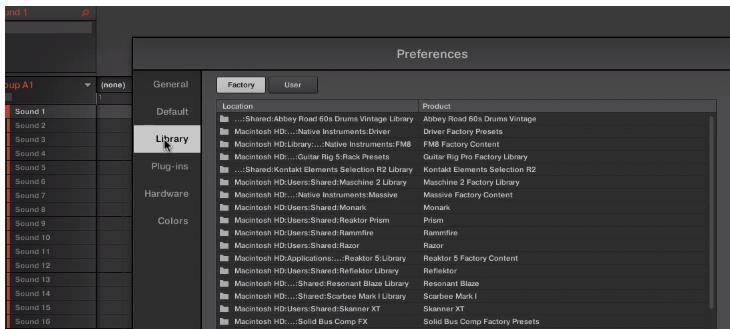
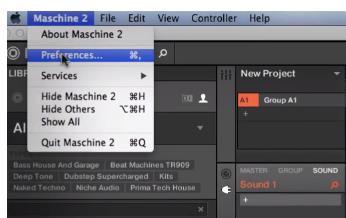
3. Launch Maschine and select the ‘Preferences’ tab via the drop-down selection, which is located via the ‘Maschine 2’ option at the top left toolbar.

4. Select ‘Library’.

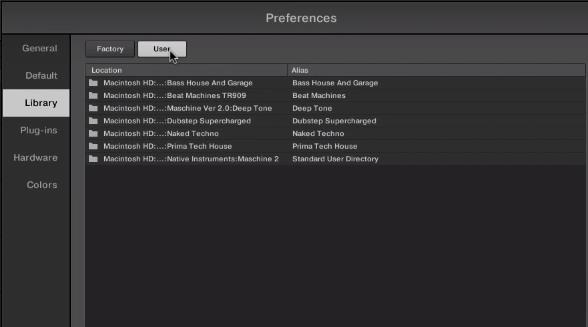
5. Click the ‘User’ tab.

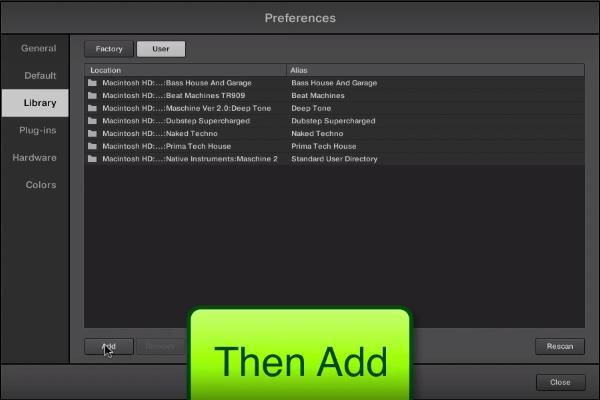
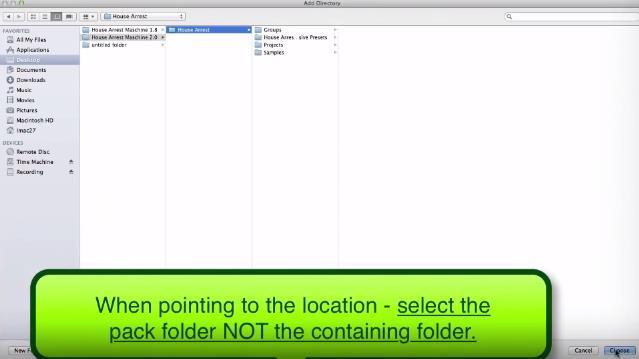
6. Click ‘Add’ to open the file browser, and then locate the pack’s main folder which contains sub-folders entitled ‘Groups’, ‘Massive Patches’, ‘Projects’, and ‘Samples’.

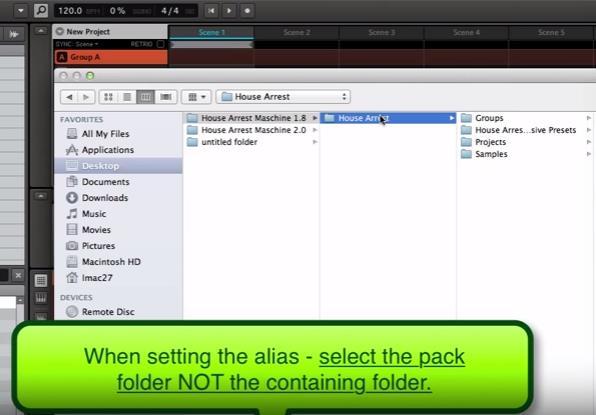
7. Be sure to select the main pack folder, which in this instance is ‘House Arrest’ > once performed, click the ‘Choose/Open’ option that is located at the bottom right-hand corner of the Mac - Finder/Windows - Library window.

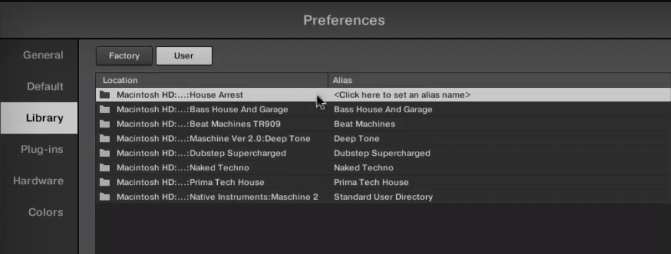
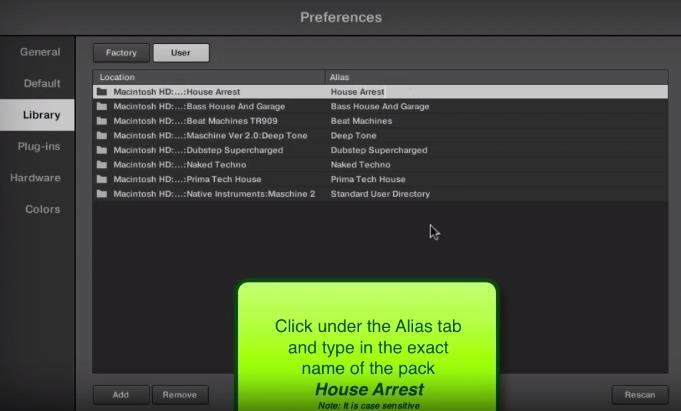
8. After the folder has been located, you will then need to enter and add an alias name for the pack e.g ‘House Arrest’ > double-click underneath the ‘Alias’ tab (where it reads ‘Click here to set an alias name’) and type the exact name of the pack, including numbers, capitals and symbols.

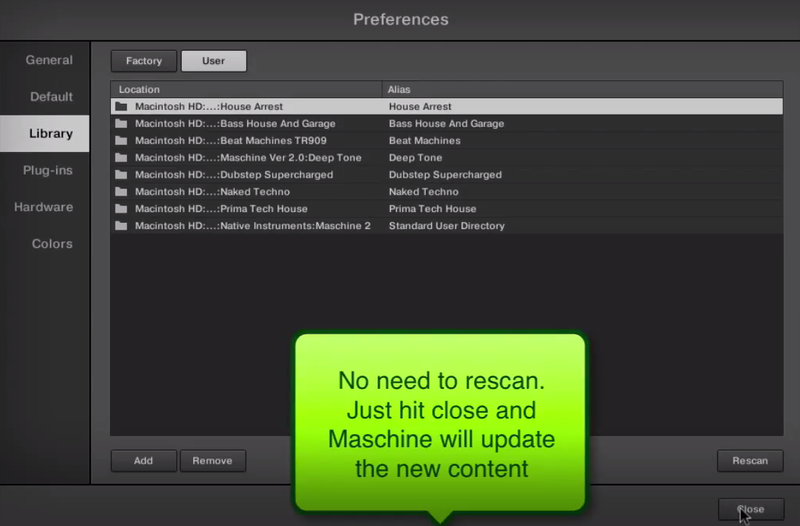
9. Once this has been performed, select ‘Close’ and the Niche Audio pack content will automatically upload to Maschine.

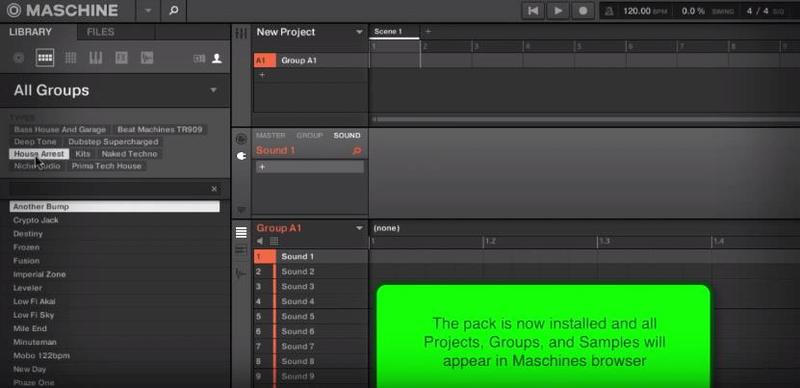
10. Select ‘Close’ once again to exit the preferences window, and you will then see the pack’s content within your user library!

The Pack is now Installed and Ready for Use Within Maschine!

Maschine 1.8 Video Installation Guide

(Note: Skip to 2.02 mins)

1. Download the purchased Niche Audio software .zip folder provided within your User Account, to your computer.

2. Double-click the .zip folder to open and reveal its contents > save it to a computer location of choice, e.g documents or your external hard drive.

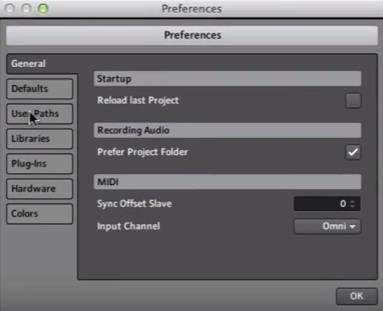
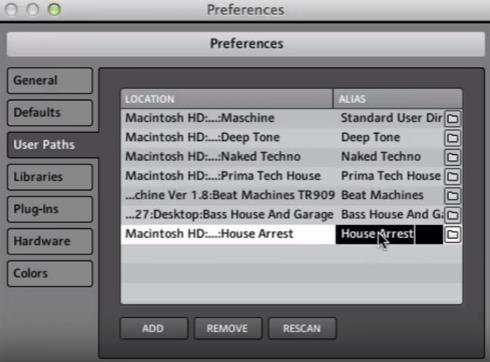
3. Launch Maschine and select the ‘Preferences’ tab via the drop-down selection, which is located via the ‘Maschine’ option at the top left toolbar.

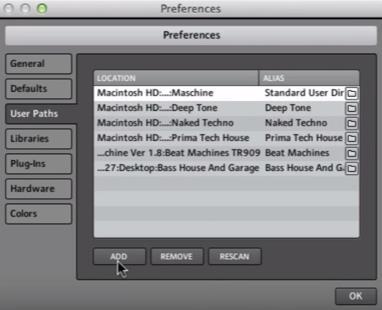
4. Click ‘User Paths’.

5. Click ‘Add’.

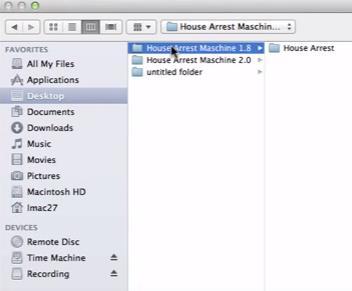
6. Locate the main Niche Audio 1.8 folder, which in this instance is entitled ‘House Arrest Maschine 1.8’.

7. Be sure to select the main pack folder, which in this instance is ‘House Arrest’ > once selected, click the ‘Choose/Open’ option that is located at the bottom right-hand corner of the Mac - Finder/Windows - Library window.

8. After the folder has been located, you will then need to enter and add an alias name for the pack e.g ‘House Arrest’ > double-click underneath the ‘Alias’ tab (where it reads ‘Click here to set an alias name’) and type the exact name of the pack, including numbers, capitals and symbols.

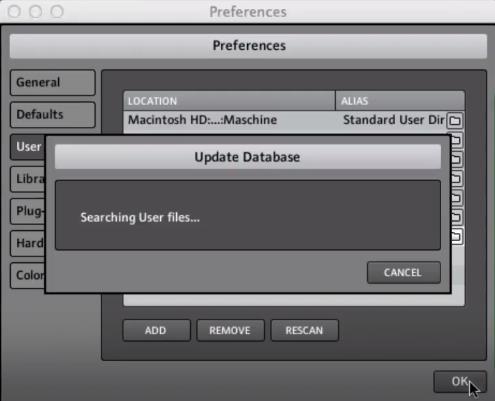
9. Once this has been performed, select ‘OK’ and the Niche Audio pack content will automatically upload to Maschine.

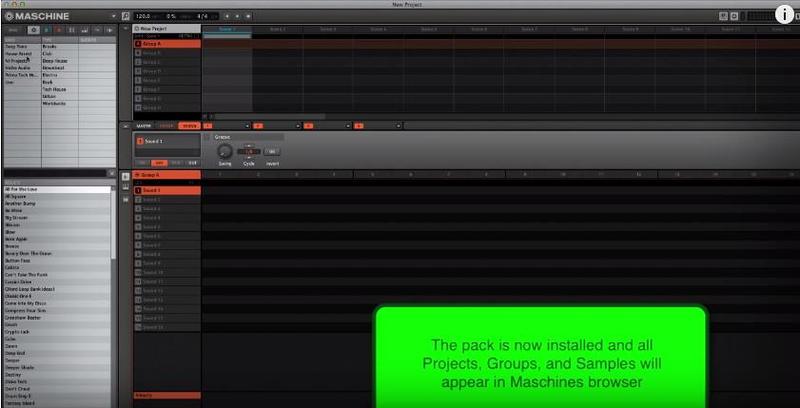
10. Select ‘OK’ once again to exit the preferences window, and you will then see the pack’s content within your user library!

The Pack is now Installed and Ready for Use Within Maschine!

Install Problem?

  • If you have previously installed a Maschine Pack and the groups or projects are not loading, please ensure that you have installed the correct pack for your version of Maschine
  • Also check that you have created an alias to the sample pack, so that Maschine can locate the projects: For example, the alias should be written as ‘House Arrest’

Note: The alias should not be written as ‘house arrest’

  • If you do not type the exact name of the pack, it will not install correctly
  • If you encounter any issues when attempting to install your purchased Niche Audio pack, it is advisable to uninstall the pack entirely from Maschine before re-installing it, to prevent any further cross-referencing problems

Uninstalling the Pack

1. Go to Maschine’s ‘Preferences’ tab, which is located at the top-left toolbar.

2. Select the ‘Library’ tab, followed by the ‘User’ option.

3. Remove any previous location path to the Niche Audio packs, and then close/quit Maschine.

4. Reopen Maschine and create a new project - this is necessary to clear the software history.

5. Quit Maschine, reopen it and follow the instructions from step 1 of the installation process.

Ableton Live Pack Installation Guide

(Note: Post Dubstep & Future Garage is used as the example).

1. Download the .zip folder provided within your User Account, and double-click it to extract its contents > save it to a computer location of choice, e.g documents or to your external hard drive.

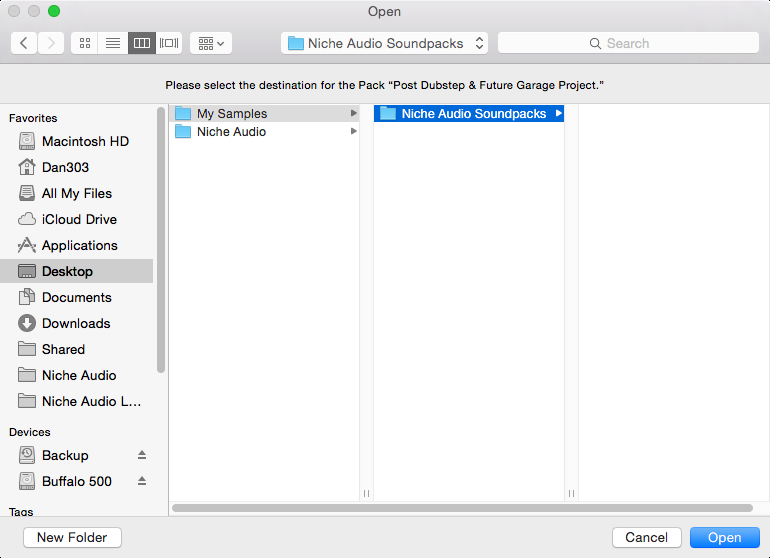
2. Locate the .alp file and double-click it > Live will automatically open and ask where you would like to install the project folder.

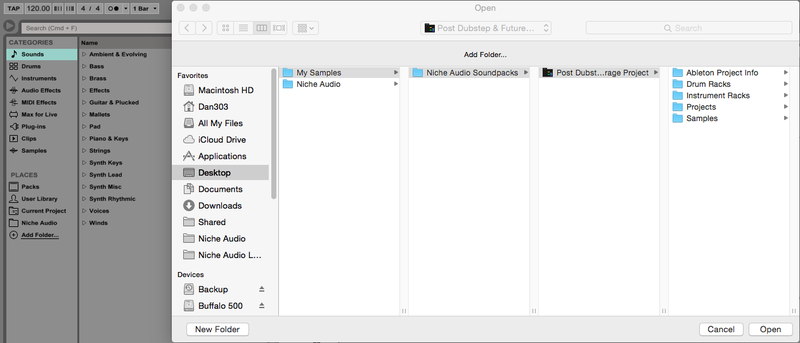
3. Locate the main extracted folder from the computer location that you saved it in (in step 1. of the installation process) > click 'Open' and Live will begin the unpacking process.

4. Once the unpacking process is finished you will need to tell Ableton Live where the pack is.

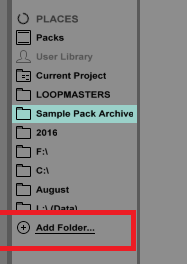
5. Within Ableton’s browser, select the ‘Add Folder’ option and then the project folder that you have installed. 

6. Click 'Open' and Ableton will add the pack to the browser for easy access.

7. The Ableton Live Pack is now ready for use within the DAW.

Plugin Boutique Rewards

Discover the most rewarding loyalty programme among all plugin retailers.

  • Free Loopmasters Samplepacks
  • Discounts on products and courses
  • Extra Virtual Cash claimed immediately at checkout
Find out more

Follow us:

X (Twitter) Facebook YouTube Instagram
Logo Logo

Plugin Boutique Limited, Part of the Beatport Group LLC.

Copyright © 2011-2025 Plugin Boutique. All rights reserved