Log In
Free gifts available with your purchase
Most 909 sample packs are unprocessed recordings using variations of the 909s drum tunings and decays. Others are passively sampled through some kind of analog summing buss, a console, or recorded to analog tape. These are great and cover a lot of bases for musicians. However, the vast majority of records made with real 909 drums have processing on them, sometimes huge amounts of EQ and compression have been used on the 909 sounds. The great thing is, even with copious amounts of processing the909 doesn't lose its character, on the contrary processing can seriously enhance a 909 in all areas, and of course make it dangerously punchy! Processing can also make the 909 deep, moody, and oozing with vibe!
At Niche Audio we believe the 909 when processed and abused through the right gear takes its vibe to another level! We felt such a909 sample collection was missing - a 909 sample pack lovingly created and saturated with vibe and character, along with user flexibility! That is what we intended…and we believe this collection succeeds in capturing the soul of one of the most legendary analog drum machines ever made, and processed by some of the best boutique hardware around.
What is in the Pack?
This is not your every day average 909 sample pack - this really is so much more! Every single drum hit has been processed by an assortment of boutique (and low end) gear for maximum authentic vibe. The hardware used includes a SSL 900 AW mixing console, and original UAD 1170, Distressors compression, DBX 165, along with Focusrite EQ. Of course, we’ve also included a non processed kit recorded via very high end convertors. Vibe, not just quality is what this pack is all about. One of the kits even uses the exact same budget Mackie mixer used by thousands of dance record producers in the 90s. Authenticity, if its worth doing, its worth doing it right!
All samples were recorded at 96 kHz and only the best sample rate conversion was used for down sampling. No samples were loudness limited, and all samples importantly are set to a level -4db, allowing your plugins to breathe and have room to manoeuvre, and thats why you need them in your armoury!
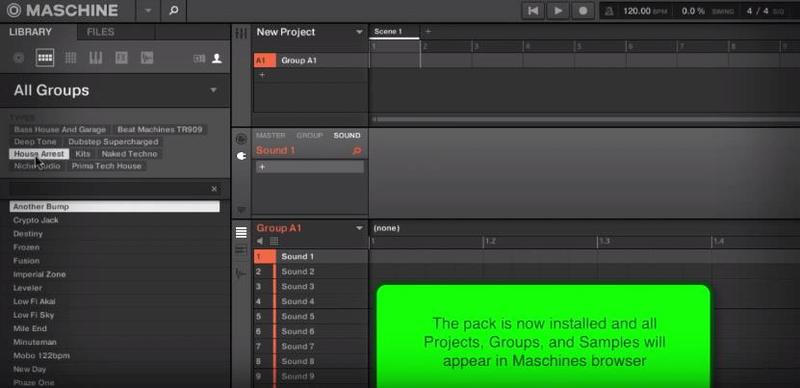
Although easy enough for Ableton users to design their own custom kits, Maschine users can take advantage of its intuitive tagging features. All Niche Audio samples are fully tagged, making it a breeze to create your own custom kits. Simply hit the samples tag, BeatMachines and then click the appropriate tag for the drum you want. Then click the kick drum tag and all the kick drums from only that pack will display, allowing you to create your own 909 kits within minutes!
How about blending some SSL processed drums with Moog filtered ones, or try a pure-path snare along with a heavily UAD compressed one! The possibilities for unique 909 combinations are endless, especially when you add your own processing!
Processing Used In Detail
Zeds Dead
Medium saturated kit with various sounds processed through a Mooger Fooger, Summit Audio TLA-50 Tube Levelling Amplifier, ZEDR 16 EQ, Styromon Blue Sky Reverb, and a Moog Voyager Filter section.
Drum The Beat
Medium driven kit processed through a Mooger Fooger, Sequential Circuits Pro One filter, Summit Audio TLA-50Levelling Tube Amplifier, ZEDR16 EQ, Strymon Blue Sky Reverb and El Capistan Delay, and an Oto Machines Biscuit.
Tape Driven
Well, not quite, we recorded a kit using a Revox B77 quarter inch tape machine, but scrapped it in favour of the UHE Satin plugin which seems to have been made for the 909! Some drums were driven hard, others moderately. Some of the drum sounds also received additional processing via high quality EQ plugins as well as a Focusrite ISA 430.
Drum Step
A simple but punchy 909 kit suitable for many genres including Drum N Bass and Dub Step, House and Techno. Processing on some of the sounds includes a Summit Audio TLA-100A, and the EQ section of a Mind Print Dual Channel.
Classic One
Very subtle processing on all drum sounds via an API 2500 compressor just to add a little depth. A set of the hats and one of the claps were processed via an Avalon U5 DI box. Almost a pure untreated 909 kit.
Solid State
Kit EQ'ed through an SSL AWS 900. Clap 2 was completely squashed by the onboard compressor to add a different flavour one of the claps. A simple but effective 909 kit suitable for almost any genre of dance music.
State Solid
A Variation of Solid State. Again the entire kit was processed and EQ'ed through an SSL AWS 900s.
XOXO
We don't discriminate against equipment, its all about vibe!. Inexpensive gear was the staple of the majority of dance music producers during the 90's. Of course the 909 was popular but so was equipment like Mackie mixers. This kit re-creates the 90's 909 and Mackie VLZ Pro mixer sound popular with dance producers during the 90's. All drum were processed via the mixers EQ.
The Kick, Snare, and Toms were driven hard to achieve the gritty overloaded sound. We also added a touch of reverb on some of the drum sounds via an Ensoniq DP4. Basic gear, but many thousands of dance records were produced with this combination of equipment during the 90s.
Generation X
Classic 90's grungy driven kit. Ideal starting point for any Deep House, Detroit Techno, House, and Tech HouseProducers. For this one we set up an Avalon U5 DI, TLA 100A, and a Mooger Fooger LPF. An Oto Biscuit was also used to create variations for the Clap, Hats, and Cymbals. No EQ processing was used on this kit.
Generation Y
This one uses the exact same signal path and hardware as Generation X but all settings including those on the 909 were adjusted.
Pure
Simply pure untreated 909. All sounds DI'ed through an Avalon U5 in passive mode then straight to the convertor. If you need a high quality untreated 909 kit this one is very good place to start.
Passive SSL
No EQ or any other processing. Almost a pure unprocessed kit but with a little touch of the SSL console sound.
Face Off
An in your face, tough 909 kit heavily processed through an array of equipment including the SSL AWS900 channel EQs andBuss Compressor, Original UA 1176 Compressor, DBX 165 Compressor, Distressor and Focusrite EQ.
Face On
A much tamer version of Face Off using the exact same hardware. All console, hardware and 909 settings were adjusted.
Vegas
Even though we have lots of outboard stuff we love plugins to. for this kit we recorded the 909 straight through the Avalon and in to the convertor. Then we transferred the sounds to Xfer Nerve drum machine to use some of direct wav manipulating and filter features. Then we piled a heap of hi quality EQ and compression plugs to create a kit which has a Deep House, 2 Step feel.
Important Tip
Some of these kits really shine when sent to a compressed bus. Drive some of those compressors hard and you can really hear the character the boutique processing. Yes…were talking about that sound!
About Niche Audio
Niche Audio is the label for producers looking for top flight mix ingredients and perfectly processed Maschine and Ableton Live expansion packs in contemporary styles and genres, mixed and engineered with precision, allowing you total flexibility and inspiration to take your music to the next level!
Focusing on one shot drums, bass, music and fx packs - Niche Audio delivers custom built kits within each native software instrument, including project files, patterns and the one shot samples themselves to give you perfect flexibility and inspiration every time.
Our royalty free samples have been carefully selected for maximum authenticity and we use only the very best studio equipment and seasoned producers and audio engineers for our projects.
Note: Please ensure you have the latest update of the Maschine/Ableton Software to ensure successful installation.
Features
Ableton Live 9:
- 20 Drum Racks
- 238 Samples
Maschine 2+:
- 20 Group Kits
- 238 One Shots
System Requirements
- The full version of Maschine 2+ and Ableton Live 9+ are required to run the full contents of this software.
Important note: The full version of Maschine 2+ and Ableton Live 9+ are required to run the full contents of this software!