Log In

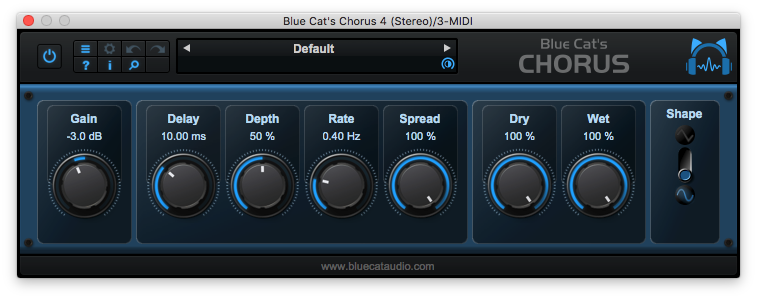
From a light ensemble to a deep destructive modulation effect, Blue Cat's Chorus can just do anything, for free! The Chorus effect was originally designed to simulate several voices, just as if several people were playing the same notes together but with a variable delay between them. This is one of the typical effects that you can get with Blue Cat's Chorus.
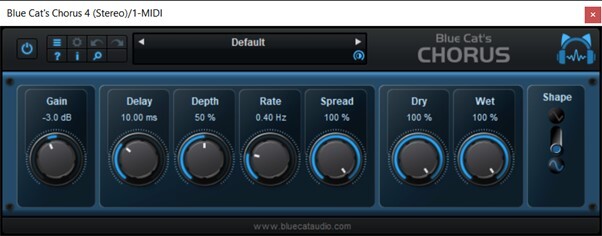
This plug-in also enables you to drastically change the original sound and create deep pitch modulation or crazy 'bubbling' effects. With the additional "Spread" control on the stereo version, the famous stereo widening and head-spinning chorus effects are a few click away.
Features
- Single voice vintage chorus effect
- Stereo spread control
- Sine or triangle LFO shapes
- In or out of phase mix control
- Available in most plug-in formats for Mac and Windows
- Full MIDI control and automation support with silent, zipper-free parameters update, advanced response control and MIDI Learn
- No CPU load on idle: when the plug-in is fed with silence, the processing smoothly shuts down, to optimize the CPU usage of your Digital Audio Workstation
- Skinnable and customizable user interface with transparency management
- Smooth Bypass: activate/deactivate the plug-in with absolutely no noise
- Undo/Redo
- Full-featured integrated presets manager
- Any sample rate supported
What's New?
- Arrow keys can now be used to navigate presets.
- Improved smooth plug-in bypass (faster and smoother transition).
- New high-resolution graphics for knobs.
- Reduced disk footprint.
- Misc DSP performance enhancements.
- Improved GUI loading performance.
- Native Apple Silicon (M1 processor) support.
- Added MIDI control support (MIDI CC messages) for Next and Previous Preset commands, with MIDI learn.
- Improved MIDI & automation control settings with lock, reset and "save as global setting" capabilities.
- Unicode support.
- Reduced the number of threads used by the plug-in.
- Reduced memory footprint.
System Requirements
macOS
- Intel or Apple Silicon processor
- OS X 10.9 or newer
- VST / VST3 / AU / AAX compatible DAW (64-bit only)
Windows
- SSE2-enabled processor (Pentium 4 or newer)
- Windows Vista or newer
- VST / VST3 / AAX compatible DAW (32 or 64 bit)
Overall Opinion - 9/10 It's tough to find free plug-ins that are available in all plug-in formats and for both Mac and PC operating systems, but that's exactly what you'll get with the Blue Cat Audio Blue Cat's Chorus as well as their other plug-ins. Of course the plug-in doesn't have t...
Read More