/ Expansion Packs / BigKick Expansion V14 - House Kicks V3 with Da Sunlounge
Plugin Boutique

BigKick Expansion V14 - House Kicks V3 with Da Sunlounge

4.6 (295 Reviews)
$5.00 $15.00

66% off until Dec 07

BigKick Expansion V13 - House Kicks V3 with Da Sunlounge - Main Image
Buy Now
Product information

Our Fourteenth BigKick Expansion has been Carefully Crafted by one of the Original, Consistent Deep House Producers & DJs - Da Sunlounge

For the last 15 years Da Sunlounge has been making and releasing a steady stream of sleekly crafted House Music for labels including 2020 Vision, OM, Salted Music, Defected, Tango, Double Down & more. His music has featured on legendary compilations from Fabric, Defected, Ministry of Sound and received A-list dj support from the likes of Danny Rampling, DJ Sneak & many more.

You can expect an expertly produced collection of 64 BigKick presets ready to be dropped into all styles of House and 4/4 music. The selection features deep and punchy warm kicks with characterful highs, tailored mid-range and powerful defined low end designed to ensure keep the kick remains upfront in the mix. Expand your BigKick library and get to work on the next Ibiza Classic!

Features

  • 64 crafted kick drum presets
  • 32 attack hits
  • 32 attack presets
  • Simply load in your presets with the new BigKick Preset Manager

System Requirements

  • The full version of BigKick is required to run this expansion pack

Important Note: Plugin Boutique's BigKick Drum Generator is required to run this software!
Installation Instructions

Note: Kilholm expansion used as the example.

Mac

1. Download the .zip folder from within your User Account, and double-click it to open and reveal its contents.

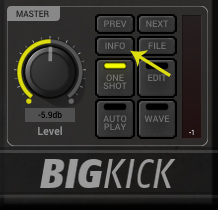
2. Open BigKick within your DAW and click the ‘Info’ tab.

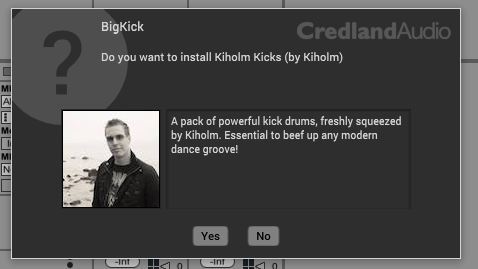
3. Click ‘Yes’ to confirm that you wish to install the expansion pack.

4. Locate the .big file from within the extracted folder and click ‘Open’.

5. Click ‘Yes’ to confirm that you wish to install the expansion pack.

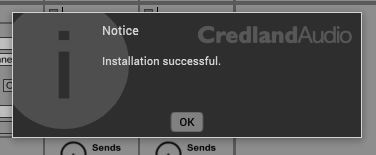
6. Once the installation is complete you will receive this message > click ‘OK’ to finish the installation.

The Expansion Pack is now Ready for Use Within BigKick!

Windows

1. Download the .zip folder from within your User Account, and double-click it to open and reveal its contents.

2. Open BigKick within your DAW and click the ‘Info’ tab.

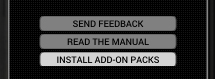
3. Click ‘Install Add-On Packs’.

4. Locate the .big file from within the extracted folder and click ‘Open’.

5. Click ‘Yes’ to confirm that you wish to install the expansion pack.

6. Once the installation is complete you will receive this message > click ‘OK’ to finish the installation.

The Expansion Pack is now Ready for Use Within BigKick!

Bundle & Save

BigKick+ Bundle
$29.00
$59.00 (50% off)
Plugin Boutique BigKick Complete Expansion Bundle
$59.00
$139.00 (57% off)

Plugin Boutique Rewards

Discover the most rewarding loyalty programme among all plugin retailers.

  • Free Loopmasters Samplepacks
  • Discounts on products and courses
  • Extra Virtual Cash claimed immediately at checkout
Find out more

Follow us:

X (Twitter) Facebook YouTube Instagram
Logo Logo

Plugin Boutique Limited, Part of the Beatport Group LLC.

Copyright © 2011-2025 Plugin Boutique. All rights reserved