Buy Baervaag, get a free gift with purchase:
FM Synthesizer
FM synthesis for the masses
Baervaag is a fairly simple FM synthesizer with one carrier and one modulator. The oscillator waveforms can be modified seamlessly between sine wave to pure square wave with PWM (pulse width modulation).
Anatomy
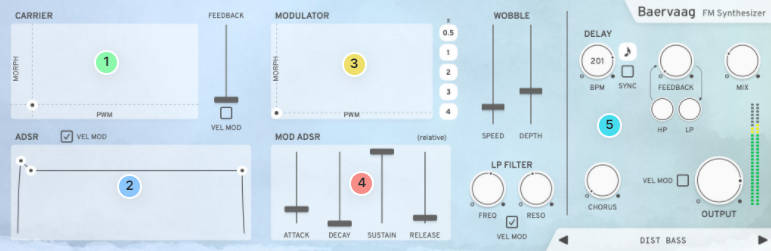
1. Carrier Oscillator - This XY pad controls pulse width modulation on the X-axis and the wave shape on the Y-axis.
2. Carrier ADSR - Controls the carrier oscillator envelope. The attack time is optionally reactive to MIDI Velocity.
3. Modulator Oscillator - This XY pad works like the Carrier Oscillator, but it also has a frequency multiplier button.
4. Modulator relative ADSR - These sliders control the envelope of the Modulator oscillator and are relative to the Carrier ADSR. If all values of the sliders are in the middle, the Modulator envelope will be the same as the Carriers.
5. FX & Master section - High-Quality Delay, High-Quality Chorus, High-Quality Master Output Knob.
Features
- FM Feedback, Filter, ADSR Attack and Volume can be modulated by velocity
- Oscillators can be shaped between sine, square and PWM
- One ADSR for each oscillator.
- Controllable wobble factor that adds analogue unpredictability
- 50+ handcrafted presets created by professional musicians
System Requirements
- macOS 10.10 or later (optimized for the M1-processor)
- Windows 7 SP1 or later
- AU, VST-2, VST-3, AAX

Please Note: Pana is used as the example:
Mac
License Redemption
1. Navigate to https://klevgrand.com/redeem > Paste your 16 digit redemption code found in your Plugin Boutique User Account > Click 'Submit!'.
2. Your redemption code has been accepted > Scroll down to Step 2.
3. Click either 'Sign in' if you already have a Klevgrand account, or 'Create new account' if you do not > Fill in your personal details > Click 'I'm ready'.
4. Your account has now been created.
5. Navigate to your email inbox and locate the activation email that you should have received from Klevgrand > Click 'Let me in!' to activate your account.
6. Create a password for your account > Click 'Enter Klevgrand'.
7. Your software and serial number is now available within your Klevgrand account > Click the Apple logo to download the installer file.
Installation
1. Launch the pana_x_x_x_macOS.dmg installer file.
2. Double click the KLEVGR. logo to launch the installer.
3. Click 'Continue'.
4. Click 'Continue'.
5. Click 'Agree'.
6. Click 'Install'.
7. Enter your system password > Click 'Install Software'.
8. Click 'Close'.
9. Navigate back to your Klevgrand My Account page > Click on the serial number to copy it to your clipboard.
10. Launch your DAW > Create a new audio track > Insert Pana onto the channel > Paste your serial number into the box.
Your software is now activated and ready to use within your DAW
Windows
License Redemption
1. Navigate to https://klevgrand.com/redeem > Paste your 16 digit redemption code found in your Plugin Boutique User Account > Click 'Submit!'.
2. Your redemption code has been accepted > Scroll down to Step 2.
3. Click either 'Sign in' if you already have a Klevgrand account, or 'Create new account' if you do not > Fill in your personal details > Click 'I'm ready'.
4. Your account has now been created.
5. Navigate to your email inbox and locate the activation email that you should have received from Klevgrand > Click 'Let me in!' to activate your account.
6. Create a password for your account > Click 'Enter Klevgrand'.
7. Your software and serial number is now available within your Klevgrand account > Click the Windows logo to download the installer file.
Installation
1. Unpack the pana_x_x_x_win.zip installer file > Launch the pana_x_x_x_win.exe file.
2. Click 'I accept the agreement' > Click 'Next'.
3. Click 'Next'.
4. Click 'Next'.
5. Click 'Next'.
6. Click 'Install'.
7. Click 'Finish'.
8. Navigate back to your Klevgrand My Account page > Click on the serial number to copy it to your clipboard.
9. Launch your DAW > Create a new audio track > Insert Pana onto the channel > Paste your serial number into the box.
Your software is now activated and ready to use within your DAW