Log In
.jpeg)
Free gifts available with your purchase
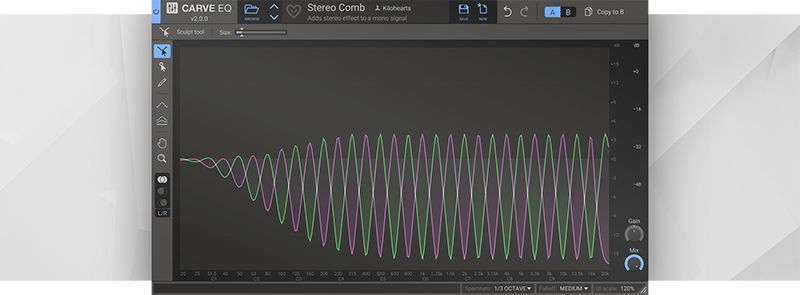
Graphic equalizers have stayed the same for a long time, but Carve EQ takes the next big step in evolution.
Carve EQ is a 31-band graphic equalizer, that runs laps around the competition. Innovative new tools, and loads of EQ profiles from famous songs makes sure you'll get your desired results in no time!
Carve EQ has a very advanced filtering system hidden under a small set of efficient and deceptively simple tools, to give you perfect control in any situation.
Perfect sound: Carve EQ won't let anyone down soundwise. Using top of the line, digitally clean filters it will give you a crisp result every time.
Workspace layout: With a recognizeable workspace layout the Carve EQs user interface makes sure you will quickly find your way to all the features.
Really fast!: All Kilohearts plugins get the job done quickly. That way you can stack them high without worrying about performance issues.
Size does matter: The Carve EQ workspace is freely resizable and you can set the UI scale to match your preference.
Snapin compatible: Carve EQ works with our excellent Snapin hosts. Check out Snap Heap for instance.
Precision all the way: The point selection tool lets you control single bands perfectly with clearly labeled axes. You can also select multiple bands at once and make exact changes where you need them.
More of a feeling: Carve EQ excells at letting you smoothly work with sections of the spectrum through the awesome "Sculpt tool" that adds a peak that you can drag around and modify easily.
Compare your work: Using others sounds or songs as a reference has never been easier. Choose from the factory profiles or create your own from any WAV file. You can also use a sidechain channel as a reference.
Match EQ: Do you like that special Taylor Swift sound, or the whole Surrender album by The Chemical Brothers? Simply steal the mastering of any audio and let Carve EQ apply it to your song in seconds.
Tired ears? When EQing you can sometimes start having problems determining if your are actually making things better or worse. Use the A/B comparison tool to make your way forward.
EQ in stereo: Are you used to working in Left/Right, or Mid/Side? Either way Carve EQ present your work in a way that is intuitively understandable at a glance.
System Requirements
- Operating System: Any version of Windows or MacOS actively maintained by Microsoft or Apple.
- CPU: 2 GHz or faster
- Memory: 1 GB or more
- Software: Any DAW supporting VST 2, VST 3, AAX, or Audio Unit plugin standards
Kilohearts recommend keeping up to date with OS versions as they become available. Kilohearts are not able to support OS versions that are no longer supported by their respective manufacturers. If you are using an outdated OS please try the free trials to ensure compatibility before making any purchases.
Shadient
Mad Zoo Records
"Carve EQ allows so much creative sonic versatility. Plus I love that sculpt tool feature."
Adam Fielding
Distinctive Records, Lost Language
"The sidechain/external audio matching tool is incredibly useful as a referential aid, and the interface is lovely and musically intuitive. I love it!"