


 Log In

Free gifts available with your purchase

A MIDI Processing Plugin that helps you play chords and chord progressions faster and easier.
The foundation of a great song is based on its harmonic movements and chord changes which often is called chord progression. A change in chord progression can have a drastic effect on the mood or direction of a song. Even those with a background in music theory can experience repetition and stagnation. Using richer chords and new chord progressions can take the song to a new level and make it sound unique and professional.
Whether or not you are an experienced musician or just a beginner, with a vast chord bank and amazing playability, InstaChord has something to offer to you.
- If you're a songwriter or a producer It will help you speed up the workflow and song creation process. Find the best progression and use a single midi pattern to play all of them.
- If you're a player it allows you to play some of the hardest chords, in any musical key and combination of notes and different voicings, using just a few keys on your controller. Or jam and practice over them without spending much time creating a jam track.
- If you're a student or a teacher you can use the plugin to learn and study the chords and use it as a reference and hear them in action.
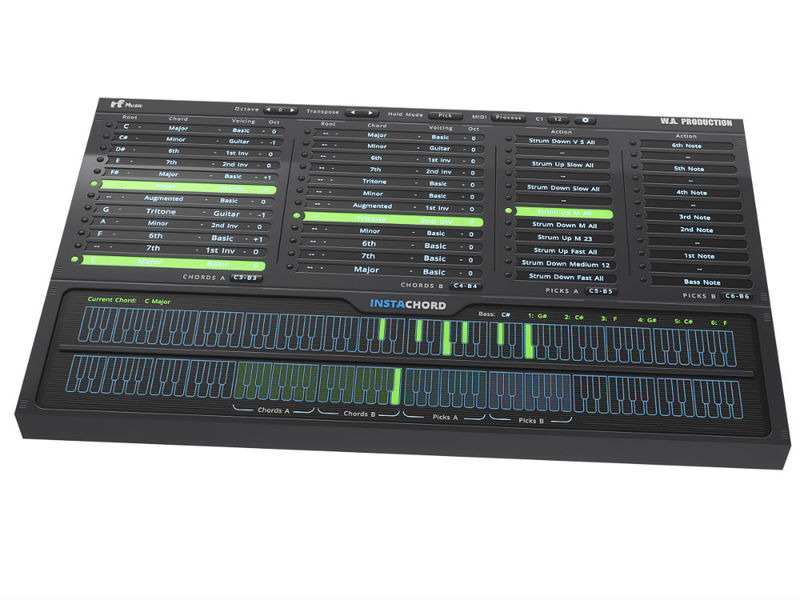
Find the chords that work well together and build a perfect chord progression for your next song with just a few clicks. You can transpose all the chords to any other key you want using the 'transpose' button.
In addition to having access to chords and being able to set a progressions, one of the other great thing about InstaChord is it's playability.
Features
Chords with different voicing
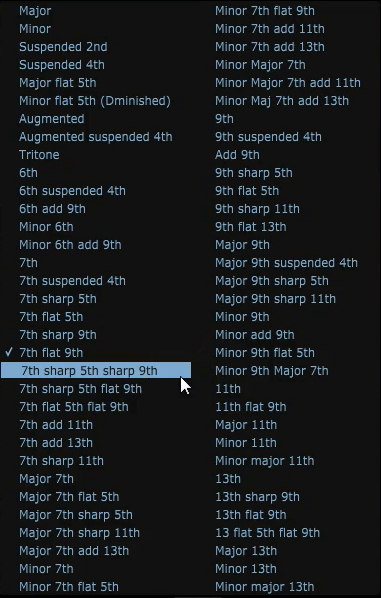
We have Included almost all the common chords (maj, min, sus2, 6th, 7th, etc) in 5 different voicing (basic, 1st and 2nd inversions, guitar and wide). Each voicing mode has a unique sound due to the order of notes and might be a better choice to fit with the other chords in the song.
Playing chords
There are a lot of ways that you can play the chords. You can Hit or strum the chords with different combination of notes, speeds and directions. For example a key can be assigned to strum top 3 notes of the chord and another one to hit 2 middle notes.
You can also play individual notes of the chord separately. So it's possible to arpeggiate the chords or strum them manually as well.


Hold mode
This feature allows the fretting hand (chord changer keys) to control the sustain. So as long as the chord key is held down any note you play will ring out, just like a guitar or using a sustain pedal.

Chord Keys
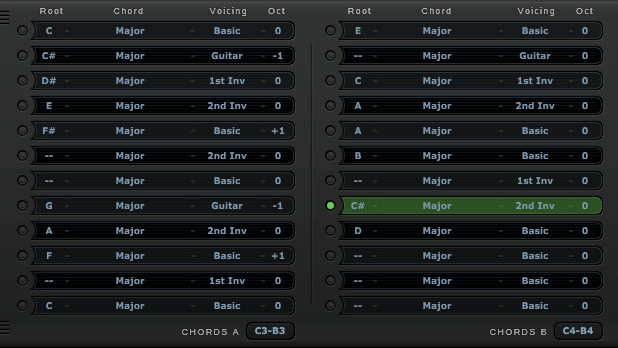
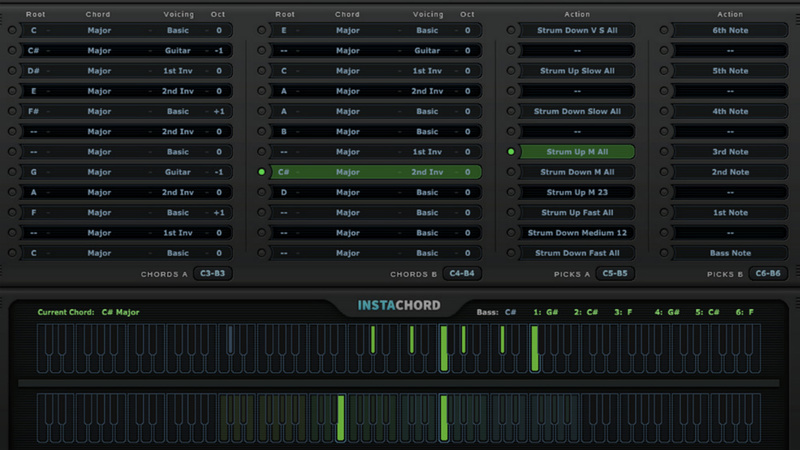
Set up to 24 different chords and switch between them using the chord keys.
Action Keys
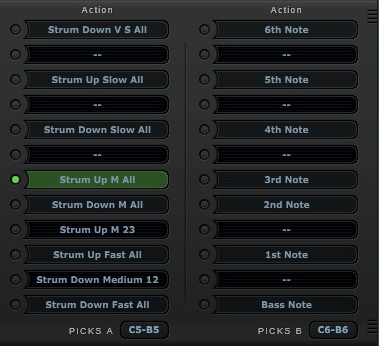
Set your own functions for the 24 action keys provided and tell them what you want them to do. Play a full strum, hit first two notes, transpose, etc.
Transpose
Transpose the current chords to any other key you want with just a few click. This is also useful when playing live when the key of the song changes.

Flexibility
Endless possibility of customization for any kind of applications. InstaChord is highly customizable and users can change things to match their needs.
Set your own favorite action key setup out of vast number of action options and lock it so it won't change when loading a new preset.
The position of the chord and action keys on your controller, each in two separate octaves can be moved up or down placed in a more comfortable position.
Factory Presets
40 carefully designed presets included with the plugin. These presets with professional chord progressions might come in handy starting you're new song.
InstaChord is easy to install and use and has a user-friendly interface. But we wanted to make sure you get the most out of the plugin so we have made several tutorials that cover installing the plugin and setting it up on different operations systems and DAWs.
DAW Compatibility
InstaChord can be used on any software that supports VST/VST3 plug-ins with MIDI routing or AU/AAX MIDI effect type. But to make sure it's compatible with yours, please try out the Demo Version before you buy (only major chords are allowed in the trial version).
Windows
- FL Studio 12
- Cubase 9.5
- Studio One 3
- Ableton Live 9/10
- Pro Tools 11+
- Maschine 2 - No MIDI routing
- Reason - Not compatible
Mac
- Cubase 9.5
- Studio One 3
- Ableton Live 9/10
- Logic Pro X
- Pro Tools 11+
- Maschine 2 - No MIDI routing
- Reason - Not compatible
System Requirements
Mac
- macOS 10.13 and later (64-bit only)
- VST, VST3, AU and AAX
Important Notes:
- There may be some issues with InstaChord on Apple Silicon Macs which W.A. Production are working on.
Important Note for Mac Apple Silicon users: Before purchasing, please review the current compatibility status of this plugin on your system here.
Windows
- Windows 8 and later (32 / 64-bit)
- VST, VST3 and AAX
22 Bullets
As an Artist/Producer from Thailand, 22Bullets has released music through Spinin' Records, Musical Freedom, Revealed, Warner Music, and Panda Funk.
"The plugin is great for a starting point, to get your creative workflow to kick in right away. A must-have in every arsenal!"
Klaas
Artist/Producer who has remixed records for Dimitri Vegas, Guru Josh, Erick Morillo, Stromae, DJ Antoine and more.
"InstaChord is awesome! It offers intuitive design and a great workflow. It is a must have plugin for anyone who is looking for all-in-one MIDI processing."
Austin Leeds
Austin Leeds has been producing for 20 years & has tracks on Spinnin, Armada, Ultra and Toolroom.
"A really nice piece of software. I mainly enjoy the "Picking Keys" sections, where you can make your chord progressions even more interesting and unique."


