Buy BigKick Expansion - Hybrid Acoustic Kicks, get a free gift with purchase:
Hybrid Acoustic Kicks is a collection of 75 crafted kick drum presets for the BigKick drum generator.
Inject some acoustic energy into your productions with this extensive package of kicks. Sourced from choice acoustic kick drum tops, these presets have been engineered and processed to highlight the character, warmth and flavour of the acoustic world. Layered with big, thick, powerfully tuned subs, this array of kicks will cut through any dense mix.
This pack is perfect for hybrid rock tracks, epic trailer cues, drum & bass, cinematic and downtempo genres plus more.
Add some organic vibe to your productions with weight and depth that the BigKick is renowned for!
Check out the audio demos to hear a selection of these presets in action.
Features
- 75 crafted kick drum presets
- 50 attack presets
- Simply load in your presets with the new BigKick Preset Manager
System Requirements
- The full version of BigKick is required to run this expansion pack
Important note: Plugin Boutique's BigKick Drum Generator is required to run this software!
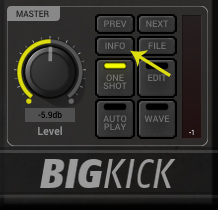
Note: Kilholm expansion used as the example.
Mac
1. Download the .zip folder from within your User Account, and double-click it to open and reveal its contents.
2. Open BigKick within your DAW and click the ‘Info’ tab.

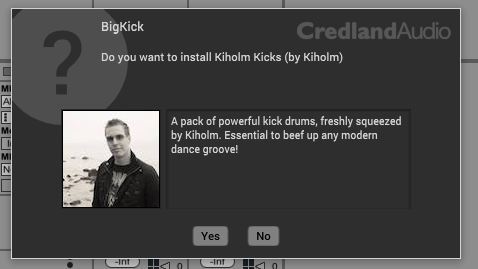
3. Click ‘Yes’ to confirm that you wish to install the expansion pack.

4. Locate the .big file from within the extracted folder and click ‘Open’.

5. Click ‘Yes’ to confirm that you wish to install the expansion pack.

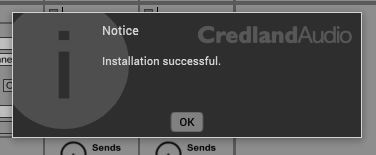
6. Once the installation is complete you will receive this message > click ‘OK’ to finish the installation.
The Expansion Pack is now Ready for Use Within BigKick!

Windows
1. Download the .zip folder from within your User Account, and double-click it to open and reveal its contents.
2. Open BigKick within your DAW and click the ‘Info’ tab.

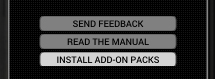
3. Click ‘Install Add-On Packs’.

4. Locate the .big file from within the extracted folder and click ‘Open’.


5. Click ‘Yes’ to confirm that you wish to install the expansion pack.

6. Once the installation is complete you will receive this message > click ‘OK’ to finish the installation.
The Expansion Pack is now Ready for Use Within BigKick!